Lesson Plan & Lecture Notes: Python Dictionaries by T. C. Okenna
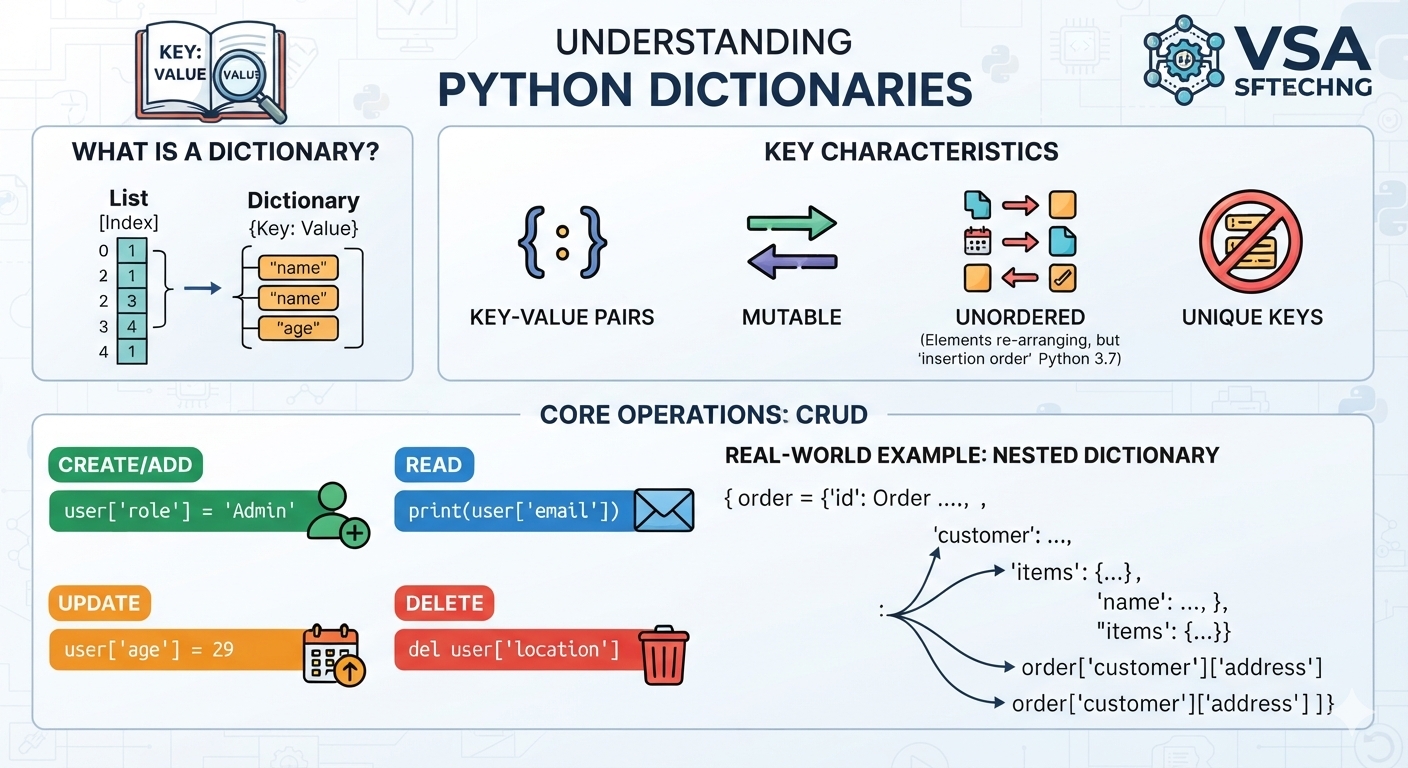
Lesson Plan & Lecture Notes: Python Dictionaries by T. C. Okenna.
Python Dictionaries are mutable, unordered (but ordered by insertion since Python 3.7), and indexed collections of data. Unlike lists that store elements by sequential position, dictionaries store data in key-value pairs, making them ideal for modeling real-world objects and structural data.
📋 Lesson Overview
Target Audience: Beginner to Intermediate Python Learners
Duration: 60 Minutes
Prerequisites: Python variable assignments, data types, and basic loops.
Learning Objectives: By the end of this lesson, students will be able to:
Define a dictionary using key-value mapping.
Perform CRUD operations (Create, Read, Update, Delete) on dictionary data.
Traverse dictionaries using loops.
Apply dictionaries to manage data structures in real-world scenarios.
👩🏫 Lesson Structure
1. Introduction: The "Why" (10 Mins)
The Real-World Analogy: A classic language dictionary or a phone book.
You look up a Key (a person's name) to find their corresponding Value (their phone number).
The Problem: Imagine storing a user's profile information in a list:
["John Doe", 28, "Engineer", "Lagos"].If you want to grab the city, you have to remember it is at index
3.If the list order changes, your code breaks.
The Solution: A dictionary allows you to explicitly label your data:
{"name": "John Doe", "age": 28, "role": "Engineer", "city": "Lagos"}.
2. Core Concepts & Syntax (15 Mins)
Dictionaries use curly braces {} with elements separated by commas. Each element contains a key and a value separated by a colon (key: value).
Key Constraints:
Keys must be unique: Duplicating a key overrides the existing value.
Keys must be immutable: You can use strings, integers, or tuples as keys, but never lists.
python
# Real-World Scenario: A product catalog entry
product = {
    "id": "PROD-1029",
    "name": "Wireless Headphones",
    "price": 89.99,
    "in_stock": True,
    "tags": ["audio", "bluetooth", "gadget"] # Values can be any data type!
}
Use code with caution.
3. CRUD Operations: Managing Data (15 Mins)
🟢 Create & Update
You add or update data using square brackets []. If the key exists, it updates; if it does not, it adds a new entry.
python
# Real-World Scenario: A ride-hailing app tracking driver details
driver = {"name": "Amadi", "rating": 4.8}

# Update an existing key
driver["rating"] = 4.9

# Create/Add a new key-value pair
driver["vehicle"] = "Toyota Corolla"
print(driver)
# Output: {'name': 'Amadi', 'rating': 4.9, 'vehicle': 'Toyota Corolla'}
Use code with caution.
🔵 Read (Accessing Values)
You can fetch values using square brackets or the safety-first .get() method.
python
# Scenario: Fetching configuration settings for an app
settings = {"theme": "dark", "notifications": True}

# Method 1: Square Brackets (Throws KeyError if key doesn't exist)
print(settings["theme"]) # Output: dark

# Method 2: .get() method (Returns None or a default value instead of crashing)
print(settings.get("font_size", 14)) # Output: 14 (default fallback)
Use code with caution.
🔴 Delete
Remove items using the del keyword or the .pop() method.
python
# Scenario: Inventory management tracking a shopping cart
cart = {"apples": 3, "milk": 1, "bread": 2}

# Remove 'milk' and get its value
milk_qty = cart.pop("milk")

print(cart)     # Output: {'apples': 3, 'bread': 2}
print(milk_qty) # Output: 1
Use code with caution.
4. Iterating Through Dictionaries (10 Mins)
You can loop through keys, values, or both simultaneously using specific built-in methods.
python
# Scenario: User contact database
user_contacts = {
    "Alice": "alice@email.com",
    "Bob": "bob@email.com",
    "Charlie": "charlie@email.com"
}

# 1. Loop through keys only
for name in user_contacts.keys():
    print(name)

# 2. Loop through values only
for email in user_contacts.values():
    print(email)

# 3. Loop through both keys and values using .items()
for name, email in user_contacts.items():
    print(f"Send email to {name} at {email}")
Use code with caution.
5. Advanced Layout: Nested Dictionaries (10 Mins)
Dictionaries can hold other dictionaries. This structure mimics JSON data, which powers modern web backend APIs.
python
# Scenario: E-Commerce warehouse order management
orders = {
    "order_001": {
        "customer": "Kelechi",
        "items": {"Laptop": 1, "Mouse": 2},
        "total": 1250.00
    },
    "order_002": {
        "customer": "Fatima",
        "items": {"Keyboard": 1},
        "total": 75.00
    }
}

# Accessing deeper levels
print(orders["order_001"]["customer"])       # Output: Kelechi
print(orders["order_001"]["items"]["Mouse"]) # Output: 2
Use code with caution.
🎯 Diagnostic Challenge & Live Code Review
Ask the Class: What will happen when we execute this block of code? Spot any potential errors and describe the exact console output.
python
student_scores = {
    "Chidi": 85,
    "Tunde": 92,
    "Chidi": 95
}

# Modifying structural items
student_scores[["Grace", "Zainab"]] = [78, 88]

print(student_scores["Chidi"])
print(student_scores)
Use code with caution.
Expected Solution Analysis:
The Duplicate Key Conflict: The value for
"Chidi"will simply be overwritten by the latest entry (95).The Breaking Error: The line
student_scores[["Grace", "Zainab"]]will throw aTypeError: unhashable type: 'list'. This happens because lists are mutable data structures and cannot be used as dictionary keys.
Did you find this ICT insight helpful?