The Latest in

ICT Articles & Tutorials

World ICT News is a professional platform dedicated to Artificial Intelligence, Cloud Computing, DevOps, and Cybersecurity. Empowering the next generation of ICT specialists. Our exclusive tutorials and articles are designed to serve as a stepping stone for you into the world of ICT industry...

Cloud Security Best Practices for Digital Infrastructure
May 16, 2026
10 min read

Cloud Security Best Practices for Digital Infrastructure

Cloud Security Best Practices: Securing Your Digital Infrastructure. As organizations rapidly migrate their operations to platforms like Amazon Web Services (AWS), Microsoft Azure, and Google Cloud Platform (GCP), the traditional perimeter-based security model has become obsolete. Cloud computing offers unparalleled scalability, agility, and cost-efficiency, but it also introduces unique vulnerabilities. From misconfigured cloud storage buckets to compromised identity credentials, the modern threat landscape is vast and sophisticated.Securing your digital infrastructure requires a proactive strategy that moves away from the old mindset of "building a higher firewall." Instead, modern cloud security focuses on data-centric security, zero-trust architectures, and automated governance. This comprehensive guide breaks down the foundational cloud security best practices that IT administrators, DevOps teams, and enterprise organizations must implement to safeguard sensitive assets, maintain compliance, and prevent catastrophic data breaches.1. The Shared Responsibility Model: Who Protects What?Before deploying a single workload, every cloud professional must understand the foundational rule of cloud computing: The Shared Responsibility Model. A common misconception among new cloud adopters is that shifting infrastructure to a provider like AWS or Microsoft means shifting 100% of the security burden. This misunderstanding is a primary cause of enterprise cloud data leaks.Cloud security is a strict partnership between the vendor and the customer:Security OF the Cloud (Provider Responsibility): The cloud service provider (CSP) is responsible for safeguarding the global infrastructure that runs all the services offered. This includes the physical security of data centers (concrete walls, biometric access, security guards), the underlying hardware (servers, storage arrays), and the virtualization software layer.Security IN the Cloud (Customer Responsibility): The customer is entirely responsible for what they place inside the cloud. This includes configuring operating systems, managing network traffic controls (firewalls, security groups), setting up Identity and Access Management (IAM), protecting customer data, and ensuring applications are securely coded.+-------------------------------------------------------------+| CUSTOMER RESPONSIBILITY (Security IN the Cloud) || [ Data ] [ IAM ] [ OS Patching ] [ Network Firewalls ] |+-------------------------------------------------------------+| PROVIDER RESPONSIBILITY (Security OF the Cloud) || [ Virtualization ] [ Hardware ] [ Physical Data Centers ]|+-------------------------------------------------------------+If a hacker accesses an open, unencrypted Amazon S3 bucket, it is not an AWS security failure; it is a customer configuration failure. Understanding where the provider's responsibility ends and yours begins is the first step toward building a bulletproof cloud architecture.2. Implement Strict Identity and Access Management (IAM)In a cloud-native ecosystem, identity is the new network perimeter. In traditional on-premises networks, security relied on physical access or corporate VPNs. In the cloud, anyone with the right credentials can access critical backend resources from anywhere in the world. Consequently, robust Identity and Access Management (IAM) is your primary line of defense.The Principle of Least Privilege (PoLP)The most critical IAM rule is the Principle of Least Privilege (PoLP). This rule dictates that every user, service account, and software application should only have the minimum necessary permissions required to perform its specific task—and absolutely nothing more.For example, a junior developer should not have global "Administrator" access to your entire cloud suite if their only task is deploying code to a specific testing environment. Instead, restrict their access using granular, role-based access control (RBAC).Enforcing Multi-Factor Authentication (MFA)Password leaks happen daily through phishing attacks, credential stuffing, and social engineering. Relying on a single password to protect a root cloud account is an invitation to disaster.Enforcing Multi-Factor Authentication (MFA) across 100% of your user accounts is mandatory. MFA requires users to provide two or more verification factors to gain access, such as a password combined with a time-based token from an authenticator app (like Google Authenticator) or a hardware key (like a YubiKey). Enabling MFA instantly stops the vast majority of automated credential attacks.Managing and Rotating API Keys and CredentialsHumans are not the only entities accessing your cloud infrastructure; automated scripts, CI/CD pipelines, and application microservices do too. These services rely on programmatic access keys or API tokens.Never Hardcode Keys: Never embed secret API keys, database passwords, or private tokens directly into your software application code. If that code is pushed to a public repository like GitHub, malicious bots will scrape it within seconds.Use Secrets Managers: Utilize native tools like AWS Secrets Manager, Azure Key Vault, or HashiCorp Vault to securely store and inject secrets at runtime.Enforce Automated Rotation: Implement policies that automatically rotate programmatic keys every 90 days or less. This ensures that even if a key is leaked, its window of usability is extremely narrow.3. Data Encryption: Protecting Assets at Rest and in TransitData is an organization's most valuable asset, making it the primary target for malicious actors. To protect data from unauthorized access or interception, it must be encrypted at every stage of its lifecycle.Encryption at RestData at rest refers to information stored statically on physical media, such as block storage volumes, relational databases, object storage buckets, or archived backups.Server-Side Encryption (SSE): Enable server-side encryption across all cloud storage repositories by default. Major CSPs allow you to toggle this on with a single click, using advanced encryption standards like AES-256.Key Management Services (KMS): Manage your cryptographic keys using services like AWS KMS or Azure Key Vault. These platforms provide full visibility into who accessed a key and when, and allow you to control access policies independently of the underlying data.Encryption in TransitData in transit refers to information moving across a network—whether traveling between the user's browser and your cloud server, or moving internally between microservices within your private cloud network.Enforce HTTPS/TLS: Ensure that all web-facing endpoints enforce modern Transport Layer Security (TLS 1.3 or at minimum TLS 1.2) via HTTPS. Block all unencrypted HTTP traffic (Port 80) at the load balancer or firewall level.Internal Network Protection: Do not assume your internal cloud network is completely safe. Use Virtual Private Clouds (VPCs) and configure secure internal routing protocols to encrypt traffic passing between backend web servers and database instances.4. Network Security and Perimeter DefenseWhile identity management is vital, traditional network security principles still play a critical role in preventing unauthorized entry and mitigating Distributed Denial of Service (DDoS) attacks.Segregating Networks with VPCs and SubnetsA basic architectural error is putting all your virtual servers into one open, unmanaged network pool. Instead, structure your environment using a Virtual Private Cloud (VPC) divided into public and private subnets.[ Internet ] │ ▼┌──────────────┐│ PUBLIC SUBNET (Accessible to Internet) ││ [ Internet Gateway ] ──► [ Application Load Balancer ] │└──────────────┘ │ ▼┌───────────────┐│ PRIVATE SUBNET (Isolated from Internet) ││ [ Internal Web Servers ] ──► [ Secure Database ] │└───────────────┘Public Subnets: Reserve these exclusively for resources that must interact directly with the open internet, such as load balancers, public content delivery networks (CDNs), or public-facing API gateways.Private Subnets: Place all core application logic, backend processing engines, and databases here. These assets should have internal private IP addresses only, completely cut off from direct internet access.Configuring Firewalls and Security GroupsCloud firewalls operate at two distinct levels: the network interface level and the subnet level.Security Groups (Stateful): Think of these as a firewall for your individual virtual servers (instances). Configure them to block all incoming traffic by default, only opening specific necessary ports (such as opening Port 443 for web traffic, while restricting database Port 5432 strictly to internal application servers).Network Access Control Lists (NACLs - Stateless): Operating at the subnet boundary, NACLs serve as a secondary defense layer to block or allow large blocks of IP addresses before they ever hit your virtual machine instances.Deploying Web Application Firewalls (WAF)Standard firewalls block traffic based on IP addresses and ports, but they cannot read the intent of HTTP web traffic. A Web Application Firewall (WAF) analyzes application-layer traffic to detect and block common exploits, such as SQL Injection (SQLi), Cross-Site Scripting (XSS), and malicious bot scraping, before the requests reach your servers.5. Continuous Monitoring, Auditing, and Automated LoggingCloud environments are dynamic. Systems launch, scale up, change configurations, and shut down automatically. In such an elastic ecosystem, manual inspections are impossible. You must establish a continuous monitoring and logging architecture.Implement Centralized LoggingIf a security breach occurs, your security team needs a reliable, tamper-proof paper trail to figure out exactly what happened, when it happened, and what data was exposed. Turn on native cloud auditing tools immediately:AWS CloudTrail / Azure Activity Log: These services record every single API call made within your cloud account. Whether an administrator logs in, a developer modifies a firewall rule, or an automated script deletes a database, the action is stamped with a timestamp, IP address, and identity signature.Store Logs Securely: Route these logs to an isolated, highly secure storage bucket with write-once-read-many (WORM) policies enabled to prevent an intruder from wiping their tracks.Automated Threat Detection and Vulnerability ScanningDo not wait for a periodic audit to discover a configuration mistake. Use cloud-native security posture management tools to continuously analyze your infrastructure against known compliance frameworks (like ISO 27001 or CIS Benchmarks). Tools like AWS GuardDuty, Microsoft Defender for Cloud, or open-source equivalents use machine learning to flag anomalies, such as an unknown administrative login from an unusual country or an unexpected spike in outbound data transfers.Conclusion & Actionable Cloud Security ChecklistSecuring a cloud environment is not a one-time project; it is an ongoing operational commitment. By treating security as a core architectural requirement rather than an afterthought, you protect your business, secure your user data, and build an infrastructure that inspires trust.To implement this guide effectively, review your cloud dashboard against this immediate 5-step checklist:Turn on Multi-Factor Authentication (MFA) for every single user account, starting with the root/master account. Audit your firewalls and security groups to ensure no database or internal web port is accidentally exposed to the public internet (0.0.0.0/0).Enable default Server-Side Encryption (SSE) across all storage repositories and object storage buckets.Activate comprehensive API logging (e.g., AWS CloudTrail or Azure Activity Log) and store the results securely.Adopt the principle of least privilege, ensuring your application software accounts hold zero administrative permissions.Frequently Asked Questions (FAQ)1. What is the most common cause of cloud security breaches?The vast majority of cloud security breaches are caused by human misconfiguration rather than direct vendor vulnerability. Examples include leaving cloud storage buckets open to the public internet, using weak administrative passwords without multi-factor authentication (MFA), or hardcoding programmatic API keys into public software repositories.2. How does the Principle of Least Privilege (PoLP) protect cloud data?The Principle of Least Privilege protects data by limiting the potential blast radius of a security breach. By giving users and automated service accounts only the exact permissions needed to execute their roles, a compromised credential cannot be weaponized to wipe out entire databases or modify global cloud network firewall configurations.3. What is the difference between stateful security groups and stateless NACLs?Stateful security groups operate at the individual server or virtual machine instance level, meaning any approved inbound traffic is automatically allowed to exit back out. Stateless Network Access Control Lists (NACLs) operate at the wider subnet boundary, meaning you must explicitly write separate inbound and outbound firewall rules to allow traffic to flow through.4. Why is a standard firewall insufficient for modern web applications in the cloud?A standard network firewall only filters traffic based on source IP addresses and network ports. It cannot inspect the payload of an incoming HTTP request. A Web Application Firewall (WAF) operates at the application layer, allowing it to inspect traffic patterns and block advanced cyberattacks like SQL Injection (SQLi) and Cross-Site Scripting (XSS).5. Do cloud providers encrypt my data by default?While major providers like AWS, Google Cloud, and Azure offer native encryption capabilities, default settings vary by specific service. Best practice mandates explicitly enabling Server-Side Encryption (SSE) on all storage volumes, object storage buckets, and relational database snapshots during creation, and managing the keys through a dedicated Key Management Service (KMS).
The "Cloud Repatriation" Trend in 2026
May 10, 2026
3 min read

The "Cloud Repatriation" Trend in 2026

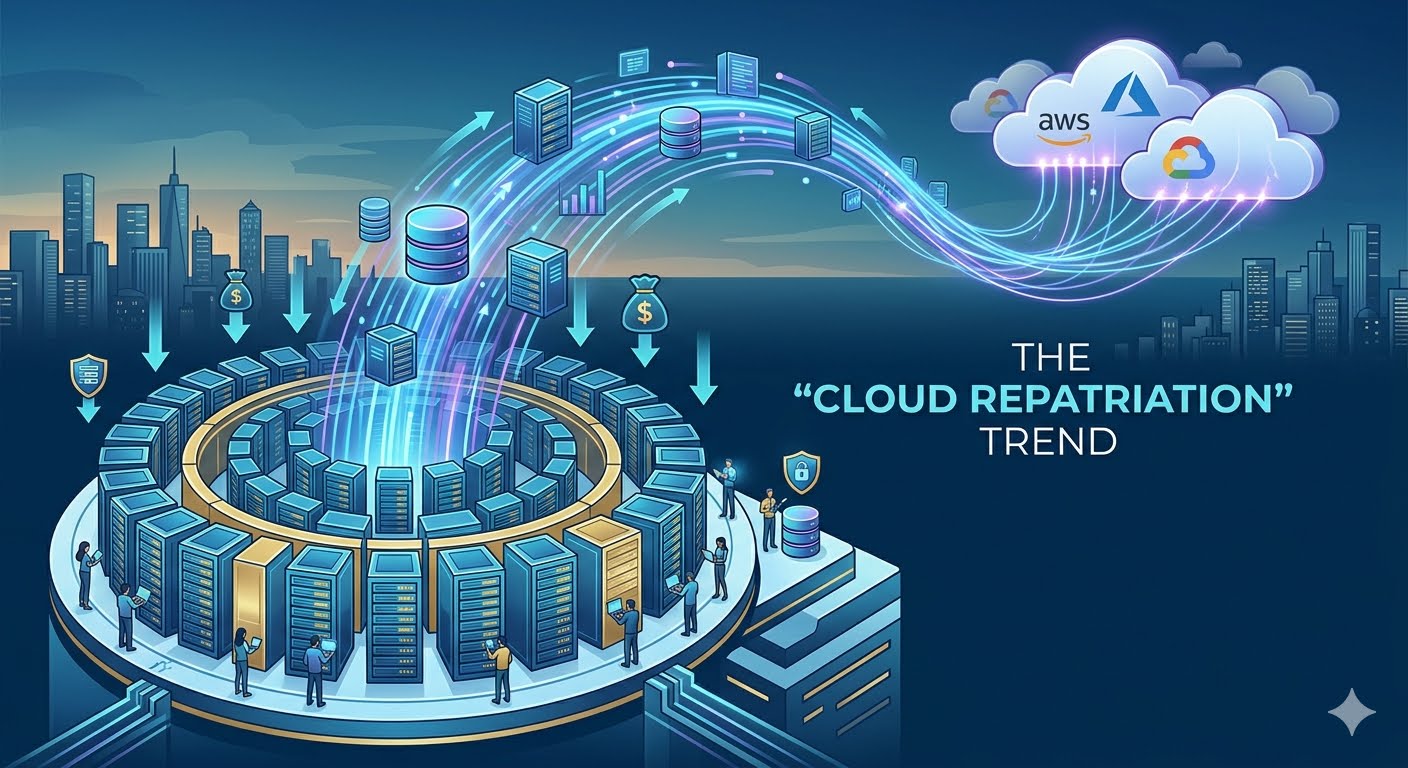
The "Cloud Repatriation" Trend in 2026. Cloud repatriation is the strategic movement of applications, data, and workloads from public cloud providers (like AWS, Azure, or Google Cloud) back to on-premises data centers, private clouds, or colocation facilities. In 2026, this trend has shifted from a fringe experimental idea to a dominant board-level agenda as enterprises seek a "cloud reset" to achieve a sustainable, high-performance infrastructure equilibrium.The "Cloud Reset" of 2026After a decade of "cloud-first" mandates, the industry is entering a phase of cloud maturity. According to recent data, roughly 83% to 86% of enterprise IT leaders now plan to repatriate at least some workloads to private infrastructure. This shift is not a total retreat from the cloud but a move toward cloud pragmatism, where organizations choose the "best home" for each workload based on specific economic and operational factors.Key Drivers Behind the Trend1. Cost Optimization and PredictabilityUnpredictable and escalating costs are the primary catalysts for repatriation in 2026.Billing Surprises: Public cloud budgets exceed plans by an average of 17%, with roughly 27% of spend categorized as wasted.The Scale Paradox: While the cloud is cost-effective for startups, mature and predictable 24/7 workloads often become a financial liability. Moving these to owned hardware can reduce infrastructure spending by 30% to 60%.Egress Fees: High "data gravity" taxes—the cost of extracting data from a public cloud—are a significant pain point for data-intensive applications.2. Performance and ControlModern repatriation allows organizations to "regain control" of their technical destiny.Hardware Tailoring: Public clouds offer generalized resources. Repatriating allows firms to use specialized, high-performance hardware, such as GPU clusters for AI inference, which may be prohibitively expensive to rent at scale.Eliminating Roadblocks: On-premises infrastructure allows IT teams to design and configure systems without being restricted by a cloud provider's proprietary framework or toolkits.3. Data Sovereignty and ComplianceRegulatory landscapes have tightened, making geographic distribution a core resilience strategy.Geopolitics: Nations now treat digital infrastructure as a national priority similar to energy security.Privacy Barriers: Cybersecurity and data privacy concerns remain top barriers to AI adoption, driving organizations to run AI models on-premises over their own sensitive data.Strategic Considerations for 2026CategoryPublic Cloud StrengthRepatriation Target WorkloadWorkload ProfileBursty, unpredictable, or experimentalPredictable, stable, and heavy-duty (e.g., ML inference)Financial ModelPure OpEx; low upfront costMix of CapEx (hardware) and lower OpEx (hosting)Operational SkillHigh automation; minimal internal hardware skill neededRequires internal expertise in hardware management and capacity planningThe Challenges of Returning HomeRepatriation in 2026 is no longer a "greenfield build" but a structured "backend swap". However, critical challenges remain:The Skills Gap: Decades of cloud adoption have led to a loss of internal hardware and networking skill sets, making it difficult to hire or train teams to manage physical data centers.Complexity Tax: While tools like Kubernetes help bridge the gap, managing underlying layers—such as identity federation and complex storage behavior—still requires disciplined operational upkeep.Conclusion: Cloud repatriation in 2026 represents the industry's maturation. Organizations are moving away from "cloud-at-all-costs" to a nuanced, hybrid strategy where the cloud provides elasticity for growth, and private infrastructure provides the predictable foundation for stable, core business operations.
Data Sovereignty in the Cloud in 2026
May 10, 2026
5 min read

Data Sovereignty in the Cloud in 2026

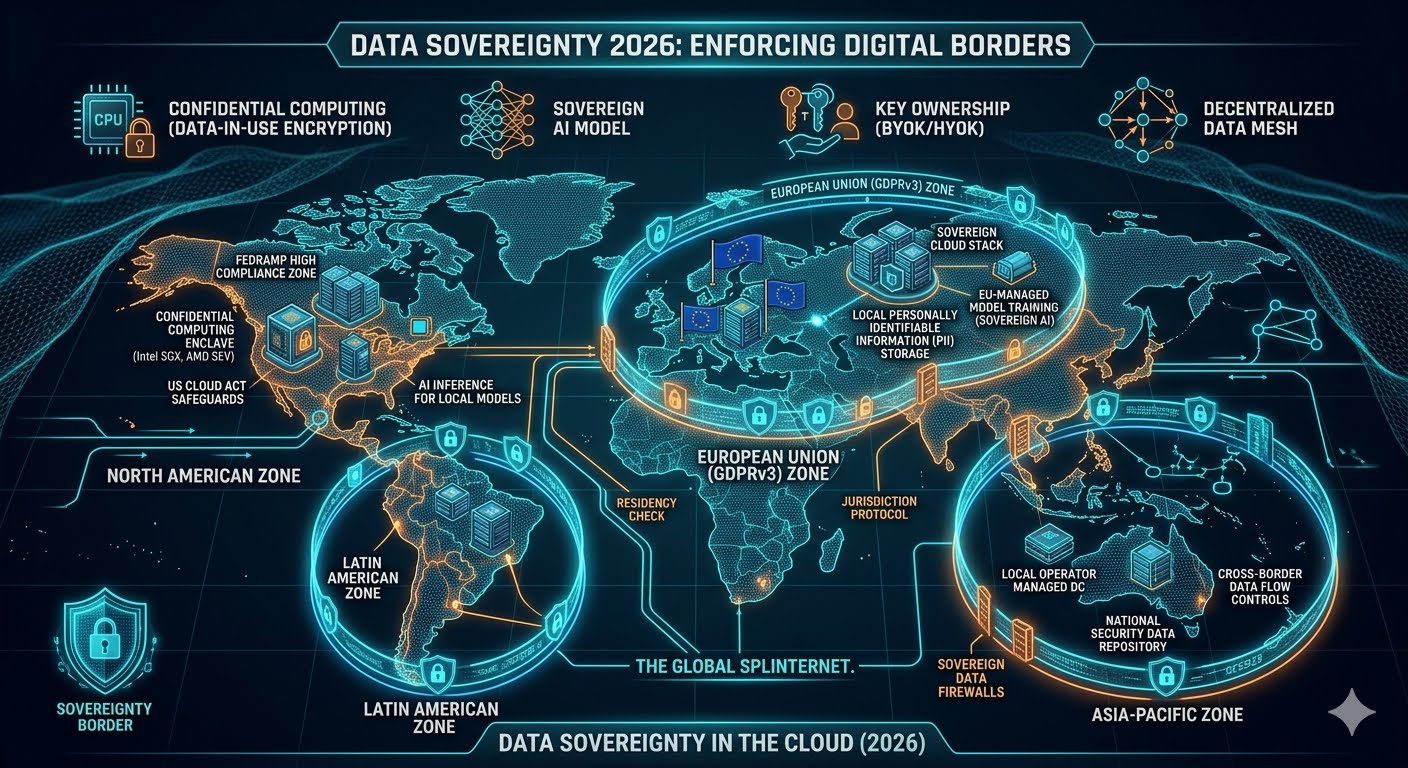
Data Sovereignty in the Cloud in 2026. Data sovereignty in 2026 is the legal and technical enforcement of national borders on digital information, ensuring that data remains subject to the specific laws and governance of the country where it is collected or processed. As the global "Splinternet" matures, the concept has evolved from a simple legal checkbox to a fundamental pillar of cloud architecture, driven by intense geopolitical competition and the insatiable data requirements of Artificial Intelligence.The New Reality: The Digital BorderIn 2026, the idea of a borderless "global cloud" is largely a relic of the past. Nations have realized that data is the "new oil," and letting it flow unchecked across borders is a risk to both national security and economic prosperity. Data sovereignty now dictates where data is stored, who can access it, and even what hardware it is allowed to touch.This shift has been accelerated by the "Splinternet"—a fragmentation of the internet into regional blocks (e.g., the EU, China, the US, and India) each with its own strict rules. For a DevOps or Platform Engineer in 2026, managing a global application means navigating a complex maze of contradictory regulations where a single misconfiguration can lead to massive fines or the complete shutdown of services in a region.The Rise of the "Sovereign Cloud"The major cloud providers—AWS, Microsoft, and Google—have responded to this demand by launching Sovereign Cloud Stacks. These are not just regional data centers; they are physically and logically isolated environments managed by local personnel and governed by local laws.Key Characteristics of 2026 Sovereign CloudsFeatureTraditional Cloud (Pre-2024)Sovereign Cloud (2026)Data ResidencyBest effort / Regional settingsHard-enforced by local hardwareOperational ControlGlobal workforce accessLocal, cleared personnel onlyEncryptionCloud-provider managed keysUser-held, local hardware security modules (HSM)Legal JurisdictionOften subject to the US CLOUD ActPurely local jurisdiction; no cross-border warrantsAI ProcessingGlobal processing clustersLocalized AI inference and trainingTechnological Enablers: Moving Beyond "Trust"In 2026, organizations no longer rely on the "promises" of cloud providers. They use technical safeguards to enforce sovereignty.1. Confidential ComputingThis is the "hero" technology of 2026. Confidential Computing uses hardware-based Trusted Execution Environments (TEEs) to encrypt data while it is being processed. Even the cloud provider's administrators or the underlying operating system cannot see the data. This allows sensitive government or healthcare data to run on public cloud hardware without "leaving" the sovereign control of the owner.2. BYOK and HYOK (Bring/Hold Your Own Key)Standard encryption is no longer enough. Sovereignty-conscious firms now use Hold Your Own Key (HYOK), where the encryption keys never leave the company's on-premise hardware. If a foreign government subpoenas the cloud provider, the provider literally cannot hand over the data because they don't have the keys.3. Decentralized Mesh ArchitecturesModern architectures in 2026 use Data Meshes that automatically route data based on its "nationality." A user in Paris will have their data processed by a node in Frankfurt, while a user in New York will hit a node in Virginia. The application logic is global, but the data layer is strictly regionalized.The AI Catalyst: Sovereignty in the Age of LLMsThe most significant driver of data sovereignty in 2026 is Artificial Intelligence. Nations have realized that whoever controls the data controls the AI."Data sovereignty in 2026 isn't just about protecting privacy; it's about protecting the intellectual property required to train the next generation of national AI models." — Industry Insight, 2026Governments are now banning the export of certain datasets to prevent them from being used to train foreign AI models. This has led to the birth of "Sovereign AI," where countries build their own Large Language Models (LLMs) using only data that is legally and physically located within their borders. For a business, this means you might need different AI models for different regions to stay compliant.Challenges: The Cost of ComplexityWhile sovereignty increases security and privacy, it comes with a "complexity tax."Operational Overload: Managing three different "sovereign stacks" is three times as expensive as managing one global cloud.Innovation Throttling: If data can't cross borders, it's harder for teams in different countries to collaborate on global insights.Vendor Lock-in: Moving from one sovereign cloud to another is significantly more difficult than moving between standard public regions due to the specialized local hardware and legal wrappers involved.The Future Outlook: A Border-Centric Digital WorldAs we move toward the late 2020s, the "borderless" dream of the early internet is being replaced by a more realistic, albeit more complicated, Digital Westphalianism. Organizations that succeed in 2026 will be those that don't fight this reality but instead build "Sovereignty-First" platforms from the ground up.Platform Engineering teams are now the primary defenders of data sovereignty. By building automation that handles data residency and localized encryption by default, they allow developers to focus on features while the platform ensures the company never violates a national border.ConclusionData sovereignty is the definitive challenge of the mid-2020s. It requires a total rethink of how we build, deploy, and scale software. In 2026, your data's location is just as important as its contents. By embracing confidential computing, sovereign cloud stacks, and localized AI, organizations can navigate this fragmented world without losing their ability to innovate.
AWS Cloud Practitioner and Skills
May 07, 2026
6 min read

AWS Cloud Practitioner and Skills

AWS cloud practitioner and skills. An AWS cloud practitioner is a professional trained to oversee an organization’s cloud computing architecture, including designing, deploying, and maintaining cloud-based solutions. An AWS cloud practitioner work closely with other IT professionals to ensure the cloud environment operates as expected and is always secure and available.You’ll typically be updated with the latest cloud computing developments, including new products and services AWS offers. You must also administer AWS services and deploy applications. This role requires extensive technical expertise and knowledge of cloud computing.Tasks and responsibilitiesAs an AWS cloud practitioner, you’ll have a wide range of tasks ahead of you. Your general duties and responsibilities will include, but aren’t limited to:Managing and maintaining AWS services and infrastructureDeveloping and optimizing cloud-based applications and servicesImplementing identity and security measures to protect the cloud environmentMonitoring system performance and addressing issues the end-user may haveCollaborating with cross-functional teams to optimize cloud solutionsDesigning and implementing backup and disaster recovery plansBeing the link between the organization’s business and technical operationsUnderstanding AWS design concepts, best practices, and industry standardsAnalyzing and scaling workloadsConfiguring virtual private cloudsTroubleshooting any issues that arise in the cloud infrastructureAWS cloud practitioner salary and job outlookYour salary can vary greatly depending on the company you work for, where you work, and your experience level. The US Bureau of Labor Statistics (BLS) reports an average salary of $95,360 for network and systems administrators as of February, 2025. Although the demand for network and computer systems administrators is projected to decline by 3 percent from 2023 to 2033, about 16,400 job openings are expected due to workers transitioning into other roles or leaving the workforce [1]. Keep in mind that these figures represent the role broadly and do not take the AWS specialization into account.What tools do AWS cloud practitioners use?AWS cloud practitioners use many tools throughout their careers because of the technical and non-technical components of cloud computing, networking, and security. Let’s review some important tools you may use in this role.AWS Management ConsoleAWS Management Console is a critical tool you’ll use as an AWS cloud practitioner. It allows you to access and manage the organization’s AWS resources through a convenient web-based application. You can access this tool using the latest versions of Internet browsers, including Google Chrome, Mozilla Firefox, Microsoft Edge, Apple Safari, and Microsoft Internet Explorer 11.There is also an AWS Console mobile app, which allows you to view resources such as CloudWatch Alarm and handle operational tasks on an iOS or Android device.AWS Command Line InterfaceAnother tool you’ll interact with is the AWS Command Line Interface (CLI). This open-source tool allows you to use commands within your command-line shell to interact with AWS services. It requires very little configuration and allows you to run commands to implement functionality equal to ones found in the AWS Management Console via Linux shells, Windows command line, or remotely.AWS CLI gives you access to all of the AWS public application programming interfaces (APIs). AWS capabilities are also available, and you’re able to develop shell scripts that can manage AWS resources.AWS Software Development KitsAWS Software Development Kits (SDKs) make any developer's job easier by collecting various development tools you’ll need to write code, including debuggers, compilers, and libraries, into one place.SDKs also contain valuable resources, including documentation, tutorials, APIs, and frameworks to help speed up development time.What qualifications do you need to become an AWS cloud practitioner?Like many positions in this field, many organizations will look for specific education, certifications, and skills when hiring an AWS cloud practitioner. Here’s what you’ll likely need to land a career in this field.EducationOrganizations sometimes require a bachelor’s degree in a networking-related field, such as computer science or information technology. However, some organizations may hire candidates with equivalent experience from certificates or an associate degree.Before applying for AWS cloud practitioner positions, you’ll need to demonstrate your basic knowledge of AWS and its systems by earning an AWS Certified Cloud Practitioner certification. Some organizations may not require this, but most will require you to show this foundational expertise.CertificationsTo qualify as a job applicant, many organizations will require certification in AWS cloud computing technology. Much like other proprietary cloud-computing solutions, AWS has its own certification program to ensure you’re up to speed on all the latest updates. You’ll likely need to continue your training throughout your career to learn new systems and updates that arise. You'll find useful AWS cloud practitioner certifications in the sections below.AWS Certified Cloud PractitionerThis foundational certification is generally the first step toward entering this field. To earn this certificate, take a 90-minute exam with 65 multiple-choice or multiple-response questions online or in person for $100. This exam will test your foundational, high-level understanding of subjects such as the AWS Cloud, its services, and relevant terminology.AWS Certified Developer—AssociateWhile this certification may say it's for developers, it may be a great idea for anyone who works in AWS. When studying for this certificate, you’ll gain a deeper knowledge of key AWS services like SNS, Dynamo DB, SQS, and Elastic Beanstalk. It’s a 130-minute, $150, 65-question certification exam designed to test your knowledge of core AWS services, uses, and basic AWS architecture best practices. It verifies your proficiency in developing, deploying, and debugging cloud-based AWS applications.SkillsYou’ll require a wide range of technical and workplace skills to be successful as an AWS cloud practitioner. Let’s review some of the skills in each category.Technical skillsManaging cloud architecture deployment and applications within the AWS platformGaining a thorough understanding of the cloud platformOngoing proficiency in programming languages like  C++, Java, Python, and JavaScriptProficiency in operating project management software such as Jira and MondayUnderstanding of data security and complianceUnderstanding of the Linux operating systemUnderstanding of various AWS products, including Ansible, Chef, Docker, Jenkins, and other application development and deployment toolsWorkplace skillsUnderstanding how organizations use networking hardware and softwareHandling end-user issues efficientlyHandling third-party program integration issuesUnderstanding and handling scalability issuesDecision-makingManagerial skillsInterpersonal and communication skills
Cloud Architecture
Apr 29, 2026
9 min read

Cloud Architecture

Cloud Architecture and Infrastructure. Cloud architecture defines the fundamental components of a cloud computing environment—the front end, the back end, the networking and the delivery model—and describes how those components are combined to run a specific application or applications.Based on business needs, a cloud architecture serves as a design strategy for connecting the cloud-based infrastructure for running and deploying applications. Cloud architecture considers an organization’s workload requirements and operational costs to deliver the flexibility, scalability and cost-savings of cloud computing.Cloud architecture componentsCloud computing architecture integrates four essential components to create an IT environment that abstracts, pools and shares scalable resources across one or more cloud environments.A front-endA back-endA networkA cloud-based delivery platformCloud architectures vary based on an organization’s unique business drivers and technology requirements. Still, they all share the same goal of creating a roadmap that considers application workloads, cloud deployment models, service management and design needs.1. The front-endFront-end cloud architecture refers to the user- or client-side of the cloud computing system. It consists of graphic user interfaces (GUIs), dashboards and navigation tools that provide on-demand access to cloud services and resources. Key components include software apps and programs installed on devices (such as., mobile phone, laptop or desktop) to access the cloud platform or service. Accessing a web-based video communications application (for example, Zoom, Webex) via a laptop computer or ordering food through a mobile delivery platform (Uber Eats, DoorDash) are both examples of front-end cloud architecture capabilities.2. The back-endWhile the front-end includes all elements related to the client (for example, a visitor to an e-commerce site), the back-end (or ‘server-side’) refers to the structuring of the site and the programming of its main functionalities. It provides all of the behind-the-scenes technology (cloud servers, cloud databases, application programming interfaces (APIs) to access files) used by the CSP to support the front-end, including all the code that helps a database or web server communicate with a web browser or a mobile operating system.Back-end cloud architecture components include the following:Applications: Back-end apps are the software or platforms that deliver the client service requests on the front-end.Cloud computing service: The back-end service provides utility in cloud architecture and manages the accessibility of cloud-based resources (such as, cloud-based storage services, application development services, web services, security services, and more).Cloud runtime: Runtime provides the environment (operating system, hardware, memory) for executing or running services. Virtualization plays a crucial role in enabling multiple runtimes on the same server. (Read more about virtualization below.)Cloud storage: Cloud storage in the back-end refers to the flexible and scalable storage service and management of data stored to carry out applications.Infrastructure: Infrastructure consists of all the back-end resources or hardware (such as, servers, databases, CPU (central processing unit), network devices like routers and switches, graphics processing unit (GPU), and so on.) and all the software used to run and manage cloud-based services. In cloud-computing speak, the term infrastructure is sometimes confused with cloud architecture, but there’s a distinct difference. Like a blueprint for constructing a building, cloud architecture serves as the design plan for building cloud infrastructure.Management software: Middleware coordinates communication between the front-end and back-end in a cloud computing system. This component allows for the delivery of services in real-time to ensure smooth front-end user experiences.Security tools: Security tools provide the back-end security (also referred to as service-side security) for potential cyberattacks or system failures. Virtual firewalls protect web applications, prevent data loss and ensure backup and disaster recovery. Back-end components include encryption, access restriction and authentication protocols to protect data from breaches.3. A networkAn internet connection typically connects the front-end with the back-end functions. An intranet—a privately maintained computer network accessed only by authorized persons and limited to one institution—or an intercloud connection may also connect the back-end and front-end. A cloud network should provide high bandwidth and low latency, allowing users to continuously access their data and applications. The network must also provide agility so that access to resources can occur quickly and efficiently between servers and cloud-based environment.Other significant cloud architecture networking gear includes load balancers, content delivery networks (CDNs) and software-defined networking (SDN) to ensure data flows smoothly and securely between front-end users and back-end resources.4. Cloud-based delivery modelsThere are three main types of cloud delivery models (also known as cloud service models): IaaS, PaaS and SaaS. These models are not mutually exclusive. Most large enterprises use all three as part of their cloud delivery stack:IaaS, or Infrastructure-as-a-Service, is the on-demand access to cloud-hosted physical and virtual servers, storage and networking—the back-end IT infrastructure for running applications and workloads in the cloud. IaaS allows organizations to scale and shrink infrastructure resources as needed. This cloud-based service helps them avoid the high costs associated with building and managing an on-premises data center, providing the capacity to accommodate highly variable or ‘spiky’ workloads.PaaS, or Platform-as-a-Service, is the on-demand access to a complete, ready-to-use cloud computing platform for developing, running and managing applications. PaaS can simplify the migration of existing applications to the cloud through re-platforming (moving an application to the cloud with modifications that take better advantage of cloud scalability, load balancing and other capabilities) or refactoring (re-architecting some or all of an application using microservices, containers and other cloud-native technologies).SaaS, or Software-as-a-Service, is the on-demand access to ready-to-use, cloud-hosted application software (such as, Salesforce, Mailchimp). SaaS offloads all software development and infrastructure management to the cloud service provider. Because the software (application) is already installed and configured, users can provision the cloud-based server instantly and have the application ready for use in hours. This capability reduces the time spent on installation and configuration and speeds up software deployment.According to a Gartner report, almost two-thirds (65.9%) of enterprise IT spending will go toward Software-as-a-Service in 2025, up from 57.7% in 2022.Other popular service platforms include the following:Serverless computing (or serverless): Serverless is a cloud application development and execution model that allows developers to build and run code without provisioning or managing servers or back-end infrastructure.Business-Process-as-a-Service (BPaaS): BPaaS is a business process outsourcing platform that combines IaaS, PaaS and SaaS services.Function-as-a-Service (FaaS): FaaS is a subset of SaaS in which application code runs only in response to specific events or requests. FaaS makes it easier for DevOps and other teams to run and manage microservices applications.Key cloud architecture technologiesThe following are a few of the most critical technologies for developing cloud architecture.VirtualizationCrucial to cloud architecture, virtualization acts as an abstraction layer that enables the hardware resources of a single computer—processors, memory, storage and more—to be divided into multiple virtual computers known as virtual machines (VMs). Virtualization connects physical servers maintained by a cloud service provider (CSP) at numerous locations, then divides and abstracts resources to make them accessible to end users wherever there is an internet connection. Besides virtualizing servers, cloud technology uses many other forms of virtualization, including network virtualization and storage virtualization.AutomationCloud automation involves implementing tools and processes that reduce or eliminate the manual work associated with provisioning, configuring and managing cloud environments. Cloud automation tools run on top of virtualized environments and play an essential role in enabling organizations to take more significant advantage of the benefits of cloud computing, like the ability to leverage cloud resources on demand and scale them up and down on an as-needed basis. Automation plays a vital role in DevOps workflows, speeding up tasks related to building, testing, deploying and monitoring applications, resulting in cost savings and faster time to market.Cloud deployment modelsThere are four main cloud delivery models, each offering unique features for running workloads and optimizing business value.Public cloudA public cloud is a computing model where a cloud service provider makes computing resources (such as, software applications, development platforms, VMs, bare metal servers, and more) available to users over the public internet. CSPs sell these resources according to subscription-based or pay-per-usage pricing models.Public cloud environments are multi-tenant, where users share a pool of virtual resources automatically provisioned for and allocated to individual tenants through a self-service interface. This feature allows providers to maximize utilization of their data center hardware and infrastructure, thus offering cloud customers services for the lowest possible costs with access from anywhere.Private cloudA private cloud is a single-tenant cloud environment where all resources are isolated and operated exclusively for one organization. Private cloud combines many benefits of cloud computing with the security and control of on-premises IT infrastructure. For instance, companies that must meet strict regulatory compliance requirements, such as healthcare or financial institutions, may choose private clouds for their sensitive data using customized security measures like firewalls, virtual private networks (VPNs), data encryption and API keys.Hybrid cloudA hybrid cloud combines public cloud, private cloud and on-premises (‘on-prem’) infrastructure to create a single IT infrastructure so companies can get the best out of all computing environments to meet their business needs. Organizations favor a hybrid cloud model for its agility in moving applications and workloads across cloud environments based on technological or business goals.For instance, an enterprise with concerns surrounding sensitive data (such as, intellectual property, personally identifiable information (PII), medical records, and more) can store them in a private cloud. For other workloads, such as web hosting or content hosting, businesses may choose a public cloud setting for its cost savings and ability to scale resources up and down based on user traffic (for example, scale up during a social media campaign promoting a new product).According to the IBM Transformation Index: State of Cloud, over 77% of business and IT professionals have adopted a hybrid cloud approach.Hybrid multicloudToday, most enterprise businesses merge a hybrid cloud with a multicloud environment. A multicloud is a cloud computing model that incorporates multiple cloud services from more than one provider within the same IT infrastructure. Together, hybrid and multicloud models create a hybrid multicloud architecture that offers businesses the flexibility to create the best of both cloud computing worlds for migrating, building and optimizing applications across multiple clouds.In addition to offering the control and flexibility to choose the most cost-effective cloud service, hybrid multicloud provides the most control over where organizations can deploy and scale workloads (for example, deploy closer to edge environments), further improving performance. Each cloud provider offers its unique services. Businesses can customize a mix of network, storage and cloud solutions from different cloud providers to find the best-in-class solutions. For instance, a company may use IBM Cloud for its advanced data and artificial intelligence (AI) capabilities, Microsoft Azure for its compliance and security features and Google Cloud for its global networking reach.
Cloud Computing in 2026
Apr 29, 2026
17 min read

Cloud Computing in 2026

Cloud Computing in 2026 and Business Connectivity. Cloud computing is on-demand access to computing resources—physical or virtual servers, data storage, networking capabilities, application development tools, software, AI-powered analytic platforms and more—over the internet with pay-per-use pricing.In simpler terms, the "cloud" doesn't refer to something floating in the sky. Instead, when you use cloud services, you're accessing remote servers, powerful mainframe computers housed in large data centers, through the internet. The cloud computing model gives you, the customer, greater flexibility and scalability compared to traditional on-premises infrastructure.Cloud computing is pivotal in our everyday lives, whether that means to access a cloud application such as Google Gmail, stream a movie on Netflix or play a cloud-hosted video game. With cloud computing, you get the computing power or storage you need, without having to own or manage the physical hardware yourself.Cloud computing has also become indispensable in business settings, from small startups to global enterprises, as it offers greater flexibility and scalability than traditional on-premises infrastructure. Its many business applications include enabling remote work by making data and applications accessible from anywhere, creating the framework for seamless omnichannel customer engagement and providing the vast computing power and other resources needed to take advantage of cutting-edge technologies such as generative AI and quantum computing.Benefits of cloud computingCompared to traditional on-premises IT, where a company owns and maintains physical data centers and servers to access computing power, data storage and other resources, cloud computing offers many benefits, including:Cost-effectivenessIncreased speed and agilityUnlimited scalabilityEnhanced strategic valueCost-effectivenessCloud computing lets you offload some or all of the expense and effort of purchasing, installing, configuring and managing mainframe computers and other on-premises infrastructure. You only pay for cloud-based infrastructure and other computing resources as you use them.Increased speed and agilityWith cloud technologies, your organization can use enterprise applications in minutes instead of waiting weeks or months for IT to respond to a request, purchase and configure supporting hardware and install software. This feature empowers users—specifically DevOps and other development teams—to help use cloud-based software and support infrastructure.Unlimited scalabilityCloud computing provides elasticity and self-service provisioning, so instead of purchasing excess capacity that sits unused during slow periods, you can scale capacity up and down in response to spikes and dips in traffic. You can also use your cloud provider’s global network to spread your applications closer to users worldwide.Enhanced strategic valueCloud computing enables organizations to use various technologies and the most up-to-date innovations to gain a competitive edge. For instance, in retail, banking and other customer-facing industries, generative AI-powered virtual agents deployed over the cloud can deliver better customer response time and free up teams to focus on higher-level work. In manufacturing, teams can collaborate and use cloud-based software to monitor real-time data across logistics and supply chain processes.Origins of cloud computingThe origins of cloud computing technology go back to the early 1960s when Dr. Joseph Carl Robnett Licklider, an American computer scientist and psychologist known as the “father of cloud computing,” introduced the earliest ideas of global networking in a series of memos discussing an Intergalactic Computer Network.However, it wasn’t until the early 2000s that modern cloud infrastructure for business emerged. In 2002, Amazon Web Services started cloud-based storage and computing services. In 2006, it introduced Elastic Compute Cloud (EC2), an offering that allowed users to rent virtual computers to run their applications. That same year, Google introduced the Google Apps suite (now called Google Workspace), a collection of SaaS productivity applications.In 2009, Microsoft started its first SaaS application, Microsoft Office 2011.By 2028, Gartner predicts cloud shifts from being an industry disruptor to becoming a business necessity and an integral part of business operations.1Cloud computing componentsThe following are a few of the most integral components of today’s modern cloud architecture:Data centersNetworking capabilitiesVirtualizationData centersCSPs own and operate remote data centers that house physical or bare metal servers, cloud storage systems and other physical hardware that create the underlying infrastructure and provide the physical foundation for cloud computing.Networking capabilitiesIn cloud computing, high-speed networking connections are crucial. Typically, an internet connection known as a wide-area network (WAN) connects front-end users (client-side interface made visible through web-enabled devices) with back-end functions (data centers and cloud-based applications and services).Other advanced cloud computing networking technologies, including load balancers, content delivery networks (CDNs) and software-defined networking (SDN), are also incorporated to help ensure data flows quickly, easily and securely between front-end users and back-end resources.VirtualizationCloud computing relies heavily on the virtualization of IT infrastructure (servers, operating system software, networking) that’s abstracted by using special software so that it can be pooled and divided irrespective of physical hardware boundaries.For example, a single hardware server can be divided into multiple virtual servers. Virtualization enables cloud providers to make maximum use of their data center resources.Cloud computing servicesInfrastructure-as-a-service (IaaS), platform-as-a-service (PaaS), software-as-a-service (SaaS) and serverless computing are the most common “as-as-service” cloud platform models. Most developers at large-scale organizations use some combination of all four.IaaS offers full control over IT infrastructure, allowing organizations to build and manage systems. PaaS builds on IaaS by providing a platform that simplifies the development and deployment of applications, handling the underlying infrastructure for you. SaaS, the most widely used cloud service, delivers ready-to-use software, removing the need for management. And serverless computing, built on IaaS and PaaS, lets you focus solely on writing code.IaaS (Infrastructure-as-a-Service)Infrastructure as a service (IaaS) provides on-demand access to fundamental computing resources—physical and virtual servers, networking and storage—over the internet on a pay-as-you-go basis.IaaS enables users to scale and shrink resources on an as-needed basis, reducing the need for high up-front capital expenditures or unnecessary on-premises or “owned” infrastructure and for overbuying resources to accommodate periodic spikes in usage.According to a report from the Business Research Company, the IaaS market is predicted to grow rapidly in the next few years, growing to USD 212.34 billion in 2028 at a compound annual growth rate (CAGR) of 14.2%.2PaaS (Platform-as-a-Service)Platform as a service (PaaS) provides software developers with an on-demand platform—hardware, complete software stack, infrastructure and development tools—for running, developing and managing applications without the cost, complexity and inflexibility of maintaining that platform on-premises.With PaaS, the cloud provider hosts everything at their data center. These include servers, networks, storage, operating system software, middleware and databases. Developers simply pick from a menu to spin up servers and environments they need to run, build, test, deploy, maintain, update and scale applications.Today, PaaS is typically built around containers, a virtualized compute model one step removed from virtual servers. Containers virtualize the operating system, enabling developers to package the application with only the operating system services it needs to run on any platform without modification and the need for middleware.Red Hat® OpenShift® is a popular PaaS built around Docker containers and Kubernetes, an open source container orchestration solution that automates cloud deployment, scaling, load balancing and more for container-based applications.SaaS (Software-as-a-Service)Software as a service (SaaS), also known as cloud-based software or cloud applications, is interactive application software hosted in the cloud. Users access SaaS through a web browser, a dedicated desktop client or an application programming interface (API) that integrates with a desktop or mobile operating system. Cloud service providers offer SaaS based on a monthly or annual subscription fee. They can also provide these services through pay-per-usage pricing.In addition to the cost savings, time-to-value and scalability benefits of the cloud, SaaS offers the following:Automatic upgrades: With SaaS, users have access to new features when the cloud service provider adds them without having to orchestrate an on-premises upgrade.Protection from data loss: Because SaaS stores application data in the cloud with the application, users don’t lose data if their device crashes or breaks.SaaS is the primary delivery model for most commercial software today. Hundreds of SaaS solutions exist, from focused industry and broad administrative (for example, Salesforce) to robust enterprise database and artificial intelligence (AI)-driven software tools.According to a study from Fortune Business Insights, the global software as a service (SaaS) market size was valued at USD 273.55 billion in 2023 and is projected to grow from USD 317.55 billion in 2024 to USD 1,228.87 billion by 2032.3Serverless computingServerless computing, or simply serverless, is a cloud computing model that offloads all the back-end infrastructure management tasks, including provisioning, scaling, scheduling and patching, to the cloud provider. This capability frees developers to focus all their time and effort on the code and business logic specific to their applications.Moreover, serverless runs application code on a per-request basis only and automatically scales the supporting infrastructure up and down in response to the number of requests. With serverless, customers pay only for the resources used when the application runs; they never pay for idle capacity.Function as a service (FaaS) is often confused with serverless computing when, in fact, it’s a subset of serverless. FaaS allows developers to run portions of application code (called functions) in response to specific events. Everything besides the code—physical hardware, virtual machine (VM), operating system and web server software management—is provisioned automatically by the cloud service provider in real-time as the code runs and is spun back down once the execution is complete. Billing starts when execution starts and stops when execution stops.Types of cloud computingPublic cloudA public cloud is a type of cloud computing in which a cloud service provider makes computing resources available to users over the public internet. These include SaaS applications, individual virtual machines (VMs), bare metal computing hardware, complete enterprise-grade infrastructures, and development platforms. These resources might be accessible for free or according to subscription-based or pay-per-usage pricing models.The public cloud provider owns, manages and assumes all responsibility for the data centers, hardware and infrastructure on which its customers’ workloads run. It typically provides high-bandwidth network connectivity to help ensure high performance and rapid access to applications and data.Public cloud is a multi-tenant environment where all customers pool and share the cloud provider’s data center infrastructure and other resources. In the world of the leading public cloud vendors, such as Amazon Web Services (AWS), Google Cloud, IBM Cloud®, Microsoft Azure and Oracle Cloud, these customers can number in the millions.Most enterprises have moved portions of their computing infrastructure to the public cloud since public cloud services are elastic and readily scalable, flexibly adjusting to meet changing workload demands. The promise of greater efficiency and cost savings through paying only for what they use attracts customers to the public cloud. Others seek to reduce spending on hardware and on-premises infrastructure.Private cloudA private cloud is a cloud environment where all cloud infrastructure and computing resources are dedicated to one customer only. Private cloud combines many benefits of cloud computing—including elasticity, scalability and ease of service delivery—with the access control, security and resource customization of on-premises infrastructure.A private cloud is typically hosted on-premises in the customer’s data center. However, it can also be hosted on an independent cloud provider’s infrastructure or built on rented infrastructure housed in an offsite data center.Many companies choose a private cloud over a public cloud environment to meet regulatory compliance requirements. Large-scale entities such as government agencies, healthcare organizations and financial institutions often opt for private cloud settings for workloads that deal with confidential documents, personally identifiable information (PII), intellectual property, medical records, financial data or other sensitive data.By building private cloud architecture according to cloud-native principles, organizations can quickly move workloads to a public cloud or run them within a hybrid cloud (see below) environment whenever ready.Hybrid cloudA hybrid cloud is just what it sounds like: a combination of public cloud, private cloud and on-premises environments. Specifically (and ideally), a hybrid cloud connects a combination of these three environments into a single, flexible infrastructure for running the organization’s applications and workloads.At first, organizations turned to hybrid cloud computing models primarily to migrate portions of their on-premises data into private cloud infrastructure and then connect that infrastructure to public cloud infrastructure hosted off-premises by cloud vendors. This process was done through a packaged hybrid cloud solution such as Red Hat OpenShift or middleware and IT management tools to create a “single pane of glass.” Teams and administrators rely on this unified dashboard to view their applications, networks and systems.Today, hybrid cloud architecture has expanded beyond physical connectivity and cloud migration to offer a flexible, secure and cost-effective environment that supports the portability and automated deployment of workloads across multiple environments. This feature enables an organization to meet its technical and business objectives more effectively and cost-efficiently than with a public or private cloud alone. For instance, a hybrid cloud environment is ideal for DevOps and other teams to develop and test web applications. This frees organizations from purchasing and expanding the on-premises physical hardware needed to run application testing, offering faster time to market. Once a team has developed an application in the public cloud, they can move it to a private cloud environment based on business needs or security factors.A public cloud also allows companies to quickly scale resources in response to unplanned spikes in traffic without impacting private cloud workloads, a feature known as cloud bursting. Streaming channels such as Amazon use cloud bursting to support the increased viewership traffic when they start new shows.MulticloudMulticloud uses two or more clouds from two or more different cloud providers. A multicloud environment can be as simple as email SaaS from one vendor and image editing SaaS from another. But when enterprises talk about multicloud, they typically use multiple cloud services—including SaaS, PaaS and IaaS—from two or more leading public cloud providers.Organizations choose multicloud to avoid vendor lock-in, have more services to select from and access more innovation. With multicloud, organizations can choose and customize a unique set of cloud features and services to meet their business needs. This freedom of choice includes selecting “best-of-breed” technologies from any CSP (as needed or as they emerge), rather than being locked into offering from a single vendor. For example, an organization can choose AWS for its global reach with web hosting, IBM Cloud for data analytics and machine learning (ML) platforms and Microsoft Azure for its security features.A multicloud environment also reduces exposure to licensing, security and compatibility issues resulting from "shadow IT"— any software, hardware or IT resource used on an enterprise network without the IT department’s approval and often without IT’s knowledge or oversight.The modern hybrid multicloudToday, most enterprise organizations use a hybrid multicloud model. Besides the flexibility to choose the most cost-effective cloud service, hybrid multicloud offers the most control over workload deployment, enabling organizations to operate more efficiently, improve performance and optimize costs.According to an IBM Institute for Business Value study, the value derived from a full hybrid multicloud platform technology and operating model at scale is two-and-a-half times the value derived from a single-platform, single-cloud vendor approach.Yet the modern hybrid multicloud model comes with more complexity. The more clouds that you use—each with its own management tools, data transmission rates and security protocols—the more difficult it can be to manage your environment. With over 97% of enterprises operating on more than one cloud and most organizations running 10 or more clouds, a hybrid cloud management approach has become crucial.Hybrid multicloud management platforms provide visibility across multiple provider clouds through a central dashboard where development teams can see their projects and deployments, operations teams can monitor clusters and nodes, and the cybersecurity staff can monitor for threats.Cloud securityTraditionally, security concerns have been the primary obstacle for organizations considering cloud services, mainly public cloud services. Maintaining cloud security demands different procedures and employee skill sets than legacy IT environments. Some cloud security best practices include the following:Shared responsibility for security: Generally, the cloud service provider is responsible for securing cloud infrastructure, and the customer is responsible for protecting its data within the cloud. However, it’s also essential to clearly define data ownership between private and public third parties.Data encryption: Data should be encrypted while at rest, in transit and in use. Customers need to maintain complete control over security keys and hardware security modules.Collaborative management: Proper communication and clear, understandable processes between IT, operations and security teams help ensure seamless cloud integrations that are secure and sustainable.Security and compliance monitoring: IT, operations and security teams must understand all regulatory compliance standards applicable to their industry and establish active monitoring of all connected systems and cloud-based services to maintain visibility of all data exchanges across all environments—on-premises, private cloud, hybrid cloud and at the edge.Cloud security management toolsCloud security is constantly changing to keep pace with new threats. Today’s CSPs offer a wide array of cloud security management tools, including:Identity and access management (IAM): IAM tools and services automate policy-driven enforcement protocols for all users attempting to access both on-premises and cloud-based services.Data loss and prevention (DLP): DLP services combine remediation alerts, data encryption and other preventive measures to protect all stored data, whether at rest or in motion.Security information and event management (SIEM): SIEM is a comprehensive security orchestration solution that automates threat monitoring, detection and response in cloud-based environments. SIEM technology uses artificial intelligence (AI)-driven technologies to correlate log data from various sources (for example, network devices, firewalls) across multiple platforms and digital assets. This allows IT teams to successfully apply their network security protocols, enabling them to react to potential threats quickly.Automated data and compliance platforms: Automated software solutions provide compliance controls and centralized data collection to help organizations adhere to regulations specific to their industry. Regular compliance updates can be baked into these platforms so organizations can adapt to ever-changing regulatory compliance standards.Cloud sustainabilitySustainability in business refers to a company’s strategy to reduce negative environmental impact from their operations in a particular market, and it has become an essential corporate governance mandate. Gartner predicts that 50% of organizations will adopt sustainability-enabled monitoring by 2026 to manage energy consumption and carbon footprint metrics for their hybrid cloud environments.4As companies strive to advance their business sustainability objectives, cloud computing has evolved to play a significant role in helping them reduce their carbon emissions and manage climate-related risks. For instance, traditional data centers require power supplies and cooling systems, which depend on large amounts of electrical power. By migrating IT resources and applications to the cloud, organizations only enhance operational and cost efficiencies and boost overall energy efficiency through pooled CSP resources.All major cloud players have made net-zero commitments to reduce their carbon footprints and help clients reduce the energy they typically consume using an on-premises setup. For instance, IBM is driven by sustainable procurement initiatives to reach NetZero by 2030.Cloud use casesAccording to an International Data Corporation (IDC) forecast, worldwide spending on public cloud services is expected to double by 2028.5 Here are some of the main ways businesses can benefit from cloud computing:Migrate existing applications to the cloudScale infrastructureEnable business continuity and disaster recoveryBuild and test cloud-native applicationsSupport edge and IoT environmentsUse cutting-edge technologiesScale infrastructureOrganizations can allocate resources up or down quickly and easily in response to changes in business demands.Enable business continuity and disaster recoveryCloud computing provides cost-effective redundancy to protect data against system failures and provide the physical distance required to apply disaster recovery strategies and recover cloud data and applications during a local outage or disaster. All of the major public cloud providers offer disaster recovery as a service (DRaaS).Build and test cloud-native applicationsFor development teams adopting agile, DevOps or DevSecOps, the cloud offers on-demand, scalable resources that streamline the provisioning of development and testing environments, eliminating bottlenecks such as manually setting up servers and enabling teams to focus on building and testing cloud-native applications and their dependencies more efficiently.Support edge and IoT environmentsThe cloud can address latency challenges and reduce downtime by bringing data sources closer to the edge. It supports Internet of Things (IoT) devices (for example, patient monitoring devices, sensors on a production line) to gather real-time data.

Stay Ahead in Tech

Get the latest ICT tutorials, DevOps guides, and AI news delivered directly to your inbox.