A Beginner’s Guide to Website Structure and Components
Blueprint of the Web: A Beginner’s Guide to Website Structure and Components.
Every single day, billions of people click links, scroll through feeds, and complete checkouts on websites without ever thinking about how those digital spaces are built. To a beginner, a website can look like magic. However, beneath the beautiful designs, smooth animations, and product grids lies a highly logical structure built from standardized, reusable components.
Building a website is very much like building a house. You cannot start by choosing the paint colors or picking out furniture; you must first lay a solid foundation, build the structural framework, map out the plumbing, and design the floor plan. In the digital world, this layout is known as website architecture.
Whether you are looking to learn web development, starting an e-commerce side-hustle, or simply trying to understand how your business’s digital assets work, this guide breaks down website structures and essential components in plain language.
🧭 The Core Mechanics: Frontend vs. Backend
Before diving into the visual building blocks of a webpage, it is critical to understand the two main layers that make a website function: the Frontend and the Backend.
[ Frontend: The Visual Interface ] ── (Requests Data) ──► [ Backend: The Engine Room ]
◄── (Sends Data) ──
The Frontend (The Client-Side)
The frontend is everything a user sees, clicks, and interacts with directly inside their web browser. If you can view it, click it, or hover over it, it is part of the frontend. It is constructed using three primary languages:
HTML (HyperText Markup Language): The raw bones and skeleton of the website. It defines where headings, paragraphs, images, and buttons go.
CSS (Cascading Style Sheets): The clothing and makeup. It dictates the colors, fonts, spacing, alignment, and overall design style.
JavaScript: The muscle and nervous system. It makes the site interactive, handling things like pop-up windows, drop-down menus, and data calculations.
The Backend (The Server-Side)
The backend is the invisible engine room behind the scenes. It consists of a web server, an application instance, and a database. When you log into an account, buy a product, or type a search query, the backend processes your request, searches the database, and sends the correct data back to your screen.
🗺️ Website Architecture: Organizing the Whole Site
Website structure refers to how the different pages of your website are linked together and organized. A well-planned architecture helps human users find information in less than three clicks and enables search engine bots (like Google) to crawl and index your content efficiently.
There are several ways to structure a site, but the most widely adopted framework is the Hierarchical Tree Structure.
[ Home Page ]
│
┌───┴───┐
▼ ▼
[ Services Page ] [ About Us Page ]
│
┌──┴──┐
▼ ▼
[Web Dev] [SEO Optimization]
1. The Home Page (The Roots)
The home page acts as your website's virtual front door and the main entry point for your traffic. It sets the tone, introduces the core value proposition, and points visitors toward the site's deeper sections.
2. Category Pages (The Branches)
These pages group related content together. For an online clothing store, categories would be "Men's Clothing," "Women's Clothing," and "Accessories." For a corporate business site, categories might include "Services," "Case Studies," and "Contact Us."
3. Sub-Category/Individual Pages (The Leaves)
These are the deepest pages on your website. They hold specific information, such as an individual blog article, a single product checkout page, or a breakdown of a specific service feature.
🛠️ The Global Components: Anatomy of a Webpage
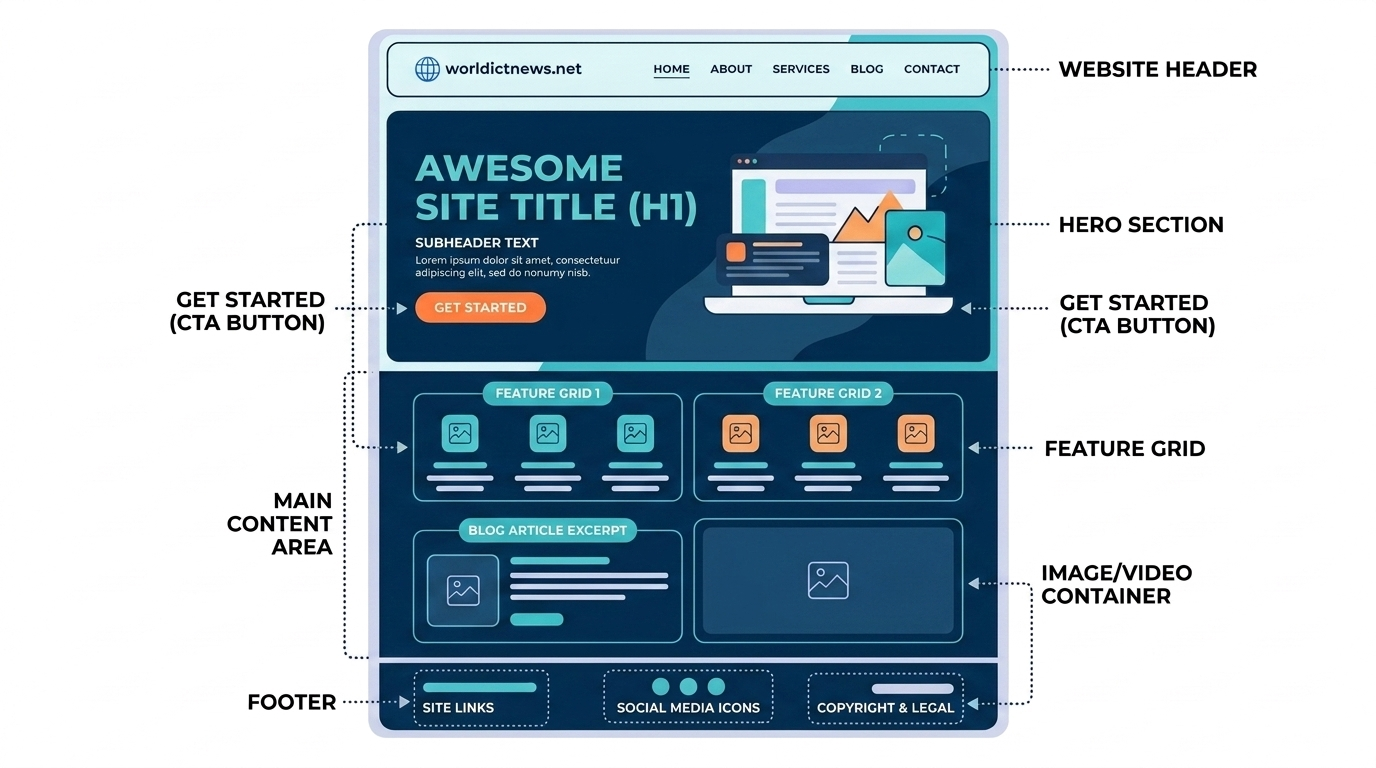
Every single page on a website contains standard structural regions. Regardless of whether you visit a news outlet, a personal blog, or a banking dashboard, you will almost always find these global components.
┌─────┐
│ [HEADER] Logo Home About Services Contact │
├─────┤
│ │
│ [HERO SECTION] │
│ Big Bold Heading (H1) │
│ Subheading explanatory text │
│ [Call-to-Action Button] │
│ │
├───┤
│ [MAIN CONTENT AREA] │
│ Articles, product grids, images, videos, testimonials │
│ │
├────┤
│ [FOOTER] Privacy Policy | Terms of Service | © 2026 │
└───┘
1. The Header (Navigation Bar)
Located at the absolute top of the page, the header is a permanent anchor across your entire website. Its main job is to help users find their way around.
The Logo: Usually placed in the top-left corner. Clicking it will always return the user to the home page.
Navigation Links: Buttons or text paths leading directly to primary category pages.
Search Bar: A helpful field for larger websites, allowing users to bypass menus and search for specific content immediately.
Shopping Cart / Profile Icon: Common on interactive e-commerce and member websites.
2. The Hero Section
The Hero Section is the first major visual area a visitor sees right below the header. It needs to capture attention instantly before the user scrolls down.
The H1 Heading: The most important title on the page, summarizing exactly what the business or website does.
Supporting Copy: A short 2–3 sentence paragraph expanding on the title.
Call-to-Action (CTA) Button: A bright, highly visible button designed to drive user action (e.g., "Get Started," "Shop Now," "Book a Free Call").
Background Visual: A high-resolution image, video loop, or clean abstract illustration matching the brand tone.
3. The Main Content Body
This is the heart of the page, holding the unique content that the user came to read. The body is typically broken down into distinct sections separated by vertical whitespace:
Feature Grid blocks: Highlighting key benefits or capabilities.
Media Containers: Embedded images, audio players, or video elements.
Testimonials / Social Proof: Reviews, customer quotes, and case studies proving credibility.
Contact Forms: Simple boxes allowing visitors to send messages directly without opening an email app.
4. The Footer
The footer sits at the very bottom of the page. It serves as a safety net for lost users and holds important administrative, regulatory, and legal links.
Legal Links: Copyright notices, Privacy Policies, and Terms of Service documents.
Contact & Location Details: Physical addresses, customer service phone numbers, and support email channels.
Social Media Icons: Direct hyperlinked connections to the company's profiles on external platforms like LinkedIn or Instagram.
Sitemap Links: A comprehensive, text-based list of links to all major areas of the website.
📈 Key Best Practices for Website Design
When assembling these pieces for the first time, keep these fundamental digital design principles in mind:
Mobile-First Responsiveness: Over 55% of all web traffic comes from smartphones. Your website structure must adjust dynamically to look fantastic on desktop monitors, tablets, and small phone screens alike.
Visual Hierarchy: Use size, weight, and color contrast to guide the user's eye. Your H1 heading should always be much larger than body paragraphs, and your primary CTA buttons should pop out noticeably against your background colors.
Clear White Space: Avoid cluttering elements together. Generous spacing around text and sections gives your design room to breathe and makes it much easier to read.
Fast Load Speed: Websites with heavy, unoptimized images load slowly, driving visitors away. Keep files compressed and use modern image formats like WebP.
📊 Summary Structure Checklist for Absolute Beginners
Component Layer | Core Responsibility | Typical Elements Included |
|---|---|---|
Header | Navigation and Orientation | Company logo, menu navigation links, user search utility |
Hero Section | First Impression & Primary Goal | H1 title statement, brief value copy, Call-to-Action button |
Main Content | Delivery of Information | Paragraphs, informative images, videos, lists, contact forms |
Footer | Legal and Secondary Links | Copyright info, privacy policy links, social media channels |
🏁 Conclusion
Building a website becomes much less intimidating once you realize it is just a puzzle made of standardized components. By understanding how the header, hero section, content body, and footer work together across a clear page hierarchy, you can design user-friendly digital spaces from scratch. Master these baseline building blocks first, and you will have a solid foundation for your journey into web development, design, or digital marketing.
Did you find this ICT insight helpful?