Introduction to CI/CD Pipelines for Absolute Beginners
An Introduction to CI/CD Pipelines for Absolute Beginners.
In the early days of software engineering, deploying new features to a live website was a stressful, high-stakes event. Developers would spend months writing code in isolation, bundle it all together into a massive update, and manually upload files to a server, often late at night. If a single typo or missing file slipped through, the entire website could crash, forcing teams to scramble for hours to find the error.
Today, modern tech giants like Amazon, Netflix, and Google deploy new code thousands of times a day without their users ever noticing a disruption. How do they achieve this level of speed and stability? The secret lies in a core DevOps practice known as the CI/CD Pipeline.
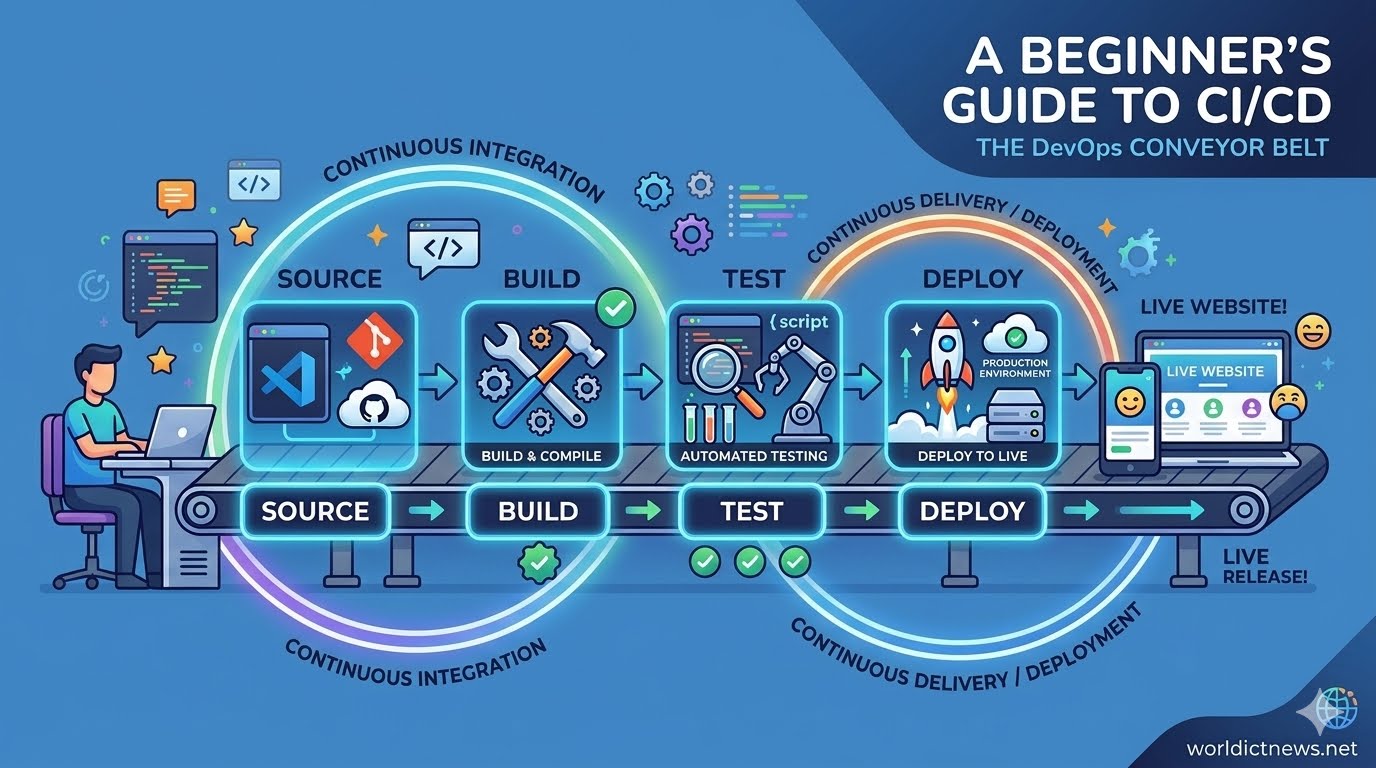
For absolute beginners, terms like "DevOps," "Automation," and "Pipelines" can sound incredibly intimidating. However, the core concept behind CI/CD is simple: it is a digital conveyor belt that takes software code from a developer’s computer, tests it to ensure it works perfectly, and safely delivers it to the live users—completely automatically.
1. Deconstructing the Acronym: What is CI/CD?
To understand how this conveyor belt works, we must break down the two main acronyms that define it: Continuous Integration and Continuous Delivery (or Continuous Deployment).
[ Developer Writes Code ]
│
▼
┌───────────┐
│ CONTINUOUS INTEGRATION │ <-- Automates compiling & testing code
└───────────┘
│
▼
┌─────────────┐
│ CONTINUOUS DELIVERY │ <-- Automates preparing code for release
└─────────────┘
│
▼
┌─────────────┐
│ CONTINUOUS DEPLOYMENT │ <-- Automates pushing code to live users
└─────────────┘
Continuous Integration (CI)
Continuous Integration focuses on the first stage of the development process. In an engineering team, multiple developers work on different features of the same application at the same time. If they all try to merge their individual changes back into the main codebase at the end of the month, it results in chaotic code conflicts—often called "merge hell."
CI solves this by encouraging developers to merge their code changes back into a central repository frequently—often multiple times a day. Every single time a developer submits code, an automated system kicks into gear. This system automatically builds (compiles) the code and runs a battery of automated tests. If the tests pass, the code is safely integrated. If a bug is detected, the system alerts the developer immediately, allowing them to fix it while it is still fresh in their mind.
Continuous Delivery vs. Continuous Deployment (CD)
The "CD" half of the acronym can mean two slightly different things depending on how far an organization chooses to automate its process:
Continuous Delivery: The automated system ensures that the code passes all tests and is fully prepared to go live. However, it stops just short of publishing it to the real world. A human manager must manually click a "Release" button to authorize the final push to production.
Continuous Deployment: This is the ultimate level of automation. There is no human gatekeeper. If the code passes all automated tests in the CI stage, it is immediately and automatically deployed to live production servers.
2. The Four Key Stages of a CI/CD Pipeline
To visualize how code travels down this automated pipeline, let’s look at the four primary phases that every code update goes through:
Pipeline Stage | What Happens | Why It Matters |
|---|---|---|
1. Source | Developer pushes code to a repository (e.g., GitHub). | Triggers the pipeline to begin. |
2. Build | Code is compiled and packaged into a runnable app. | Detects syntax errors and missing files. |
3. Test | Automated tools check for bugs and performance issues. | Prevents broken code from reaching users. |
4. Deploy | The application is pushed to a live server or cloud environment. | Makes features visible to the real world. |
Stage 1: The Source (The Trigger)
The pipeline begins the moment a developer finishes writing a feature and saves it to a version control system like GitHub, GitLab, or Bitbucket. This action acts as an electronic trigger, sending a signal to the CI/CD software that says: "New code has arrived. Start the inspection process."
Stage 2: The Build
Computers cannot run raw code exactly how humans write it. In the build stage, the pipeline compiles the source code into a clean, executable package. If the application is built using a modern framework (like React, Docker, or Java), this stage gathers all the necessary dependencies, libraries, and files into a single, cohesive bundle. If a developer accidentally left a typo that prevents the app from starting, the build fails right here, halting the conveyor belt before any damage is done.
Stage 3: The Test
This is the heart of the pipeline. Instead of relying on a human quality assurance (QA) analyst to manually click every button on a website to check for errors, the pipeline runs automated scripts. These include Unit Tests (checking if individual functions calculate data correctly) and Integration Tests (ensuring different parts of the application talk to each other flawlessly). If even a single test fails, the pipeline sounds an alarm, rejects the update, and notifies the team.
Stage 4: The Deploy
If the code passes all tests with flying colors, it reaches the final stage. The pipeline automatically moves the completed application bundle onto cloud servers (like AWS, Microsoft Azure, or Google Cloud). Within seconds, users around the world have access to the brand-new feature, entirely without downtime.
3. Why is CI/CD Vital for Modern Software?
For a beginner, setting up a pipeline might seem like an extra, unnecessary chore. Why not just write code and upload it directly? The benefits of CI/CD completely transform how software businesses operate:
Lightning-Fast Releases: Instead of waiting months to bundle hundreds of features together, companies can release value to their customers incrementally, day by day or hour by hour.
Trivial Risk: Because code changes are shipped in tiny, bite-sized updates, tracking down bugs is incredibly simple. If something breaks, engineers know exactly which 10 lines of code caused the issue, rather than searching through 10,000 lines.
Happier Engineering Teams: Automation removes the boring, repetitive tasks of manual testing and deployment. Developers get to spend their energy doing what they love most: solving problems and writing creative code.
4. Popular Tools to Start Your Journey
If you want to start practicing CI/CD, you don't need to build these automation systems from scratch. There are pre-built tools designed to manage the conveyor belt for you:
GitHub Actions: The absolute best starting point for beginners. It is built directly into GitHub, meaning you can set up automation right alongside where you store your code using simple configurations.
Jenkins: A powerful, open-source, industry-standard tool. It is highly customizable but has a steeper learning curve because you have to host and manage it yourself.
GitLab CI/CD: A robust, all-in-one platform seamlessly woven into GitLab's ecosystem, heavily favored by enterprise enterprise DevOps teams.
Conclusion: Take the First Step
Embracing the world of CI/CD requires a mental shift from thinking about software as a static product to seeing it as a living, continuously evolving service. For absolute beginners, mastering the core principles of automation is the single most valuable step you can take toward a professional career in modern web development or DevOps engineering.
Start small: write a simple HTML page, host it on GitHub, and use a tool like GitHub Actions to automatically deploy it to a free hosting provider whenever you make a change. Once you watch your first automated pipeline turn code into a live website, you will never want to deploy software manually ever again.
Did you find this ICT insight helpful?