Lecture Notes: Lists & Dictionary Manipulation with Loops by T. C. Okenna
Lecture Notes: Lists & Dictionary Manipulation with Loops.
By T. C. Okenna
This lesson covers iterating through and modifying Python data structures.
Students will learn how to combine loops with lists and dictionaries to dynamically
filter data, aggregate values, and safely update collections in real-world applications.
Lesson Overview
Target Audience: Intermediate Python Learners
Duration: 60 Minutes
Prerequisites: Python Lists, Python Dictionaries, and basic
for/whileloop syntax.Learning Objectives: By the end of this lesson, students will be able to:
Traverse lists and nested structures using loops.
Perform data aggregation (sums, counts) and filtering dynamically.
Extract keys, values, and items from dictionaries during iteration.
Avoid common pitfalls like mutating a collection while iterating over it.
Lesson Structure
1. Introduction: The Need for Automation (10 Mins)
The Problem: Modifying index variables or dictionary keys manually is fine for one or two data points.
But what if you need to apply a 10% discount to 10,000 items in an e-commerce catalog,
or filter out spam accounts from a subscriber list of millions?
The Solution: Combining loops with data structures allows your program to
automate structural data changes efficiently based on logical rules.
2. List Manipulation with Loops (15 Mins)
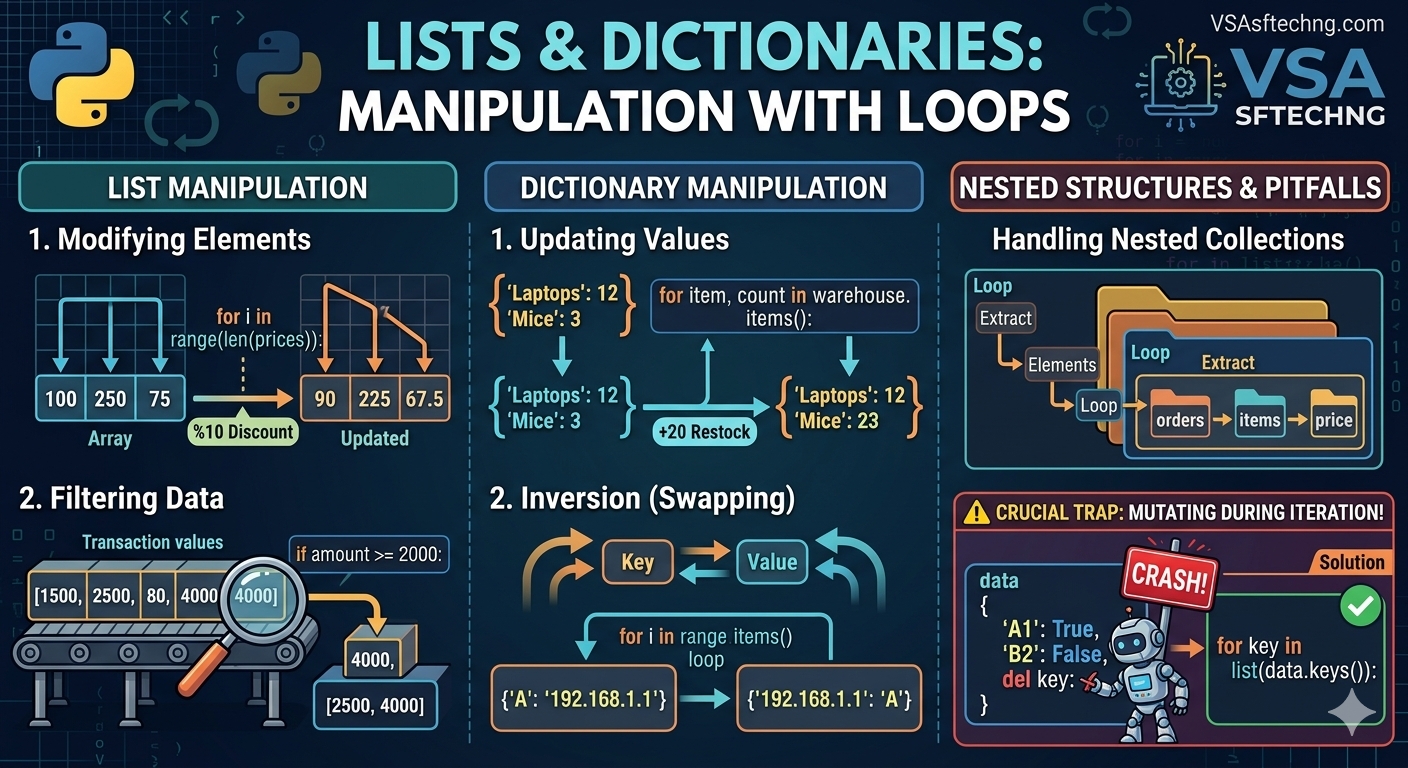
Modifying List Elements by Index
To update items within an existing list during execution, you must use their indices.
The range(len()) pattern allows you to target each element directly.
python
# Real-World Scenario: Processing a list of e-commerce prices to apply a 10% discount
prices = [100.0, 250.0, 75.0, 500.0]

for i in range(len(prices)):
    prices[i] = prices[i] * 0.9  # Reduce each item by 10%

print(prices)  # Output: [90.0, 225.0, 67.5, 450.0]
Use code with caution.
Filtering Data into New Lists
Instead of updating the existing structure, a very common practice is
evaluating elements and using the .append() method to build a filtered collection.
python
# Real-World Scenario: Filtering high-value transactions for fraud review
transactions = [120, 4500, 80, 2300, 15, 6000]
flagged_transactions = []

for amount in transactions:
    if amount >= 2000:
        flagged_transactions.append(amount)

print(flagged_transactions)  # Output: [4500, 2300, 6000]
Use code with caution.
3. Dictionary Manipulation with Loops (15 Mins)
When looping through dictionaries, you can iterate
over keys, values, or key-value pairs concurrently.
Updating Specific Dictionary Values
Using .items() unzips the dictionary entries into key and value
variables, making conditional updates clean and readable.
python
# Real-World Scenario: Increasing the stock count of low inventory items
warehouse_stock = {"Laptops": 12, "Mice": 3, "Monitors": 5, "Keyboards": 2}

for item, count in warehouse_stock.items():
    if count < 5:
        warehouse_stock[item] += 20  # Add emergency restocking batch

print(warehouse_stock)
# Output: {'Laptops': 12, 'Mice': 23, 'Monitors': 5, 'Keyboards': 22}
Use code with caution.
Dynamic Aggregation & Inversion
You can loop through structural collections to create
entirely new transformed calculations or mappings.
python
# Real-World Scenario: Reversing a data route mapping
server_routes = {"Server_A": "192.168.1.1", "Server_B": "192.168.1.2"}
ip_to_server = {}

for server, ip in server_routes.items():
    ip_to_server[ip] = server  # Swap key and value

print(ip_to_server)  # Output: {'192.168.1.1': 'Server_A', '192.168.1.2': 'Server_B'}
Use code with caution.
4. Advanced Concept: Handling Nested Collections (10 Mins)
Real-world systems pass complex JSON strings that translate directly
to lists filled with nested dictionaries. Unpacking them requires a
combination of nested access loops.
python
# Real-World Scenario: Calculating custom invoice run totals
orders = [
    {"customer": "Alice", "items": [50, 100, 20]},
    {"customer": "Bob", "items": [200, 300]},
    {"customer": "Charlie", "items":}
]

for order in orders:
    total_spent = 0
    # Loop through the list nested inside the current dictionary
    for price in order["items"]:
        total_spent += price
    print(f"{order['customer']} spent a total of ${total_spent}")

# Output:
# Alice spent a total of $170
# Bob spent a total of $500
# Charlie spent a total of $15
Use code with caution.
5. Crucial Trap: Mutating While Iterating (5 Mins)
The Golden Rule: Never add or remove elements directly from a dictionary
or list while looping over that specific variable layout. This causes
unexpected logic skipping or throws runtime exceptions.
python
# BAD CODE: Will break or skip elements
active_users = {"A1": True, "B2": False, "C3": False}
for user_id, active in active_users.items():
    if not active:
        del active_users[user_id]
# Throws RuntimeError: dictionary changed size during iteration
Use code with caution.
python
# GOOD CODE: Iterate over a copy of the keys/structure instead
active_users = {"A1": True, "B2": False, "C3": False}
for user_id in list(active_users.keys()):
    if not active_users[user_id]:
        del active_users[user_id]  # Perfectly safe execution

print(active_users)  # Output: {'A1': True}
Use code with caution.
Diagnostic Challenge & Code Critique
Ask the Class: Look closely at this loop block. What does the developer
ntend to do, what error will it crash into, and how do we resolve it?
python
logins = [10, 0, 15, 0, 22, 0, 8]

# Intention: Clean up system database logs by purging zero login cycles
for activity in logins:
    if activity == 0:
        logins.remove(0)

print(logins)
Use code with caution.
Expected Solution Critique
The Trap: While it might not crash with an explicit exception,
it creates a silent semantic bug. When
.remove()alters the list, indices shift leftward.The iteration loop jumps ahead, skipping the very next structural index element.
The Output Result: It prints
[10, 15, 0, 22, 8]. It completely skipped one of the zeros!The Fix: Use a list comprehension to construct a clean output copy:
logins = [activity for activity in logins if activity != 0]
For Vsasf Tech ICT Academy, Enugu
Did you find this ICT insight helpful?