Mastering Complex Loops and Array in Javascript
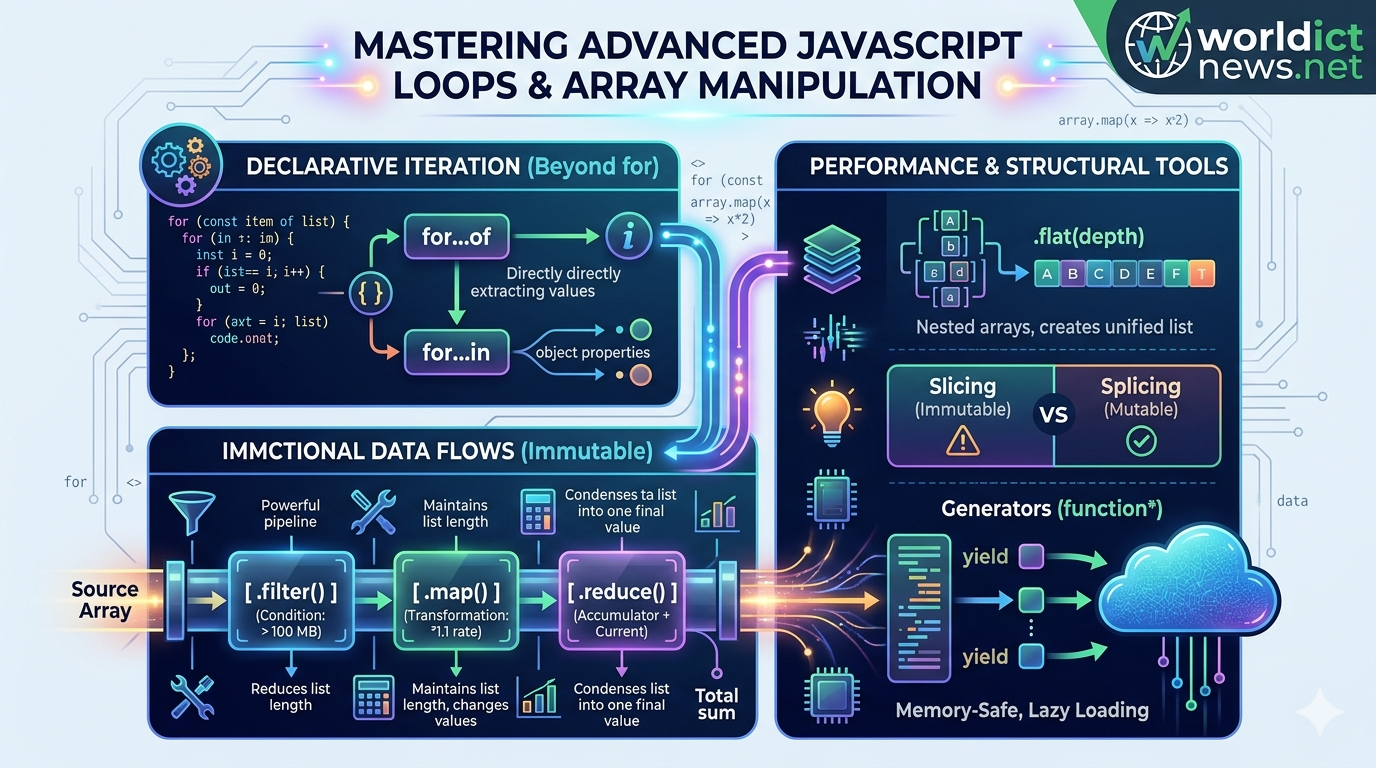
Advanced JavaScript: Mastering Complex Loops and Array Manipulation.
In modern software engineering, data is rarely processed in simple, predictable formats. Enterprise applications routinely handle deeply nested JSON payloads, real-time API streams, and large arrays of complex data objects. To build high-performance, maintainable software architectures, developers must move beyond basic for loops and standard array operations.
Modern ECMAScript (ES6+) provides a robust toolkit of advanced iteration protocols and functional array methods. Mastering these tools allows you to write declarative, highly optimized code that eliminates common logical bugs, minimizes computational overhead, and improves readability. This guide explores complex control flows, functional transformation matrices, memory-efficient generators, and optimal data mutation strategies with real-world examples.
1. Declarative Iteration Protocols: Beyond the Standard Loop
Traditional indexing loops (for (let i = 0; i < arr.length; i++)) introduce manual tracking states, making them prone to off-by-one errors and scope leaks. Modern JavaScript introduces declarative iteration protocols that abstract the underlying pointer mechanics away from the developer.
The for...of Statement
The for...of loop executes a custom iteration loop over values produced by an iterable object—including arrays, strings, maps, sets, and function arguments.
javascript
const hardwareNodes = ['Server-A', 'Server-B', 'Gateway-01'];
// Direct value extraction without manual index tracking
for (const node of hardwareNodes) {
console.log(`Node Address: ${node}`);
}
Use code with caution.
The for...in Statement (Object Reflection)
Unlike for...of, the for...in loop iterates over the enumerable string properties of an object. It should never be used to traverse standard arrays because it inspects structural keys rather than array index values.
javascript
const systemConfig = { port: 443, ssl: true, environment: 'production' };
for (const key in systemConfig) {
if (Object.prototype.hasOwnProperty.call (systemConfig, key)) {
console.log(`Setting: ${key} -> Value: ${systemConfig[key]}`);
}
}
Use code with caution.
2. Functional Functional Array Transformations: Immutable Data Streams
Modern JavaScript embraces functional programming paradigms. The cornerstone of this approach is immutability: instead of modifying a raw source array directly, functional methods process data through an assembly pipeline, returning a brand-new array instance.
Source Array ──► [ .filter() ] ──► [ .map() ] ──► [ .reduce() ] ──► Final Scalar/Array
High-Order Methods Breakdown
.map(): Transforms every individual element inside an array uniformly, producing a new array of identical length..filter(): Evaluates a boolean condition against each element, passing only items that returntrueinto the new collection..reduce(): Executes a callback reducer function across all elements, condensing the entire array down into a single cumulative scalar output (like an integer, string, or object).
Complex Pipeline Code Example
Consider an array of telemetry logs collected from a cloud infrastructure environment. We need to filter out normal logs, extract the memory usage metrics from critical warnings, and calculate the total memory deficit.
javascript
const systemLogs = [
{ id: 101, type: 'info', memoryUsage: 120 },
{ id: 102, type: 'critical', memoryUsage: 512 },
{ id: 103, type: 'warning', memoryUsage: 256 },
{ id: 104, type: 'critical', memoryUsage: 1024 }
];
// Pipeline processing: Filter -> Map -> Reduce
const totalCriticalMemoryCost = systemLogs
.filter(log => log.type === 'critical')
.map(log => log.memoryUsage)
.reduce((accumulator, currentMemory) => accumulator + currentMemory, 0);
console.log(`Total Critical Memory Deficit: ${totalCriticalMemoryCost} MB`);
// Output: Total Critical Memory Deficit: 1536 MB
Use code with caution.
3. High-Performance Searching and Matching Operations
When working with microservice arrays, locating specific objects quickly requires specialized evaluation tools that optimize computing resources.
javascript
const repositoryNodes = [
{ tag: 'v1.0.0', compiled: true },
{ tag: 'v1.1.0-beta', compiled: false },
{ tag: 'v1.2.0', compiled: true }
];
// 1. .find() - Extracts the first exact matching object instance
const activeNode = repositoryNodes.find(node => node.compiled === true);
console.log('First Compiled Node:', activeNode.tag); // Output: v1.0.0
// 2. .findIndex() - Locates the system index position of a match
const uncompiledIndex = repositoryNodes.findIndex(node => !node.compiled);
console.log('Uncompiled Pointer Index:', uncompiledIndex); // Output: 1
// 3. .some() - Checks if at least ONE item meets the condition (Returns Boolean)
const containsBeta = repositoryNodes.some(node => node.tag.includes('beta'));
console.log('Contains Beta Software:', containsBeta); // Output: true
// 4. .every() - Validates if 100% of items meet the condition
const allCompiled = repositoryNodes.every(node => node.compiled);
console.log('Deployment Validation Status:', allCompiled); // Output: false
Use code with caution.
4. Advanced Array Mutation: Flattening and Slicing
Complex data systems often produce multidimensional array models (arrays inside arrays). Modern JavaScript provides clean, built-in methods to structure these collections without resorting to recursive custom loop logic.
Flattening Nested Collections with .flat() and .flatMap()
The .flat(depth) method recursively flattens a nested array structure down to a specified depth metric. The .flatMap() method combines map-based transformations and flattening operations into a single performance loop.
javascript
const clusterMatrix = [
['Node-01', 'Node-02'],
['Node-03', ['Node-04-Backup']]
];
// Flattening down 2 layers deep
const unifiedCluster = clusterMatrix.flat(2);
console.log('Unified Node Matrix:', unifiedCluster);
// Output: ['Node-01', 'Node-02', 'Node-03', 'Node-04-Backup']
Use code with caution.
Slicing vs. Splicing: Mutating vs. Non-Mutating
Understanding the structural mechanics of .slice() and .splice() is essential for avoiding accidental data mutation bugs:
.slice(start, end): Returns a shallow, isolated copy of a portion of an array. The source array remains completely unchanged..splice(start, deleteCount, items...): Destructively alters the source array by removing, replacing, or inserting items in place.
javascript
const inventory = ['Disk-A', 'Disk-B', 'Disk-C', 'Disk-D'];
// Safe extraction using slice
const subset = inventory.slice(1, 3);
console.log('Extracted Subset:', subset); // Output: ['Disk-B', 'Disk-C']
console.log('Source Inventory Integrity Check:', inventory); // Unchanged
// Destructive replacement using splice
const removedItems = inventory.splice(2, 1, 'SSD-Replacement');
console.log('Altered Source Inventory:', inventory);
// Output: ['Disk-A', 'Disk-B', 'SSD-Replacement', 'Disk-D']
Use code with caution.
5. Memory Optimization: Lazy Iteration with Generators
When processing exceptionally large data sets (e.g., streaming millions of string entries or database records), loading the entire collection into system memory all at once can easily cause browser tab crashes or severe out-of-memory errors on backend platforms.
JavaScript resolves this constraint using Generator Functions. Denoted by an asterisk (function*), generators use the yield keyword to output values lazily, one at a time, pausing execution until the program explicitly requests the next element.
javascript
// Generator function creating an infinite, memory-safe data counter
function* streamLogGenerator() {
let internalCounter = 1;
while (true) {
yield `System-Log-Stream-ID: ${internalCounter++}`;
}
}
const logStream = streamLogGenerator();
// Requesting calculations on-demand
console.log(logStream.next().value); // Output: System-Log-Stream-ID: 1
console.log(logStream.next().value); // Output: System-Log-Stream-ID: 2
console.log(logStream.next().value); // Output: System-Log-Stream-ID: 3
Use code with caution.
Because memory is only allocated for the active yielded item, generators allow your applications to navigate gargantuan data arrays or streams with near-zero initial memory overhead.
Conclusion
Advanced loop control and structured array transformations represent a critical transition from basic scripting to scalable software development. By replacing manual loops with declarative functional workflows like .map(), .filter(), and .reduce(), you build predictable, immutable data systems. Combining these techniques with type safety, flattening architectures, and memory-safe generator streams enables you to build high-performance data operations optimized for complex enterprise applications.
Frequently Asked Questions (FAQ)
1. Why is mutability dangerous when manipulating JavaScript arrays?
When you mutate an array directly (using methods like .push(), .reverse(), or .splice()), you change the data stored at that shared memory address. If other parts of your application rely on that original array state, it can lead to silent logical bugs, broken UI renders, and unpredictable component interactions.
2. What is the execution performance difference between .map() and .forEach()?
The .map() method transforms data functionally, creating and returning a new array instance based on your callback transformations. The .forEach() method is designed strictly to execute side-effects (e.g., updating external states or logging variables); it does not return a value and leaves your data collections unchanged.
3. Can you terminate or break out of a .forEach() loop early?
No. Unlike traditional for or modern for...of loops, a .forEach() iteration loop cannot be terminated using the standard break or continue statements. If your application logic requires an early exit based on a condition, you should use for...of, .some(), or .find() instead.
4. How does the .reduce() initial value parameter impact code stability?
If you omit the initial value parameter in a .reduce() loop, JavaScript automatically assigns the first element of your array as the initial accumulator state. If your array happens to be empty at runtime, omitting this initial value will cause the application to crash, throwing a severe TypeError. Always define an explicit initial accumulator parameter (e.g., 0, "", or {}).
5. When should I choose a Generator function over a standard array return?
Choose a Generator function whenever you are processing open-ended file streams, executing infinite mathematical cycles, or reading extremely large database sets. Generators produce values on-demand using minimal memory buffers, preventing your runtime environments from exhausting application memory capacities.
Did you find this ICT insight helpful?