Advanced SSH Server Configuration and WAF Deployment
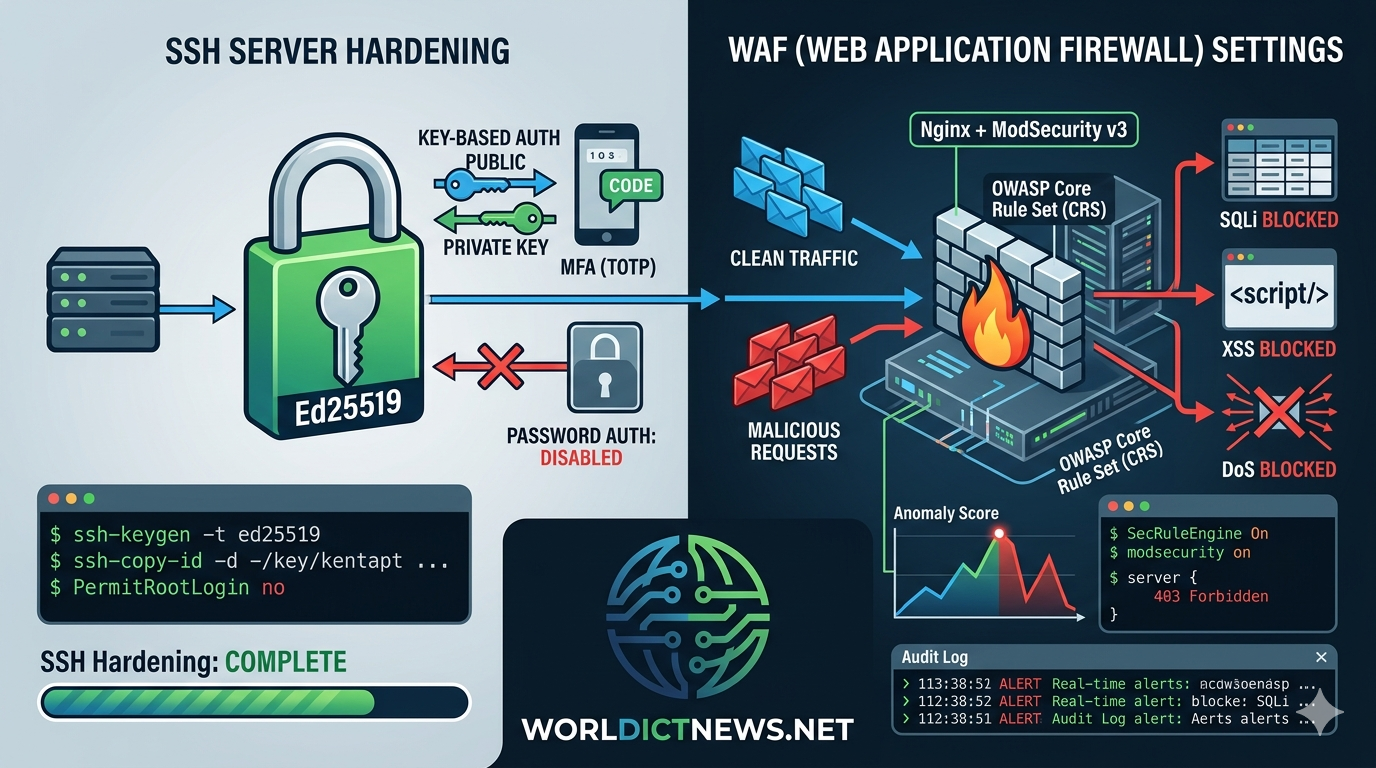
Securing Web Infrastructure: Advanced SSH Server Configuration and WAF Deployment.
Modern web infrastructure demands a layered defense strategy. Relying solely on standard cloud firewalls leaves applications vulnerable to sophisticated application-layer threats, brute-force exploits, and credential-stuffing attacks. To build a robust, secure infrastructure, administrators must secure both the remote administration pipeline and the public-facing HTTP traffic stream.
This guide details the step-by-step implementation of a secure remote management standard using OpenSSH, alongside the integration of a Web Application Firewall (WAF) using Nginx and ModSecurity v3.
1. Advanced SSH Server Hardening Architecture
The Secure Shell (SSH) protocol provides administrative access to your core infrastructure. Because it grants root-level execution capabilities, an unhardened SSH service is a prime target for continuous automated scanning and brute-force campaigns. Securing this pipeline requires moving away from default configurations and enforcing cryptographically sound access patterns.
Enforcing Key-Based Authentication
Password-based authentication is fundamentally vulnerable to social engineering, dictionary attacks, and credential stuffing. Cryptographic key pairs (specifically Ed25519) offer superior protection by utilizing asymmetric cryptography that cannot be brute-forced.
To generate a secure key pair on your local client machine, execute:
bash
ssh-keygen -t ed25519 -a 100 -C "admin@infrastructure"
Use code with caution.
-t ed25519: Specifies the Ed25519 public-key algorithm, which offers better performance and security than legacy RSA keys.-a 100: Increases the number of KDF (Key Derivation Function) rounds to make passphrase cracking significantly slower.
Deploy the public key to the remote web server using:
bash
ssh-copy-id -i ~/.ssh/id_ed25519.pub username@server_ip
Use code with caution.
Modifying the SSH Deamon Configuration (sshd_config)
Once your cryptographic key access is confirmed working, modify the primary daemon configuration file at /etc/ssh/sshd_config. Open the file using a standard terminal text editor:
bash
sudo nano /etc/ssh/sshd_config
Use code with caution.
Incorporate or adjust the following configuration parameters to disable legacy access vectors and restrict communication lanes:
text
# Move off the default port to reduce automated script sweeps
Port 2222
# Explicitly enforce SSH Protocol 2
Protocol 2
# Disable root login entirely; require users to log in as unprivileged accounts and scale privileges via sudo
PermitRootLogin no
# Block password authentication completely, rendering brute-force attacks useless
PasswordAuthentication no
PermitEmptyPasswords no
# Enforce strict key authentication compliance
PubkeyAuthentication yes
# Terminate inactive sessions promptly to prevent session hijacking on open terminals
ClientAliveInterval 300
ClientAliveCountMax 2
# Limit concurrent unauthenticated connections to mitigate Denial of Service (DoS) attempts
MaxStartups 10:30:100
# Strict explicit user access control mapping
AllowUsers adminuser webdeployer
Use code with caution.
Implementing Multi-Factor Authentication (MFA)
For high-security compliance environments, combine SSH keys with a secondary Time-based One-Time Password (TOTP).
Install the Google Authenticator PAM module on your server:
bash
sudo apt update && sudo apt install libpam-google-authenticator -y
Use code with caution.
Run the initialization wizard as the target administrative user:
bash
google-authenticator
Use code with caution.
Follow the interactive prompts to generate your emergency scratch codes, display the authentication QR code, and update your local security file settings.
Next, open the PAM configuration file for SSH:
bash
sudo nano /etc/pam.d/sshd
Use code with caution.
Append the following execution line to the bottom of the file structure:
text
auth required pam_google_authenticator.so nullok
Use code with caution.
Finally, re-open /etc/ssh/sshd_config and adjust the authentication methods rule to require both factors sequentially:
text
KbdInteractiveAuthentication yes
AuthenticationMethods publickey,keyboard-interactive
Use code with caution.
Test your syntax validation profile before restarting the service framework:
bash
sudo sshd -t
sudo systemctl restart sshd
Use code with caution.
2. Web Application Firewall (WAF) Settings and Compilation Strategy
While network firewalls filter traffic based on IP addresses and ports, a Web Application Firewall operates at Layer 7 (the application layer) of the OSI model. It inspects the actual content of HTTP requests to identify and block malicious payloads such as SQL Injection (SQLi), Cross-Site Scripting (XSS), and Remote Code Execution (RCE) vulnerabilities.
The production configuration below couples the high-performance Nginx reverse proxy web server with ModSecurity v3 (libmodsecurity) and the OWASP Core Rule Set (CRS).
Installing Prerequisites and Building ModSecurity v3
To maximize performance and security control, compile ModSecurity v3 directly on the target distribution instance. First, install the necessary dependencies:
bash
sudo apt update
sudo apt install -y apt-utils autoconf automake build-essential git libcurl4-openssl-dev \
libgeoip-dev liblmdb-dev libpcre3-dev libtool libxml2-dev libyajl-dev pkgconf zlib1g-dev
Use code with caution.
Clone the repository and compile the library framework source components:
bash
cd /usr/local/src
sudo git clone --depth 1 -b v3/master https://github.com
cd ModSecurity
sudo git submodule init
sudo git submodule update
sudo ./build.sh
sudo ./configure
sudo make -j$(nproc)
sudo make install
Use code with caution.
Compiling Nginx with the ModSecurity Connector Module
Nginx interacts with the ModSecurity core engine using an external dynamic module link layer. Download the connector source alongside a matching version of the Nginx core engine:
bash
cd /usr/local/src
sudo git clone --depth 1 https://github.com
# Determine current Nginx version package to pull matching development builds
nginx -v
# Example uses Nginx version 1.26.1
sudo wget http://nginx.org
sudo tar -xvzf nginx-1.26.1.tar.gz
cd nginx-1.26.1
# Configure Nginx arguments to compile the module dynamically
sudo ./configure --with-compat --add-dynamic-module=/usr/local/src/ModSecurity-nginx
sudo make modules
sudo cp objs/ngx_http_modsecurity_module.so /etc/nginx/modules/
Use code with caution.
Load the module file configuration inside the primary global context file area at /etc/nginx/nginx.conf:
nginx
user www-data;
worker_processes auto;
pid /run/nginx.pid;
include /etc/nginx/modules-enabled/*.conf;
# Explicitly inject the compiled WAF module binary target
load_module modules/ngx_http_modsecurity_module.so;
Use code with caution.
3. Implementing the OWASP Core Rule Set (CRS)
The WAF engine requires a rule set to define what constitutes an attack. The OWASP Core Rule Set (CRS) provides a widely trusted collection of generic attack detection rules designed to catch zero-day vulnerabilities and common web exploits.
bash
cd /etc/nginx
sudo mkdir waf
cd waf
sudo git clone --depth 1 -b v4/dev https://github.com
sudo cp coreruleset/crs-setup.conf.example crs-setup.conf
sudo cp -r coreruleset/rules .
Use code with caution.
Create a master compilation wrapper profile at /etc/nginx/waf/modsecurity.conf to organize rule ingestion steps:
bash
# Initialize using the default sample template
sudo cp /usr/local/src/ModSecurity/modsecurity.conf-recommended /etc/nginx/waf/modsecurity.conf
sudo cp /usr/local/src/ModSecurity/unicode.mapping /etc/nginx/waf/
Use code with caution.
Edit /etc/nginx/waf/modsecurity.conf to toggle the inspection engine from monitoring mode to active intervention block deployment:
text
# Change from DetectionOnly to On to actively block malicious traffic
SecRuleEngine On
SecRequestBodyAccess On
SecResponseBodyAccess On
SecAuditEngine RelevantOnly
SecAuditLogParts ABIJDEFHZ
SecAuditLog /var/log/nginx/modsec_audit.log
Use code with caution.
Append your rule ingestion pipeline configurations directly to the bottom of the master /etc/nginx/waf/modsecurity.conf structure layout:
text
# Include the primary configuration file block
Include /etc/nginx/waf/crs-setup.conf
# Include the target application rule sets
Include /etc/nginx/waf/rules/*.conf
Use code with caution.
4. Activating WAF Filtering in Nginx Server Blocks
With the module compiled and the OWASP rules configured, you can now activate the WAF inside your virtual host or server block profiles. Open your active production site layout mapping at /etc/nginx/sites-available/default:
nginx
server {
listen 80;
listen [::]:80;
server_name example.com ://example.com;
# Global WAF Engine activation configurations
modsecurity on;
modsecurity_rules_file /etc/nginx/waf/modsecurity.conf;
root /var/www/html;
index index.html index.htm;
location / {
try_files $uri $uri/ =404;
}
# Custom localization rules overrides example zone
location /api/public/ {
# Retain standard parameters while tuning anomaly profiles specifically for API integrations
proxy_pass http://api_backend;
}
# Restrict administrative login routes exclusively to known internal subnets
location /admin {
allow 192.168.10.0/24;
allow 10.0.5.0/24;
deny all;
}
error_page 403 /custom_403.html;
location = /custom_403.html {
root /usr/share/nginx/html;
internal;
}
}
Use code with caution.
Verify your Nginx pipeline layout parameters before forcing service reloads:
bash
sudo nginx -t
sudo systemctl restart nginx
Use code with caution.
5. Verification and Diagnostic Validation Commands
To verify that your security architecture is working correctly, test both the SSH entry constraints and the WAF intervention mechanisms.
Testing Hardened SSH Verification Lines
Attempt to connect from an outside node using password prompts or legacy parameters:
bash
# Attempting a connection over standard legacy default ports should timeout
ssh username@server_ip -p 22
# Explicitly force-testing connection utilizing password override settings should immediately fail
ssh username@server_ip -p 2222 -o PubkeyAuthentication=no
Use code with caution.
The output logs should print an unambiguous Permission denied (publickey) or refuse connection mapping parameters entirely.
Simulating Web Attacks to Validate WAF Performance
You can test the WAF by simulating web exploits using standard command-line tools like curl. Run these tests from an external machine to see if the WAF intercepts the malicious requests.
Test 1: Simple Directory Traversal Attack Simulation
bash
curl -I "http://example.com"
Use code with caution.
Test 2: Standard SQL Injection (SQLi) Vector Simulation
bash
curl -I "http://example.com"
Use code with caution.
Expected Output Behavior
If ModSecurity and the OWASP CRS are running correctly, the server will block these requests before they reach your web application. The output log terminal will display an HTTP 403 Forbidden status code:
text
HTTP/1.1 403 Forbidden
Server: nginx
Date: Sat, 20 Jun 2026 09:14:22 GMT
Content-Type: text/html
Connection: close
Use code with caution.
Analyzing Real-Time Security Logs
When the WAF blocks an attack, it logs detailed transaction records to your audit trails. Inspect these logs to review incoming attack payloads and debug potential false positives:
bash
# Review system block transactions in real time
sudo tail -f /var/log/nginx/modsec_audit.log
Use code with caution.
A typical alert entry contains deep structural metadata indicating the exact rule that was triggered:
text
[Message: Warning. Pattern match "(?i)(?:\\b(?:etc\\b\\bpasswd\\b))" at ARGS:file.]
[Action: Keep (Anomaly Score updated to 5)]
[Severity: Critical]
[ID: 930110]
Use code with caution.
Conclusion
By hardening your SSH configuration and deploying a compiled Nginx ModSecurity WAF, you establish a solid security baseline for your web application infrastructure. These layers protect against remote administration exploits while inspecting public HTTP traffic to block web vulnerabilities before they hit your application logic.
Did you find this ICT insight helpful?