An Introduction to Computer Networking and How Data Travels the World
The Invisible Threads: An Introduction to Computer Networking and How Data Travels the World.
We live in a world bound together by invisible digital highways. Every time you stream a high-definition video, send a WhatsApp message, process a customer’s payment via an API, or access a cloud database, you are relying on computer networking.
At its core, computer networking is the practice of connecting multiple computing devices together to share resources, exchange files, and allow communication. Without networking, every computer would be an isolated island—unable to share data without physical media like flash drives or external hard disks.
Understanding how these networks function is essential for software developers, system administrators, and business owners alike. This article provides a comprehensive introduction to computer networking, unpacking its fundamental building blocks, core architectures, protocols, and a detailed, step-by-step example of how data travels across the globe when you load a simple webpage.
1. The Core Components of a Network
A computer network is not just a single wire running between two laptops. It is an ecosystem made up of various hardware components and software structures working in perfect synchronization.
[End Device: Laptop] --------> [Switch] --------> [Router] --------> [The Internet]
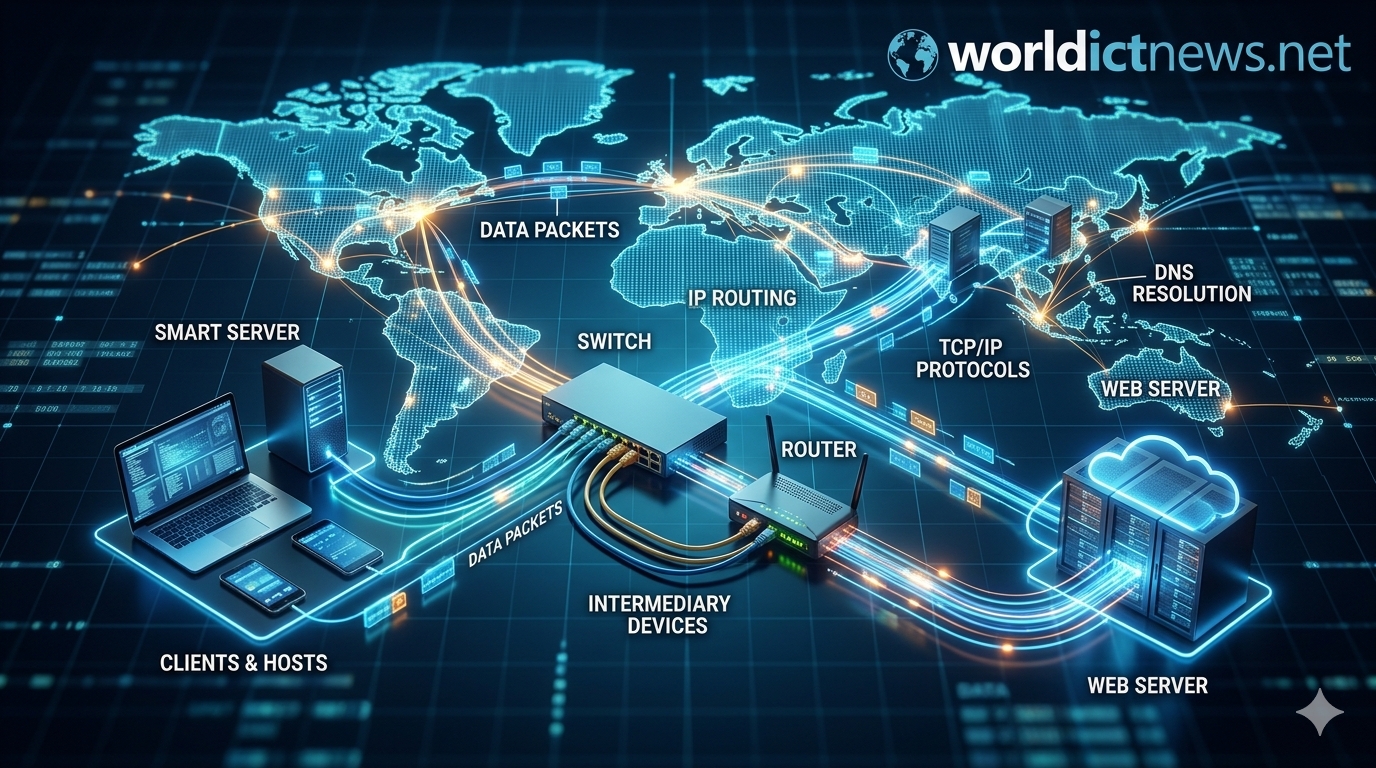
End Devices (Hosts)
These are the source and destination devices that human beings interact with directly.
Examples include laptops, smartphones, servers, smart TVs, and IoT (Internet of Things) devices like security cameras.
Every end device on a network must have a Network Interface Card (NIC)—a piece of hardware (either an Ethernet port or a Wi-Fi chip) that translates digital computer data into electrical, radio, or optical signals that can travel across a transmission medium.
Intermediary Devices
These devices connect individual end devices to the network or connect entirely separate networks together. They manage the flow of data behind the scenes.
Switches: A switch operates inside a single local network. It acts like a smart power strip, connecting all the devices in an office or home. When Device A sends data to Device B, the switch reads the hardware address and directs the data only to Device B, preventing network congestion.
Routers: While switches connect devices within a network, routers connect entirely different networks together. A router determines the best path for data to travel from your local home network out to the global internet.
Access Points (APs): These devices project a wireless radio signal, allowing Wi-Fi-enabled devices to connect to a wired network without physical cables.
Transmission Media
This is the physical pathway over which information travels.
Copper Cables (Ethernet/UTP): Uses electrical pulses to transmit data. It is highly reliable and cheap but limited in distance (usually up to 100 meters).
Fiber-Optic Cables: Uses pulses of light traveling through glass or plastic strands. Fiber optics can carry massive amounts of data over thousands of kilometers across oceans without degrading.
Wireless (Radio Waves): Uses airwaves (Wi-Fi, 4G, 5G, Bluetooth) to transmit data without physical constraints.
2. Network Typologies by Geographic Scale
Networks are classified based on the physical size and geographic area they cover.
LAN (Local Area Network)
A LAN connects devices within a highly restricted, localized area. Your home Wi-Fi network, a university computer lab, or an office floor are classic examples of a LAN. They are privately owned, offer high data-transfer speeds, and are highly secure because access is physically controlled.
WAN (Wide Area Network)
A WAN spans a large geographic area, such as a state, country, or even the entire planet. It connects multiple smaller LANs together over vast distances. The ultimate, most famous example of a WAN is the Internet itself. WANs rely on infrastructure maintained by telecommunications companies (Internet Service Providers, or ISPs) and use fiber-optic undersea cables and satellites.
3. Network Architecture: How Systems Talk
How do computers distribute the work within a network? There are two primary architectural models:
Client-Server Architecture:
[Client] ------ Requests Service -----> [Central Server]
[Client] <----- Delivers Resource ---- [Central Server]

Peer-to-Peer (P2P) Architecture:
[Node A] <==== Shares Data Equally ====> [Node B]
Client-Server Model
This is the foundation of the modern web. In this model, roles are strictly divided:
The Server: A high-powered computer that sits idle, waiting to receive requests. It hosts files, databases, websites, or applications.
The Client: A device (like your phone running a web browser) that initiates a request for information.
Example: When you open your browser and navigate to a website, your browser is the client requesting data, and the company's data center hosts the server that delivers it.
Peer-to-Peer (P2P) Model
In a P2P network, there is no centralized server. Every connected computer (called a "peer" or "node") acts as both a client and a server simultaneously. Each device shares a portion of its own resources (storage, processing power, or bandwidth) directly with other devices on the network.
Example: BitTorrent file-sharing, blockchain nodes, and localized file-sharing tools like Apple AirDrop or Android Quick Share.
4. Language of the Network: Protocols and Addresses
For two computers to understand each other, they must speak the exact same language. In networking, these languages and rules are called Protocols. The primary suite used today is the TCP/IP Protocol Suite.
Network Addressing
Before sending a message, a network needs to know where it is going. There are two critical layers of addressing:
MAC Address (Physical Address): A unique, 12-character alphanumeric code burned into a device's Network Interface Card during manufacturing (e.g.,
00:1A:2B:3C:4D:5E). It never changes, acting like a device's digital fingerprint.IP Address (Logical Address): A dynamic address assigned to a device by a network router. It changes depending on where you connect to the internet. It acts like a mailing address, routing data across the globe.
IPv4: Written as four numbers separated by dots (e.g.,
192.168.1.1).IPv6: A newer, massive address system written in hexadecimal to accommodate billions of modern smart devices (e.g.,
2001:db8::ff00:42:8329).
Essential Core Protocols
DNS (Domain Name System): The phonebook of the internet. Computers only understand numbers (IP addresses), but humans prefer names (like
google.com). DNS translates human-readable URLs into machine-readable IP addresses.HTTP/HTTPS (Hypertext Transfer Protocol Secure): The protocol used to transmit web pages securely from a server to your browser.
TCP (Transmission Control Protocol): A protocol that ensures data delivery is reliable. It breaks data into chunks, tracks them, and verifies that they arrive intact and in the correct order. If a piece goes missing, TCP requests a resend.
UDP (User Datagram Protocol): A faster, lightweight protocol that sends data without checking if it arrived safely. It is used for real-time traffic like live video streaming, online gaming, and voice calls, where speed matters more than occasional lost packets.
5. Comprehensive Practical Example: Loading a Webpage
To see all these pieces work together seamlessly, let us trace a real-world example: What happens under the hood when you sit in your room and type worldictnews.net into your web browser?
This complex journey takes less than a second and happens in five core phases:
[Your Browser]
    |-- 1. Asks DNS for IP Address --> [DNS Server]
    |<= 2. Receives IP: 192.0.2.1 <---- [DNS Server]
    |
    |-- 3. Opens TCP Connection ------> [Web Server at 192.0.2.1]
    |-- 4. Sends HTTP GET Request ---> [Web Server at 192.0.2.1]
    |<= 5. Receives Data Packets <----- [Web Server at 192.0.2.1]
[Page Displays]
Phase 1: The Phonebook Lookup (DNS Resolution)
Your browser cannot communicate using the letters worldictnews.net. It needs an IP address.
Your computer checks its local memory (cache) to see if you have visited this site recently.
If it is not there, your computer sends a request to your local router, which passes it to your Internet Service Provider's DNS Server.
The DNS server looks up the records for
worldictnews.net, finds its structural numeric IP address (for example,192.0.2.1), and passes it back to your web browser.
Phase 2: Chopping Data into Envelopes (Packetization)
Now that your browser knows the destination address, it prepares an HTTP Request asking for the website's homepage files. Because the request file is too large to travel across the wires as a single lump sum, your operating system's TCP protocol chops the data into small, manageable chunks called Packets.
Each packet acts like a physical postal letter. It gets stamped with a header containing:
The source IP address (your computer)
The destination IP address (
192.0.2.1)A sequence number (e.g., Packet 1 of 10, Packet 2 of 10) so the receiving server knows how to reassemble them.
Phase 3: The Local Departure
The packets leave your computer's Wi-Fi chip as radio frequencies.
Your home wireless Access Point catches the radio waves and converts them back into electrical pulses traveling along a copper Ethernet cable.
The cable feeds the packets to your Router. The router reads the destination IP address (
192.0.2.1), checks its routing tables, and realizes this address is outside your home LAN. It pushes the packets out of your house through a fiber optic or coaxial cable line provided by your ISP.
Phase 4: Traveling the Global Highway (Routing)
Your packets are now on the wide area network (WAN). They travel from your ISP’s local hub through a series of intermediate routers across your city, country, or even through subsea fiber-optic cables running along the ocean floor if the website's server is located on another continent.
Each intermediary router along the way reads the packet's destination IP address and forwards it to the next fastest router. Packets do not always take the same path; if one trans-atlantic cable line is congested, Router X might route Packet 3 through a completely different geographical path than Packet 4.
Phase 5: Arrival, Reassembly, and Rendering
Finally, the packets arrive at the data center housing the destination web server.
The server's network hardware receives the raw pulses of light or electricity.
The server's TCP layer gathers all incoming packets. It reads the sequence numbers, checks for any corrupted or missing packets, and reassembles them into the original, coherent HTTP request.
The web server processes the request, locates the website files (HTML, CSS, images, and Javascript code), chops those files back into responsive packets, and sends them on a return flight across the world back to your device.
Your browser receives the response packets, stitches them back together, reads the code, and renders the visual website onto your screen.
Summary Direct Comparison
Term | Analogy | Primary Function |
|---|---|---|
IP Address | Mailing Address | Identifies where a specific device is located globally on a network. |
MAC Address | Fingerprint / Serial Number | Permanently identifies a unique piece of hardware locally. |
Switch | Office Intercom System | Connects and manages devices speaking to each other within a single room or building (LAN). |
Router | International Airport Hub | Directs traffic and forwards data packs between different networks across continents (WAN). |
DNS | Smartphone Contacts App | Translates easy-to-remember web names into numeric computer coordinates. |
Conclusion
Computer networking is the quiet infrastructure driving our entire modern digital existence. By using standardized protocols like TCP/IP, distinct hardware components like switches and routers, and structured addressing layers, networks allow incredibly diverse machines—from a microscopic smart sensor to a massive cloud data center server—to converse instantly without friction. Understanding these principles forms the structural foundation for solving network downtime issues, building secure systems, and engineering distributed cloud software.
Did you find this ICT insight helpful?