Intrusion Detection System (IDS) Deployment Guide
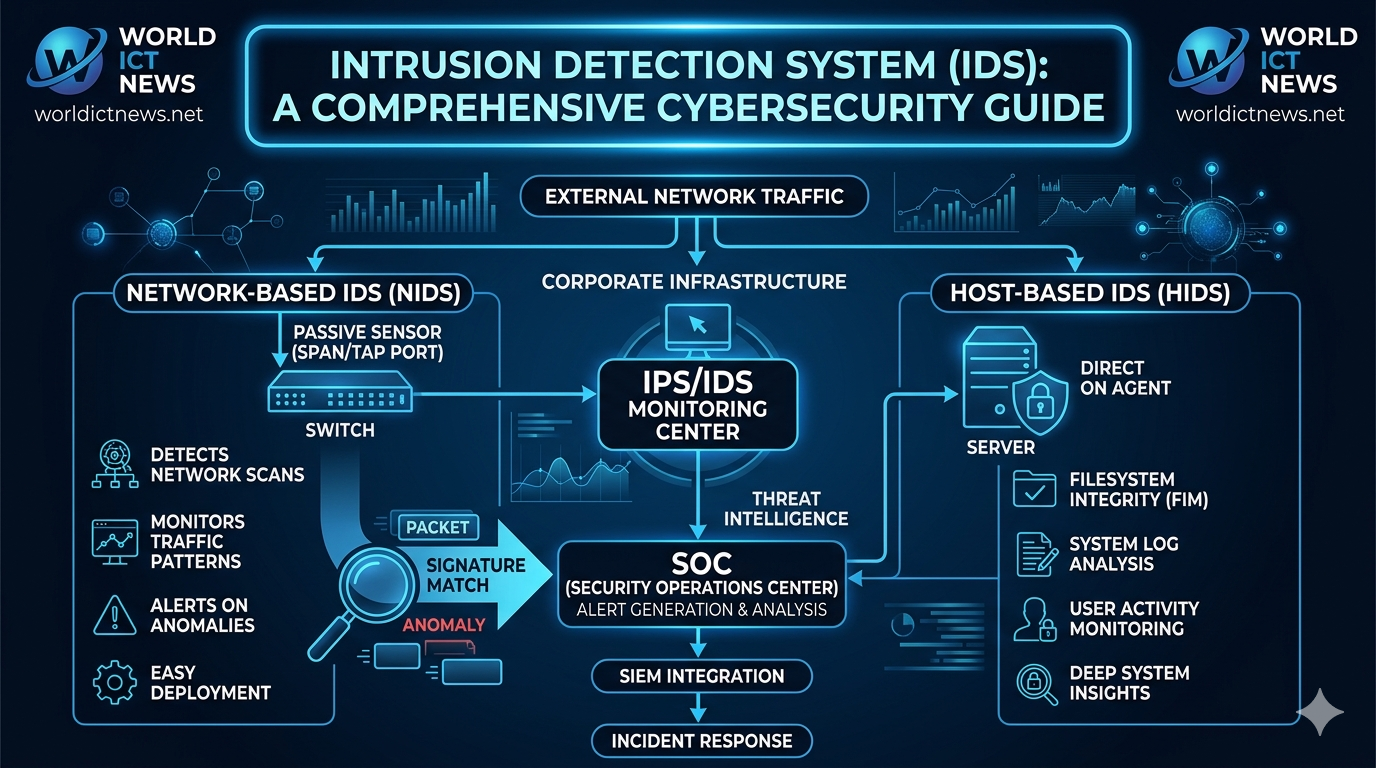
Intrusion Detection System (IDS) in Cybersecurity: A Comprehensive Deployment Guide.
In the modern digital landscape, corporate networks face an unceasing barrage of cyber threats. From automated vulnerability scanners to highly coordinated Advanced Persistent Threats (APTs), malicious actors are constantly looking for weaknesses in digital infrastructure. Traditional perimeter security tools—such as standard firewalls—operate by blocking unauthorized external access based on pre-defined ports and IP rules. However, once an attacker bypasses the perimeter or compromises an internal credential, standard firewalls offer little to no visibility into internal threat progression.
To bridge this critical visibility gap, security architecture relies on an Intrusion Detection System (IDS). An IDS serves as an automated security sensor that continuously monitors network traffic and system activity for signs of unauthorized access, policy violations, or malicious payloads. This comprehensive guide details the foundational architecture of an IDS, explores its core operational variations, analyzes signature vs. anomaly detection, and provides an implementation checklist for enterprise deployment.
1. What is an Intrusion Detection System?
An Intrusion Detection System is a specialized software application or hardware appliance configured to monitor system logs or network packets. Its primary purpose is to identify suspicious activity and generate real-time alerts for Security Operations Center (SOC) analysts to investigate.
Unlike an Intrusion Prevention System (IPS), which sits directly in line with network traffic and actively drops malicious packets to stop an attack, a standard IDS operates out-of-band as a passive monitoring tool. Think of an IPS as an active security guard physically blocking a door, while an IDS is a closed-circuit television (CCTV) security camera system that triggers an alarm when an unauthorized entry occurs.
[ Incoming Network Traffic ]
│
┌───▼───┐
│ Firewall │
└───┬───┘
│
├───────┐
▼ ▼
[ Internal Network ] [ IDS Sensor (Passive Mirror) ]
│ │
▼ ▼
[ Core Servers ] [ SOC Alert Generated ]
By functioning passively, an IDS provides deep visibility into traffic patterns without introducing processing latency or risking accidental downtime for critical applications due to false-positive blocks.
2. Core Architectures: NIDS vs. HIDS
Intrusion Detection Systems are classified into two main deployment models depending on where they collect data: Network-based and Host-based systems.
Network Intrusion Detection Systems (NIDS)
A Network Intrusion Detection System (NIDS) monitors traffic flowing across an entire subnet or network segment. It analyzes packets moving between internal systems, as well as traffic passing through the main gateway.
Deployment: NIDS sensors are typically placed at strategic choke points, such as immediately behind a perimeter firewall, inside a Demilitarized Zone (DMZ), or adjacent to core internal switches. They rely on Network TAPs or Switch Port Analyzer (SPAN) ports to mirror network traffic into the sensor.
Use Case: NIDS is used to spot network-wide anomalies, including distributed port scans, man-in-the-middle (MitM) attacks, and unauthorized lateral movement between subnets.
Popular Tool: Snort, Suricata, and Zeek (formerly Bro).
Host Intrusion Detection Systems (HIDS)
A Host Intrusion Detection System (HIDS) is installed locally on a specific endpoint or server instance. It only monitors the inbound and outbound traffic, system logs, registry changes, and file integrity of that specific machine.
Deployment: HIDS is deployed as a software agent directly on critical enterprise infrastructure, such as database servers, payment gateways, or domain controllers.
Use Case: HIDS excels at detecting internal threats that network sensors cannot see. For example, if a user plugs a malicious USB drive into a server, modifies system files, or escalates local user privileges, HIDS will flag the unauthorized alteration.
Popular Tool: OSSEC, Wazuh, and Tripwire.
3. Detection Methodologies: Signature vs. Anomaly
To differentiate safe, regular system traffic from an active exploit, an IDS relies on two primary data analysis methodologies:
Signature-Based Detection
Signature-based detection operates similarly to traditional antivirus software. It scans network packets and system logs for specific, pre-defined patterns—known as "signatures"—that match known malware samples or exploit behaviors.
The Advantage: It is highly accurate and efficient at catching known threats. If a packet contains a specific code string associated with a known Ransomware strain, the IDS triggers an immediate, low-false-positive alert.
The Limitation: It is blind to novel threats. If an attacker deploys a customized "Zero-Day" exploit or modifies a malware file's hash code, signature-based systems will fail to trigger an alert because a matching signature does not yet exist in their database.
Anomaly-Based Detection
Anomaly-based detection relies on behavioral tracking rather than file fingerprints. During its initial configuration phase, the system goes through a learning window to map out a "baseline" of typical, everyday network behavior.
The Baseline Profile: It records metrics such as typical bandwidth consumption, standard user login hours, common protocols used, and average system resource loads.
The Trigger: If network behavior deviates significantly from this established baseline (e.g., a standard employee account suddenly downloads 50GB of encrypted data from a core database server at 3:00 AM), the system flags the anomaly as a potential breach.
The Advantage: It can catch zero-day attacks and insider threats that leave no distinct signature footprint.
The Limitation: It is notorious for generating high rates of false-positive alerts. If an IT team runs a legitimate, unscheduled system backup or utility update, the sudden spike in network traffic can easily trigger a false alarm.
4. Setting Up an Open-Source NIDS: The Snort Logic
To illustrate how an intrusion detection system evaluates traffic, let us examine the logical syntax used by Snort, the industry standard for open-source signature-based NIDS.
Snort relies on simple, human-readable rules to analyze network headers and payloads. A standard Snort rule is divided into a rule header and rule options.
Example Rules Analysis:
Rule 1: Detecting Cleartext FTP Root Logins
alert tcp any any -> 192.168.1.0/24 21 (msg:"FTP Root Login Attempt Detected"; content:"USER root"; sid:1000001;)
Action (alert): Generate an alert log entry for the analyst.
Protocol (tcp): Look exclusively at TCP network traffic.
Source (any any): Look for traffic originating from any external IP and any source port.
Direction (->): Moving toward the internal network destination.
Destination (192.168.1.0/24 21): Targeted at your internal subnet on Port 21 (the standard port for FTP).
Message (msg): The explicit text shown in the SOC dashboard.
Content (content:"USER root"): The specific text pattern inside the packet payload that triggers the rule.
Rule 2: Tracking Basic Network ICMP Ping Scans
alert icmp any any -> $HOME_NET any (msg:"ICMP Ping Scan Detected"; itype:8; sid:1000002;)
Protocol (icmp): Tracks ping requests.
Option (itype:8): Specifically flags Echo Request packets, which are commonly used by attackers mapping out your internal network topology during a reconnaissance phase.
5. Enterprise Deployment Challenges and Tuning
While an IDS is critical for network visibility, simply deploying a sensor and walking away will cause problems for a security team. Effective security architecture requires ongoing system maintenance and tuning.
The Problem of Alert Fatigue
A standard out-of-the-box IDS deployment can generate thousands of alerts per day. If a SOC team is flooded with meaningless or low-priority notifications (such as false-positive anomaly logs or informational pings), they can develop alert fatigue. When alert fatigue sets in, analysts may ignore critical alerts, allowing actual compromises to pass through unnoticed.
Overcoming Encryption Blindspots
Modern web traffic is largely encrypted via HTTPS/TLS protocols. While encryption protects data privacy, it also blinds traditional network IDS sensors. If an attacker delivers a malicious payload inside a fully encrypted TLS stream, a standard NIDS cannot read the internal packet content to trigger a signature match.
To mitigate this limitation, modern enterprise networks deploy TLS Decryption Proxies or Next-Generation Firewalls (NGFW) to decrypt inbound traffic, pass the cleartext stream through the NIDS sensor for deep inspection, and re-encrypt the data before forwarding it to its internal destination.
6. Implementation Checklist for Enterprise Deployment
To maximize the value of your Intrusion Detection System, ensure your engineering team executes these five deployment steps:
Map Assets & Choke Points: Identify your highest-value data repositories (databases, web servers) and position NIDS sensors at the specific network boundaries protecting them.
Deploy Layered HIDS: Install host-based logging agents (like Wazuh) on all public-facing production servers to track file adjustments and privilege changes locally.
Implement TLS Decryption: Establish a decryption strategy at your network boundary so your NIDS sensors can analyze inbound application-layer payloads.
Establish an Automated Rule Update Pipeline: Configure your signature database to automatically update its threat definitions every 24 hours to protect against emerging vulnerabilities.
Integrate with a SIEM Platform: Stream your IDS alerts into a centralized Security Information and Event Management (SIEM) dashboard like Splunk or Elastic Security. This allows you to cross-reference network alerts with local system logs for complete situational awareness.
Conclusion
An Intrusion Detection System is an essential foundation of a modern defense-in-depth cybersecurity strategy. By providing granular visibility into both network traffic and local host alterations, an IDS ensures that security teams can spot reconnaissance attempts, malicious files, and insider threats early in the attack lifecycle. When configured properly and tuned to prevent alert fatigue, an IDS gives organizations the real-time visibility needed to discover, investigate, and mitigate infrastructure compromises before they escalate into catastrophic data breaches.
Frequently Asked Questions (FAQ)
1. What is the difference between an IDS and a Firewall?
A firewall acts as a digital barrier that allows or blocks network traffic based on rigid criteria like IP addresses, ports, or protocols. An Intrusion Detection System (IDS) sits behind that barrier to passively inspect the data inside those permitted packets, alerting security teams if the content contains malicious exploits or unauthorized behaviors.
2. Can an IDS stop a cyberattack from happening?
No, a standard IDS cannot stop an attack because it is a passive monitoring tool designed to generate alerts after an event is detected. To actively block or mitigate a live attack in real time, you must upgrade your architecture or transition the sensor into an Intrusion Prevention System (IPS).
3. Why do anomaly-based intrusion detection systems have high false-positive rates?
Anomaly-based systems flag any behavior that diverges from a previously recorded normal baseline. If a network administrator runs a valid but unscheduled high-bandwidth database migration or software update, the system treats this unexpected activity as an anomaly, triggering a false-positive alert.
4. What does "File Integrity Monitoring" mean in a Host IDS?
File Integrity Monitoring (FIM) is a HIDS function that tracks cryptographic hashes of core operating system files. If a hacker alters an official system file to hide malware or establish a back door, the file's hash value changes, prompting the HIDS to issue a critical warning to administrators.
5. Where should a Network IDS sensor be placed?
A Network IDS (NIDS) sensor should be placed at internal network choke points where critical data flows. Common deployment locations include inside the Demilitarized Zone (DMZ) behind the main firewall, directly in front of database clusters, or on internal switches routing core traffic.
Did you find this ICT insight helpful?