Lecture Notes: Introduction to Python Functions by T. C. Okenna
Lecture Notes: Introduction to Python Functions.
By T. C. Okenna
Functions are self-contained blocks of reusable code designed
to perform a specific, single action. By shifting code away from long,
repetitive scripts into modular functions, developers make their
applications significantly more organized, easier to test, and maintainable.
📋 Lesson Overview
Target Audience: Beginner to Intermediate Python Learners
Duration: 60 Minutes
Prerequisites: Python variables, operational data types,
and logical conditional blocks (
if/else).Learning Objectives: By the end of this lesson, students will be able to:
Define and call functions using the
defkeyword.Differentiate between parameters (inputs) and arguments (actual values).
Return calculations using the
returnstatement.Implement positional, keyword, and default parameters correctly.
👩🏫 Lesson Structure
1. Introduction: The "Why" of Functions (10 Mins)
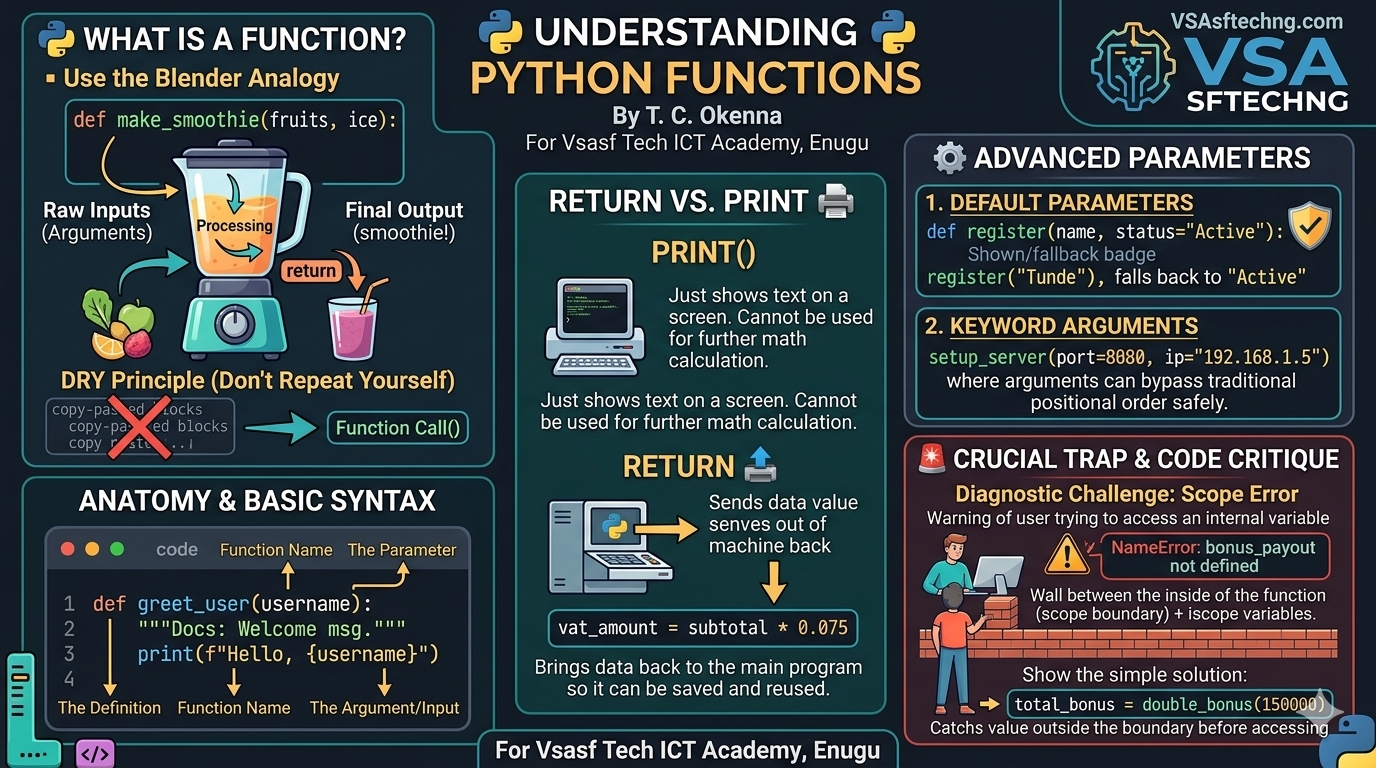
The Real-World Analogy: A kitchen blender. The blender has a
defined mechanism. You pass raw inputs into it (fruits, ice),
it processes them internally according to a fixed design, and it pours out
a final result (a smoothie). You don't rebuild the blender every
time you want a drink; you just call upon it.
The DRY Principle: Don't Repeat Yourself. If you copy-paste the same
five lines of code three or more times across a script,
it should be refactored into a reusable function.
2. Basic Syntax & Anatomy of a Function (15 Mins)
A function definition uses the def keyword, followed by a unique
function name, parental parameters inside parentheses,
a colon (:), and an indented block of code.
python
# 1. Defining the Function (Building the Blender)
def greet_user(username):
    """Docstring: Prints a welcome message to a user."""
    print(f"Welcome back to the system, {username}!")

# 2. Calling the Function (Using the Blender)
greet_user("Chinedu")  # Output: Welcome back to the system, Chinedu!
greet_user("Amaka")    # Output: Welcome back to the system, Amaka!
Use code with caution.
Parameters vs. Arguments
Parameter: The structural variable placeholder listed
inside the function definition (
username).Argument: The actual, concrete value passed into
the function when invoking it (
"Chinedu").
3. Returning Values vs. Printing (15 Mins)
A very common point of confusion for beginners is
the difference between print() and return.
print()simply displays text on the screen for a humanto look at. It has no structural computation value.
returnterminates function execution and sends data back to themain program stream so it can be assigned to variables
or utilized in subsequent math calculations.
python
# Real-World Scenario: E-commerce VAT sales calculation
def calculate_vat(subtotal):
    vat_amount = subtotal * 0.075 # 7.5% VAT rate
    return vat_amount # Handing the computation value back

# Capturing the returned value to use later
order_vat = calculate_vat(12000)
final_invoice = 12000 + order_vat

print(f"Total Invoice Cost: N{final_invoice}")
# Output: Total Invoice Cost: N12900.0
Use code with caution.
4. Advanced Parameter Handling (15 Mins)
Default Parameters
You can assign default values to parameters. If an argument
is missing during execution, the default value acts as a safe fallback.
python
# Real-World Scenario: User profile setup with default status values
def register_member(name, status="Active"):
    return f"Member: {name} | Account Status: {status}"

print(register_member("Tunde"))
# Output: Member: Tunde | Account Status: Active
print(register_member("Fatima", "Suspended"))
# Output: Member: Fatima | Account Status: Suspended
Use code with caution.
Positional vs. Keyword Arguments
Positional: Arguments matched purely by their
specific placement sequence order.
Keyword: Arguments explicitly linked by name (
parameter_name=value),allowing you to completely pass variables out of sequence order safely.
python
def setup_server(ip, port, Protocol="HTTPS"):
    return f"Hosting server at {ip}:{port} via {Protocol}"

# Using Keyword arguments out of original definition order
print(setup_server(port=8080, ip="192.168.1.5"))
# Output: Hosting server at 192.168.1.5:8080 via HTTPS
Use code with caution.
🎯 Diagnostic Challenge & Code Critique
Ask the Class: Look at this block of script logic. What will print
when we execute it, what structural variable scope
error did the developer make, and how do we resolve it?
python
def double_bonus(salary):
    bonus_payout = salary * 2
    return bonus_payout

employee_salary = 150000
double_bonus(employee_salary)

print(bonus_payout) # 💥 CRASH!
Use code with caution.
Expected Solution Critique
The Error: This script throws a
NameError: name 'bonus_payout' is not defined.The Reason: Variable scope rules. The variable
bonus_payoutis defined inside the function. It lives and dies exclusively
within that internal scope ecosystem. The main program scope
(global line footprint) cannot look inside the function boundary box directly.
Furthermore, although the function returned the value, the
developer forgot to save it into an outside variable!
The Refactored Fix: Catch the return data stream safely:
python
employee_salary = 150000
# Store the returned outcome value inside
#a globally visible variable frame
total_bonus = double_bonus(employee_salary)
print(total_bonus) # Output: 300000
Use code with caution.
For Vsasf Tech ICT Academy, Enugu
Did you find this ICT insight helpful?