Lecture Notes: Object-Oriented Programming (OOP) in Python by T. C. Okenna
Lecture Notes: Object-Oriented Programming (OOP) in Python.
By T. C. Okenna
Object-Oriented Programming (OOP) is a programming paradigm that
organizes software design around data, or objects, rather than functions
and logic. It allows developers to bundle related properties and behaviors
into individual, reusable structures, mirroring how real-world entities exist.
📋 Lesson Overview
Target Audience: Intermediate Python Learners
Duration: 60 Minutes
Prerequisites: Python functions, dictionaries, and basic loop constructs.
Learning Objectives: By the end of this lesson, students will be able to:
Differentiate between a Class and an Object.
Implement instance attributes using the
__init__constructor method.Explain and apply the four pillars of OOP: Inheritance, Polymorphism,
Encapsulation, and Abstraction.
👩🏫 Lesson Structure
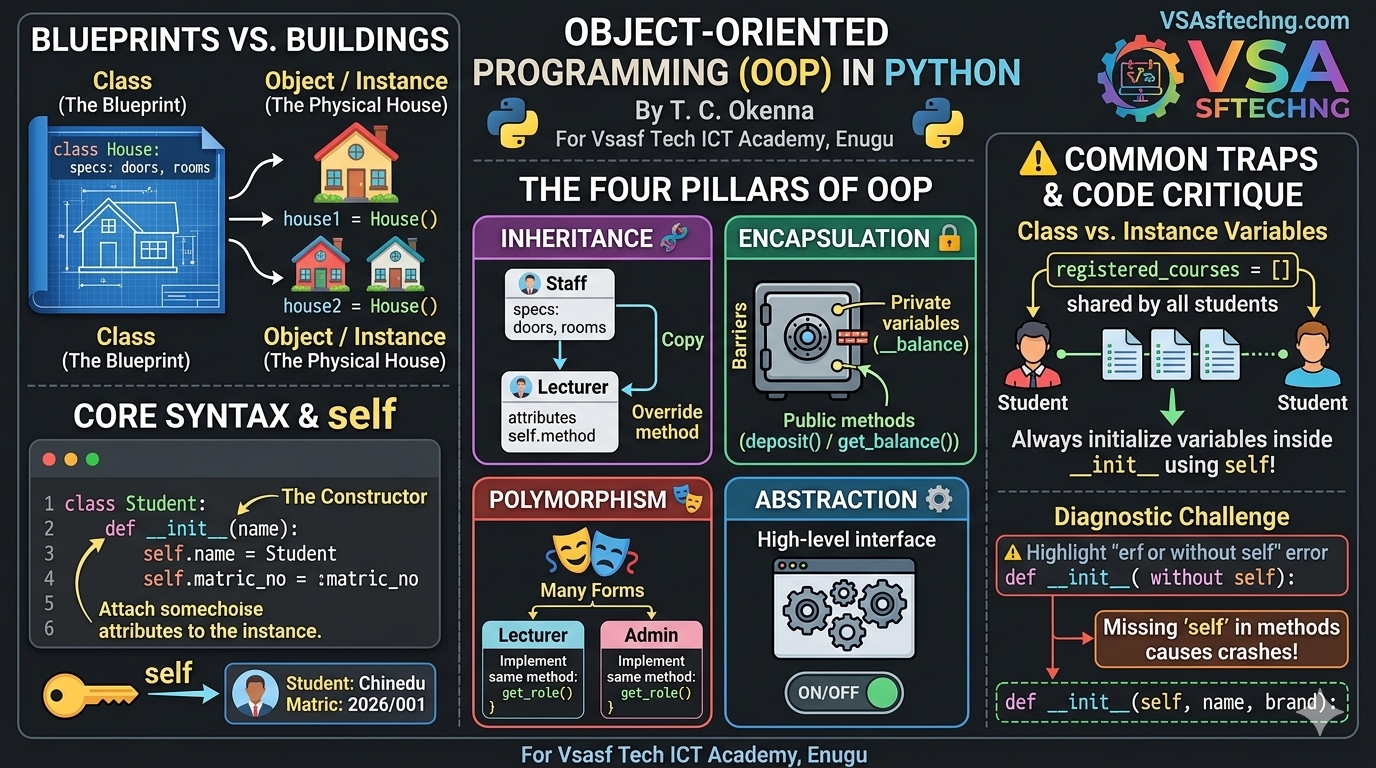
1. Introduction: Blueprints vs. Buildings (10 Mins)
The Real-World Analogy: Think of an architectural blueprint for a house.
The blueprint itself isn't a house; it's a design document containing
specifications (number of rooms, doors) and capabilities (wiring, plumbing layouts).
A Class is that architectural blueprint.
An Object (or Instance) is the actual physical house built using
that blueprint. You can build 50 completely distinct houses from one single blueprint.
2. Core Syntax: Classes, Objects, and self (15 Mins)
Defining a Class and Constructor
The __init__ method is the constructor. It initializes an object's
state when it is created. The self keyword represents the
specific instance of the class currently being modified.
python
# Real-World Scenario: Simulating a student registration profile
class Student:
    # The Constructor Method
    def __init__(self, name, matric_no, department):
        self.name = name                 # Instance Attribute
        self.matric_no = matric_no       # Instance Attribute
        self.department = department     # Instance Attribute

    # Instance Method
    def display_profile(self):
        return f"Student: {self.name} |
Matric: {self.matric_no} |
Dept: {self.department}"

# Instantiating (Creating) distinct objects
student1 = Student("Chinedu", "2026/001", "Computer Science")
student2 = Student("Amaka", "2026/042", "Electronic Engineering")

print(student1.display_profile())  # Output: Student: Chinedu | Matric: 2026/001...
print(student2.name)              # Output: Amaka
Use code with caution.
3. The Pillars of OOP (25 Mins)
🧬 Pillar 1: Inheritance
Inheritance allows a new child class to adopt the attributes
and methods of an existing parent class, eliminating redundant code.
python
# Parent Class
class Staff:
    def __init__(self, name, staff_id):
        self.name = name
        self.staff_id = staff_id

    def get_role(self):
        return "General Staff Member"

# Child Class inheriting from Staff
class Lecturer(Staff):
    def __init__(self, name, staff_id, course_assigned):
        super().__init__(name, staff_id) # Call parent constructor
        self.course_assigned = course_assigned

    # Method Overriding (Polymorphism)
    def get_role(self):
        return f"Lecturer teaching {self.course_assigned}"

lecturer = Lecturer("Dr. Okoye", "L-902", "Python Programming")
print(lecturer.get_role())  # Output: Lecturer teaching Python Programming
Use code with caution.
🔒 Pillar 2: Encapsulation
Encapsulation restricts direct access to an object's component
methods and variables to prevent accidental manipulation.
In Python, we prefix variable names with a double
underscore (__) to denote private variables.
python
class BankAccount:
    def __init__(self, owner, initial_balance):
        self.owner = owner
        self.__balance = initial_balance # Private attribute

    # Getter method to read private data safely
    def get_balance(self):
        return self.__balance

    # Setter method to update private data safely with validation
    def deposit(self, amount):
        if amount > 0:
            self.__balance += amount
        else:
            print("Invalid deposit amount!")

account = BankAccount("Kelechi", 50000)
# print(account.__balance) # 💥 CRASH! Throws AttributeError

account.deposit(15000)
print(account.get_balance()) # Output: 65000
Use code with caution.
4. ⚠️ Common Pitfalls: Class vs. Instance Variables (5 Mins)
Instance Variables: Variables defined inside constructor
methods using
self. They belong uniquely to that specific object.Class Variables: Variables declared directly in the class body outside
any method. They are shared collectively by all instances of that class.
python
# 🚫 THE INCORRECT USE-CASE (Class variable trap)
class Registry:
    registered_courses = [] # Shared by ALL student instances accidentally!

    def __init__(self, student_name):
        self.student_name = student_name

student_a = Registry("Tunde")
student_b = Registry("Fatima")

student_a.registered_courses.append("CSC 201")

# Fatima has unexpectedly been registered for Tunde's course!
print(student_b.registered_courses) # Output: ['CSC 201']
Use code with caution.
🎯 Diagnostic Challenge & Code Critique
Ask the Class: Examine this script snippet. Why will it throw a runtime crash
exception when executed, and how should we refactor it?
python
class SmartDevice:
    def __init__(name, brand):
        name = name
        brand = brand

    def power_on():
        print(f"{name} is now powered online.")

phone = SmartDevice("Pixel 8", "Google")
phone.power_on() # 💥 CRASH!
Use code with caution.
Expected Solution Critique
The Error: This script breaks with a missing argument
exception or local scope lookup errors (
NameError: name 'name' is not defined).The Reason:
The developer forgot to pass
selfas the very firstposition parameter in both
__init__andpower_on().The variables inside the constructor were assigned
locally (
name = name) instead of attaching them structurally tothe object scope instance using
self.name = name.
The Refactored Fix:
python
class SmartDevice:
    def __init__(self, name, brand): # Added self
        self.name = name             # Bound to object
        self.brand = brand

    def power_on(self):              # Added self
        print(f"{self.name} is now powered online.")
Use code with caution.
For Vsasf Tech ICT Academy, Enugu
Did you find this ICT insight helpful?