Low Code and No Code Platforms
Low Code/No code Platforms in 2026.
The "democratization of software" has reached a tipping point. For years, Low-Code/No-Code (LCNC) platforms were viewed as toys—tools for "citizen developers" to build simple internal forms or basic websites. However, in 2026, LCNC has moved into the heart of the DevOps lifecycle. It is no longer just about building apps; it is about automating the very machinery of software delivery.
In a world where the demand for software far outstrips the supply of senior developers, LCNC in DevOps offers a way to bridge the "delivery gap" without compromising on security or scale.
1. Defining Low-Code/No-Code in a DevOps Context
In traditional development, every automation—from a CI/CD pipeline to a cloud infrastructure template—requires writing code (YAML, HCL, Python, or Go). Low-Code/No-Code DevOps abstracts these technical layers into visual interfaces.
No-Code: Drag-and-drop interfaces that allow non-technical stakeholders (Product Managers, QA testers) to trigger deployments or configure environment variables without seeing a single line of code.
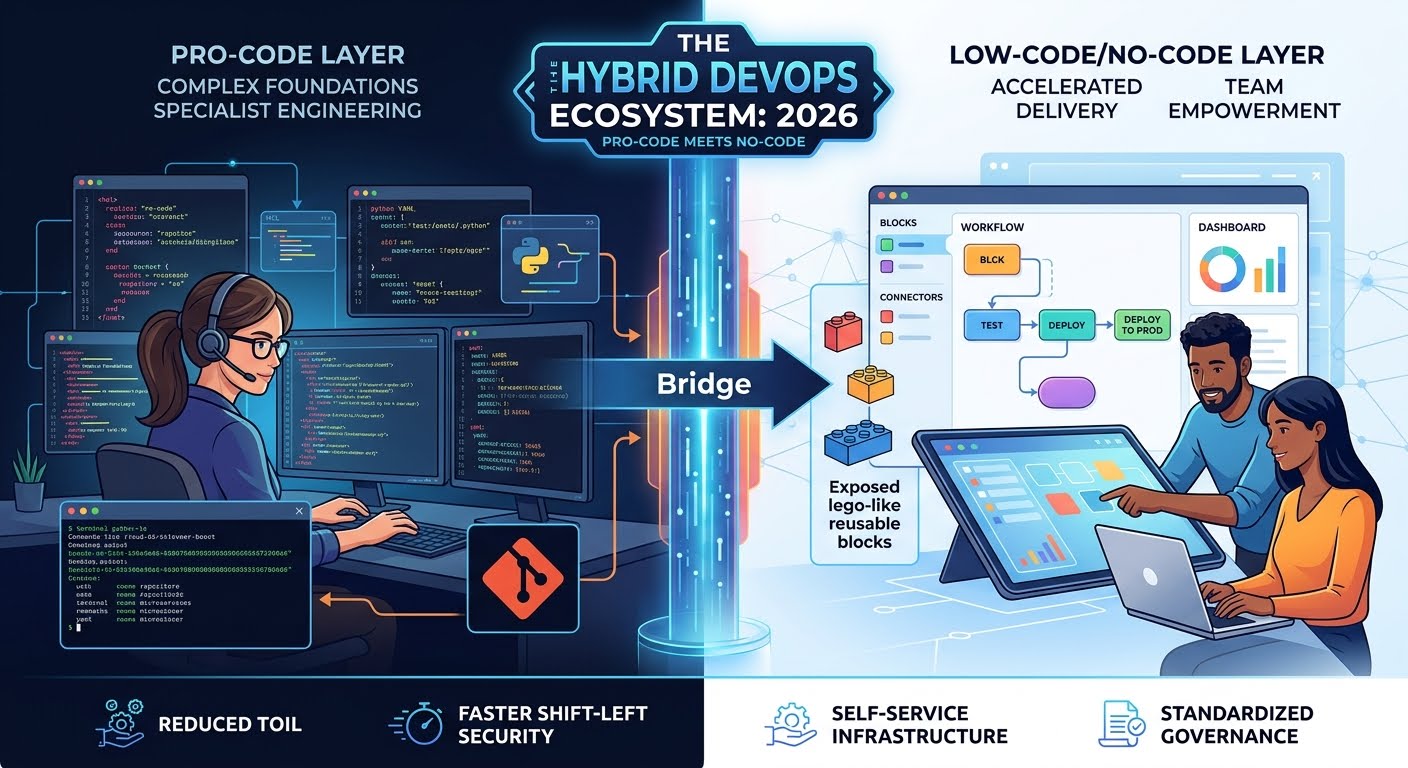
Low-Code: "Pro-code" foundations with visual layers. A DevOps engineer might write a complex custom script once and then expose it as a "visual block" for the rest of the team to use and reuse.
2. The Rise of "Citizen DevOps"
One of the biggest bottlenecks in modern tech is the "Ops Gatekeeper." Developers wait for Ops to provision a database; QA waits for Ops to set up a testing environment.
LCNC platforms empower Citizen DevOps. By using an Internal Developer Platform (IDP) with a low-code interface, a developer can self-service their infrastructure needs. Instead of writing a Jira ticket and waiting three days, they use a visual "Service Catalog" to deploy a pre-configured, company-compliant AWS environment in three minutes.
3. Visual CI/CD: The New Pipeline Reality
The "YAML-hell" of 2020—where engineers spent hours debugging indentation in a Jenkins or GitHub Actions file—is being replaced by visual pipeline builders.
In 2026, leading DevOps platforms allow teams to map out their delivery flow as a flowchart. You can visually see the "gates": If test passes → Deploy to Staging → Notify Slack → Await Manager Approval → Deploy to Production.
This visual clarity doesn't just make it easier to build; it makes it easier to debug. When a deployment fails, the visual interface highlights exactly which "node" in the flow turned red, allowing for much faster incident response.
4. The Benefits of the LCNC Shift
A. Drastic Reduction in "Toil"
DevOps is often plagued by "toil"—repetitive, manual tasks that provide no long-term value. LCNC allows teams to automate these tasks (like user onboarding, secret rotation, or log cleanup) using simple logic-based triggers (e.g., Zapier or Microsoft Power Automate for Infrastructure).
B. Accelerated "Shift Left"
When security and testing tools have low-code interfaces, it is easier to "Shift Left." A security analyst doesn't need to be a Python expert to add a new vulnerability scan into the pipeline; they can simply "plug in" the security module via the visual interface.
C. Standardized Governance
LCNC platforms allow the "Platform Team" to set the rules. They create the "Lego bricks," and the rest of the company builds with them. Because the "bricks" are pre-vetted for security and compliance, the chance of a developer accidentally leaving an S3 bucket open to the public is drastically reduced.
5. The Risks: Shadow IT and Vendor Lock-in
While the benefits are massive, LCNC in DevOps introduces new challenges:
The "Black Box" Problem: If a visual automation fails, and there is no underlying code to inspect, senior engineers can find themselves "locked out" of their own logic.
Vendor Lock-in: Unlike an open-source script that can run anywhere, a low-code workflow is often tied to a specific vendor’s proprietary engine. Moving from one LCNC tool to another can be a nightmare of manual rebuilding.
Version Control Gap: Traditional code is tracked in Git. Many early LCNC tools struggled with "versioning." If a "Citizen DevOps" user changes a visual workflow and breaks it, can you "git revert" to yesterday? In 2026, the best LCNC tools solve this by automatically generating a "Code View" (like YAML) in the background that syncs with Git.
6. The Hybrid Future: "Pro-Code" meets "No-Code"
The most successful organizations in 2026 don't choose one over the other; they embrace a Hybrid Model.
Complexity is Pro-Code: The core, high-performance engines and complex integrations are written by senior engineers using Go, Rust, or Python.
Consumption is Low-Code: The "last mile" of the workflow—how that engine is triggered, how the data is displayed, and how it connects to other apps—is handled via a low-code layer.
This creates a "tiered" ecosystem where experts focus on deep engineering, while the broader team focuses on orchestrating those efforts to deliver value to customers.
7. Conclusion
Low-Code/No-Code is no longer an "alternative" to DevOps; it is a force multiplier. By abstracting away the "grunt work" of infrastructure management and pipeline configuration, LCNC allows DevOps to finally live up to its original promise: Speed without Chaos.
In the coming years, we will see the role of the DevOps Engineer shift from "The person who writes the scripts" to "The person who builds the platform that allows everyone else to ship safely."
Did you find this ICT insight helpful?