The Latest in

ICT Articles & Tutorials

World ICT News is a professional platform dedicated to Artificial Intelligence, Cloud Computing, DevOps, and Cybersecurity. Empowering the next generation of ICT specialists. Our exclusive tutorials and articles are designed to serve as a stepping stone for you into the world of ICT industry...

A Step-by-Step Technical Guide to Penetration Testing Procedures
May 26, 2026
7 min read

A Step-by-Step Technical Guide to Penetration Testing Procedures

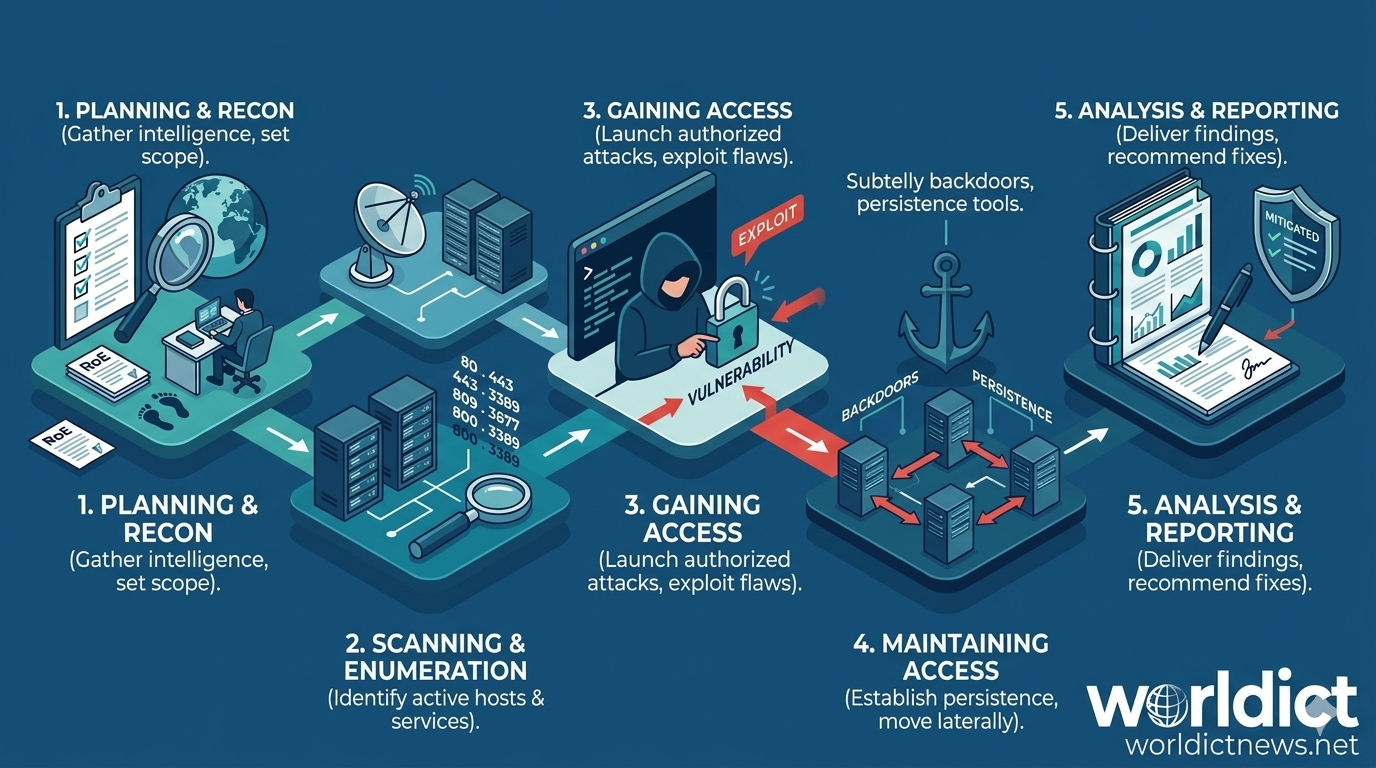
Behind the Shield: A Step-by-Step Technical Guide to Penetration Testing Procedures. In an era where data breaches cost organizations millions of dollars per incident, waiting for a cyberattack to happen is no longer an option. Reactive security is broken. To truly defend an infrastructure, security teams must adopt the mindset of an adversary.This proactive philosophy is realized through penetration testing (or pen testing)—the authorized, simulated attack against an organization's IT systems to uncover exploitable vulnerabilities.Conducting a successful penetration testing engagement requires strict adherence to a structured, repeatable methodology. Without a rigorous procedure, testing becomes chaotic, critical vulnerabilities are missed, and the risk of accidentally disrupting production systems increases.Here is the comprehensive, step-by-step procedure utilized by elite cybersecurity professionals to execute an end-to-end penetration test.🧭 The Five Core Phases of a Penetration TestA professional penetration test relies on five distinct, sequential phases. Each phase acts as a foundation for the next, moving systematically from initial administrative planning to final remediation tracking.┌────────┐│ Phase 1: Planning and Reconnaissance │└────────┘ │ ▼┌────────┐│ Phase 2: Scanning & Enumeration │└────────┘ │ ▼┌────────┐│ Phase 3: Gaining Access │└────────┘ │ ▼┌────────┐│ Phase 4: Maintaining Access & Pivoting │└────────┘ │ ▼┌────────┐│ Phase 5: Analysis and Reporting │└────────┘🛠️ Phase 1: Planning, Scoping, and ReconnaissanceThe first phase is part administrative and part technical. Before a single packet is sent over the network, the parameters of the engagement must be explicitly defined.1. Legal and Operational ScopingA penetration test without clear authorization is a cybercrime. This step establishes the legal boundaries of the engagement.Rules of Engagement (RoE): A document detailing exactly when the testing can occur, what tools are forbidden, and who to contact in case of an emergency or unexpected system outage.Scope Definition: Explicitly lists allowed targets (IP addresses, specific web applications, physical locations) and explicitly excluded assets (critical legacy servers, third-party cloud integrations).Sign-off: Executing signatures on a mutual Non-Disclosure Agreement (NDA) and a "Permission to Attack" form.2. Reconnaissance (Information Gathering)Once authorized, the pen tester gathers intelligence on the target ecosystem using open-source intelligence (OSINT) and passive discovery techniques. The goal is to map out the target's digital footprint without directly alerting their defensive monitoring tools.Passive Reconnaissance: Gathering publicly available data. This includes researching employee names and email patterns on LinkedIn, analyzing DNS records, searching public source code repositories (like GitHub) for leaked API keys, and scouring the dark web for compromised employee credentials.Active Reconnaissance: Interacting slightly closer with the targets, such as inspecting public SSL/TLS certificates and running basic domain queries to understand the underlying infrastructure hosting the company's assets.🔍 Phase 2: Scanning and EnumerationWith a map of the target's assets in hand, the tester moves to active network discovery. This phase aims to discover live hosts, open network ports, and running software services.1. Port ScanningUsing tools like Nmap or Masscan, the tester probes the target systems to find open access points. They look for exposed services such as web servers (ports 80/443), database servers (ports 1433/3306), or remote access points (ports 22/3389).2. Service and Operating System DetectionFinding an open port is not enough; the tester must identify the exact version of the software running on that port. If an Apache web server is identified as version 2.4.49, the tester immediately notes that this specific version is vulnerable to known path traversal exploits.3. Vulnerability AssessmentThe tester runs automated vulnerability scanners (such as Nessus, OpenVAS, or Qualys) against the discovered services. These tools cross-reference the active software versions against public databases of known vulnerabilities (Common Vulnerabilities and Exposures, or CVEs).Crucial Distinction: A vulnerability assessment merely points out potential holes; the penetration test must proceed to the next phase to confirm if those holes can actually be breached.🔓 Phase 3: Gaining Access (Exploitation)This is the phase where the simulated attack occurs. Armed with the list of vulnerabilities discovered in Phase 2, the penetration tester attempts to bypass security controls to gain an initial foothold inside the network.1. Flaw ExploitationTesters map specific CVEs to weaponized code samples, often utilizing framework toolsets like Metasploit, or tailoring custom exploit scripts. If a server has an unpatched remote code execution vulnerability, the tester executes the exploit code to force the system to yield command-line access.2. Web Application AttacksIf the target is a web application, testers look for flaws defined by the OWASP Top 10 framework, including:SQL Injection (SQLi): Injecting malicious database queries into input fields to bypass authentication or steal data.Cross-Site Scripting (XSS): Injecting malicious scripts into a trusted website to run inside a victim’s browser.Broken Access Control: Manipulating parameters or URLs to access data belonging to other users.3. Social EngineeringHuman error is often the easiest vulnerability to exploit. Testers may deploy controlled phishing emails mimicking internal IT services to harvest corporate login credentials from employees.⚓ Phase 4: Maintaining Access and Post-ExploitationGaining an initial foothold is only half the battle. In a real-world scenario, attackers want to stay inside a network long enough to locate high-value data assets.[ Initial Foothold ] ──► [ Privilege Escalation ] ──► [ Lateral Movement/Pivoting ]1. Establishing PersistenceIf the compromised system restarts, the tester’s access could be lost. To prevent this, they install subtle backdoors, create stealthy service accounts, or configure scheduled cron jobs that regularly dial back to the tester’s command-and-control (C2) server.2. Privilege EscalationInitial access often yields low-privileged user accounts with restricted system access. Post-exploitation requires finding local misconfigurations, weak file permissions, or unpatched kernel flaws to elevate access from a standard user to a local Administrator or Root user.3. Lateral Movement and PivotingOnce the tester controls a machine inside the internal network, they use that machine as a launching pad to attack other internal systems that were previously shielded from the outside internet. This process, known as pivoting, allows the tester to move systematically through the network until they reach critical assets like Domain Controllers or financial databases.4. Data Collection (Exfiltration Demonstration)To prove the business risk to stakeholders, testers locate sensitive assets (e.g., proprietary designs, customer credit card records, employee data) and safely stage mock data to demonstrate how an attacker could extract it from the company network.📊 Phase 5: Analysis, Reporting, and RemediationA penetration test is only as good as the actionable intelligence it delivers back to the organization. The final phase shifts focus entirely onto documentation and risk reduction.1. Technical CleanupBefore leaving the network, testers must meticulously remove all traces of the simulated attack. This includes deleting uploaded web shells, removing created user accounts, stopping active backdoor processes, and ensuring all targeted systems are left in a stable condition.2. Drafting the Comprehensive ReportThe penetration testing report serves as a formal documentation package for two entirely different audiences:Executive Summary: A high-level overview written in clear, non-technical language designed for C-level executives (CEO, CFO, CISO). It outlines the overall security posture, maps findings to business risk, and estimates potential financial exposure.Technical Findings & Detailed Breakdowns: A granular technical breakdown created for the engineering and sysadmin teams.ComponentTechnical Detail RequiredVulnerability ClassificationStandardized CVSS (Common Vulnerability Scoring System) risk ratings.Proof of Concept (PoC)Step-by-step reproduction instructions and screenshots showing exactly how the flaw was exploited.Remediation PlanActionable advice, including code patches, configuration changes, or software updates to mitigate the risk.3. Remediation and Re-testingAfter the technical team implements the suggested patches, the penetration testing cycle concludes with a focused validation test. The testers attempt to exploit the exact same vulnerabilities a second time to ensure the fixes are robust and correctly implemented.🏁 ConclusionPenetration testing is not a one-time checklist item; it is an iterative, evolving security process. As new code is deployed and network architectures shift, new security gaps will inevitably emerge. By embedding this structured, step-by-step methodology into regular corporate evaluation cycles, organizations can successfully identify and neutralize network vulnerabilities long before malicious actors have the chance to find them.
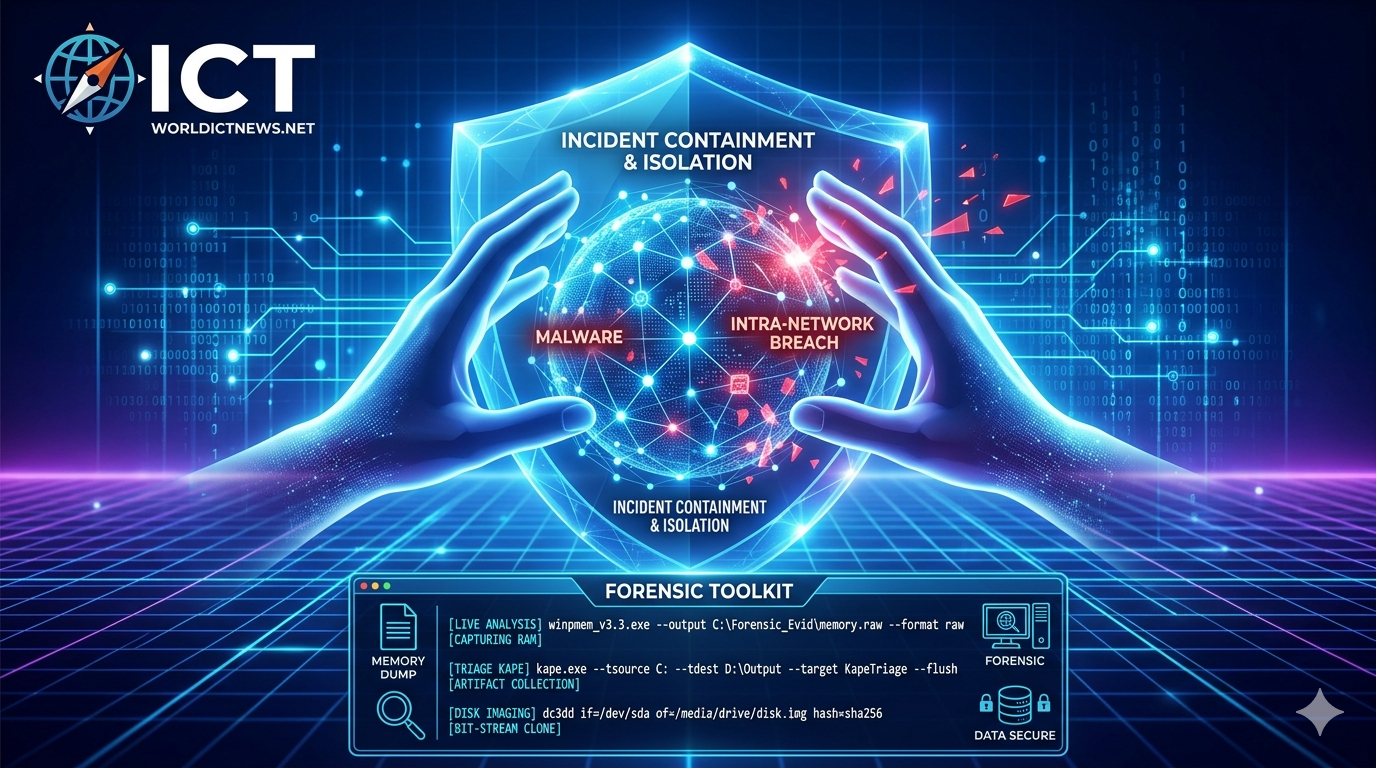
A Comprehensive Guide to Cyber Incident Response Execution
May 22, 2026
10 min read

A Comprehensive Guide to Cyber Incident Response Execution

Firefighting in the Digital Age: A Step-by-Step Guide to Incident Response Execution. When a cyberattack strikes an organization, chaos is the default setting. Servers go dark, databases leak, ransom notes appear on screens, and panic spreads through leadership teams. In these critical moments, an Incident Responder is the digital equivalent of a firefighter. They do not just understand security theory; they execute a highly coordinated, tactical protocol to find the fire, contain it, extinguish it, and ensure the building doesn’t burn down again.This article provides an operational, step-by-step blueprint of how an Incident Responder executes their duties during a cybersecurity crisis, structured around the industry-standard NIST SP 800-61 r2 framework.Phase 1: Preparation (Before the Fire Starts)Incident response does not begin when an alert fires; it begins months in advance. Execution in this phase focuses on establishing readiness, visibility, and tools.1. Tool Deployment and Health ChecksAn responder cannot defend what they cannot see. The first tactical step is ensuring the operational readiness of the Security Operations Center (SOC) stack:EDR/XDR (Endpoint Detection and Response): Verifying agents are healthy, updated, and actively checking in across all servers, workstations, and cloud instances.SIEM/SOAR Configuration: Ensuring logs from firewalls, active directories, DNS servers, and cloud providers (AWS, Azure) are normalizing and aggregating correctly.Out-of-Band Communication: Setting up secure, separate communication channels (like encrypted Signal groups or standalone Microsoft Teams tenants) in case the corporate network and email systems are compromised.2. Playbook and Kits StandardizationResponders build and update "Jump Bags"—digital toolkits containing pre-compiled, static forensic binaries (like Sysinternals, FTK Imager Lite, or KAPE) stored on secure, write-blocked media or isolated cloud repositories. They also continuously drill using tabletop exercises to ensure the chain of command is clear.Phase 2: Detection and Analysis (Spotting the Smoke)This phase marks the official start of an active incident. The responder transitions from standard monitoring to high-alert investigation.1. Alert Triage and ValidationA typical enterprise triggers thousands of security alerts daily. The responder must instantly separate noise from actual malicious behavior.Correlating Events: If an alert shows an unusual PowerShell script executing on a workstation, the responder immediately checks firewall logs to see if that same workstation initiated an outbound connection to an unknown IP address on port 443.Eliminating False Positives: Verifying if the "malicious activity" was simply an unannounced scheduled task built by the internal IT operations team.2. Initial Scoping and Indicators of Compromise (IoCs)Once an alert is validated as a true positive, the responder identifies the Indicators of Compromise (IoCs). This includes:Cryptographic hashes of malicious files (MD5/SHA256).Malicious domain names and Command and Control (C2) IP addresses.Specific registry keys modified by malware.The responder takes these IoCs and runs a global sweep across the SIEM to identify the "Blast Radius"—how many endpoints or accounts have touched these same indicators.3. Determining the Scope and SeverityThe incident is categorized based on impact:Low: A single workstation infected with adware.Medium: An employee's credentials compromised, but multi-factor authentication (MFA) blocked the login.High/Critical: Active hands-on-keyboard adversary moving laterally through the network, or data exfiltration detected.Phase 3: Containment (Putting Up the Firewalls)The primary objective of containment is to limit the damage and prevent the attacker or malware from moving further into the network. Responders usually divide this into two sub-steps.1. Short-Term ContainmentSpeed is critical. The responder executes immediate mitigation actions:Network Isolation: Using the EDR tool to logically isolate infected endpoints from the network while maintaining a secure management channel for forensics.Account Disablement: Instantly disabling compromised Active Directory or Microsoft Entra ID accounts to stop lateral movement.Firewall Blocks: Implementing temporary block rules on perimeter firewalls for the identified external C2 IP addresses.2. Long-Term Containment and Evidence PreservationBefore cleaning up the systems, the responder must preserve volatile data for legal and forensic investigation. Crucial Rule: Never reboot a machine before capturing memory. Rebooting destroys the RAM, which holds the active malware processes, encryption keys, and network connections.Live Memory Acquisition: Running tools like DumpIt or LiME to capture the system memory (RAM).Disk Imaging: Creating bit-stream copies of hard drives using hardware write-blockers to ensure no data is altered during the extraction process.Documenting Chain of Custody: Meticulously tracking who collected the evidence, at what exact time, and calculating cryptographic hashes of the forensic images to ensure tampering cannot happen.Technical Appendix: Forensic Command-Line ExecutionWhen executing live forensics on an infected machine, an incident responder must use precise commands to collect volatile data without contaminating the host operating system. Below are the standard tools and commands executed during Windows and Linux investigations.1. Volatile Memory Collection (RAM Capture)Capturing RAM must be done before any system shutdowns or reboots to preserve running processes, network connections, and unencrypted credentials.Windows: WinPmemWinPmem is an open-source tool used to dump physical memory into a single raw file. Run via an administrative Command Prompt or PowerShell:cmdwinpmem_v3.3.rc3.exe --output C:\Forensic_Evid\memory.raw --format rawUse code with caution.--output: Specifies the secure destination folder (ideally an external, write-blocked drive or network share).--format raw: Outputs a standard .raw or .dmp image compatible with memory analysis tools like Volatility.Linux: LiME (Linux Memory Extractor)On Linux systems, memory is grabbed using a kernel module approach. Responders compile or load the LiME module to dump memory over the network or to a local disk:bashsudo insmod lime-5.4.0-77-generic.ko "path=/tmp/linux_memory.lime format=raw"Use code with caution.insmod: Inserts the LiME kernel module.path=: The target file path for the memory dump.2. Triage and Artifact Collection (Live Response)Instead of waiting hours for full disk imaging, responders use triage tools to extract high-value artifacts (like event logs, registry hives, and MFT data) in minutes.Windows: KAPE (Kroll Artifact Parser and Extractor)KAPE automate the collection and parsing of Windows artifacts. It uses targets (gkape scripts) to pull specific forensic files:cmdkape.exe --tsource C: --tdest D:\TargetOutput --target KapeTriage --flushUse code with caution.--tsource C:: Identifies the target system drive.--tdest: The destination directory where the collected files will be compressed and saved.--target KapeTriage: Automatically grabs web browser history, event logs, prefetch files, and registry hives.Linux: UAC (Unix Artifact Collector)UAC is a script-based tool used to live-triage Linux and Unix-like operating systems:bashsudo ./uac -p ir_triage /tmp/uac-outputUse code with caution.-p ir_triage: Runs a pre-configured profile designed specifically for Incident Response triage, gathering information on active network connections, open files, and system configurations.3. Bit-Stream Disk Imaging (Dead Box Forensics)When a complete clone of the hard drive is required for deep analysis, responders use the standard utility dd or its forensics-focused cousin dc3dd to capture the block layer.Linux/Unix: dc3ddThis tool provides a safe command-line architecture to patch data straight to an external storage unit while hashing on the fly to protect the chain of custody.bashsudo dc3dd if=/dev/sda of=/media/forensic_drive/suspect_disk.img hash=sha256 log=/media/forensic_drive/imaging_log.txtUse code with caution.if=/dev/sda: The source file parameter representing the physical drive under investigation.of=: The path where the exact image file copy will be compiled.hash=sha256: Calculates the SHA-256 hash automatically during the imaging process to verify data integrity.4. Memory Analysis (Post-Collection)Once the memory file (.raw) is extracted and moved to an isolated investigation workstation, the responder parses it using analysis frameworks.Cross-Platform: Volatility 3Volatility allows the responder to dissect the captured memory dump to find hidden processes, rootkits, or malicious network connections that were active during the incident.bashpython3 vol.py -f /path/to/memory.raw windows.pslist.PsListUse code with caution.-f: Feeds the acquired memory image into the framework.windows.pslist.PsList: A plugin command that reconstructs and displays the process tree to identify if malicious processes were mimicking legitimate system actions (like svchost.exe).Phase 4: Eradication (Killing the Root Infection)Once the threat is safely contained and evidence is locked down, the responder switches to a search-and-destroy mindset. Eradication means completely removing all elements of the incident from the environment.1. Root Cause AnalysisThe responder looks backward to figure out exactly how the attacker got in (Weaponization and Delivery phase of the Cyber Kill Chain). Did they exploit an unpatched VPN vulnerability? Was it a phishing email?2. Threat RemovalMalware Deletion: Manually removing persistent registry keys, scheduled tasks, and malicious binaries that automated antivirus engines might have missed.Vulnerability Patching: Closing the door the attacker used. If a public-facing server was exploited via an old Apache vulnerability, that server must be patched immediately.Credential Revocation: Forcing an organization-wide password reset and revoking all active OAuth tokens across the cloud ecosystem to ensure the attacker cannot simply log back in using valid, hijacked sessions.Phase 5: Recovery (Restoring Business Operations)Recovery focuses on safely returning affected systems to production and verifying that they are operating cleanly.1. System RestorationResponders work alongside IT engineering teams to rebuild infrastructure:Clean Rebuilds: The gold standard is rebuilding affected servers from trusted Infrastructure-as-Code (IaC) templates or known-clean gold images, rather than trying to "clean" an heavily compromised operating system.Backup Verification: If restoring from backups, the responder scans the backup images before bringing them live to ensure the malware wasn't already sitting dormant inside the backup archives weeks prior to the attack.2. Enhanced Continuous MonitoringOnce a system is back online, it is placed in an "Intensive Care Unit" status. The responder deploys aggressive monitoring rules on those specific assets for the next 14 to 30 days, knowing that attackers often try to return immediately if they lose access.Phase 6: Lessons Learned (Post-Incident Optimization)Often neglected due to fatigue, this is the most critical phase for long-term organizational security. It occurs days or weeks after the threat has been resolved.1. Post-Mortem MeetingThe responder brings together leadership, legal, HR, and IT teams to review a strict timeline of events:What happened, and at what time?How well did the team respond? Were the playbooks followed?Where were the blind spots? (e.g., "We lacked logs for our cloud storage bucket, which delayed our analysis by 6 hours.")2. Updating Defenses and DocumentationThe final execution step is converting the scars of the attack into permanent armor:Modifying SIEM detection rules to catch the specific techniques used by this adversary in the future.Rewriting Incident Response playbooks to address the bottlenecks discovered during the crisis.Publishing a final, formal Incident Report detailing the root cause, financial impact, data scope, and remediation efforts for regulatory compliance and executive leadership.ConclusionIncident response is a highly structured discipline where methodology beats intuition every time. By systematically moving through Preparation, Detection, Containment, Eradication, Recovery, and Lessons Learned, a responder removes emotion from a crisis. This step-by-step execution ensures that an organization can withstand even the most aggressive cyberattacks, limiting downtime, protecting data integrity, and emerging more resilient against the threats of tomorrow.
Intrusion Prevention System (IPS) Deployment Guide
May 21, 2026
9 min read

Intrusion Prevention System (IPS) Deployment Guide

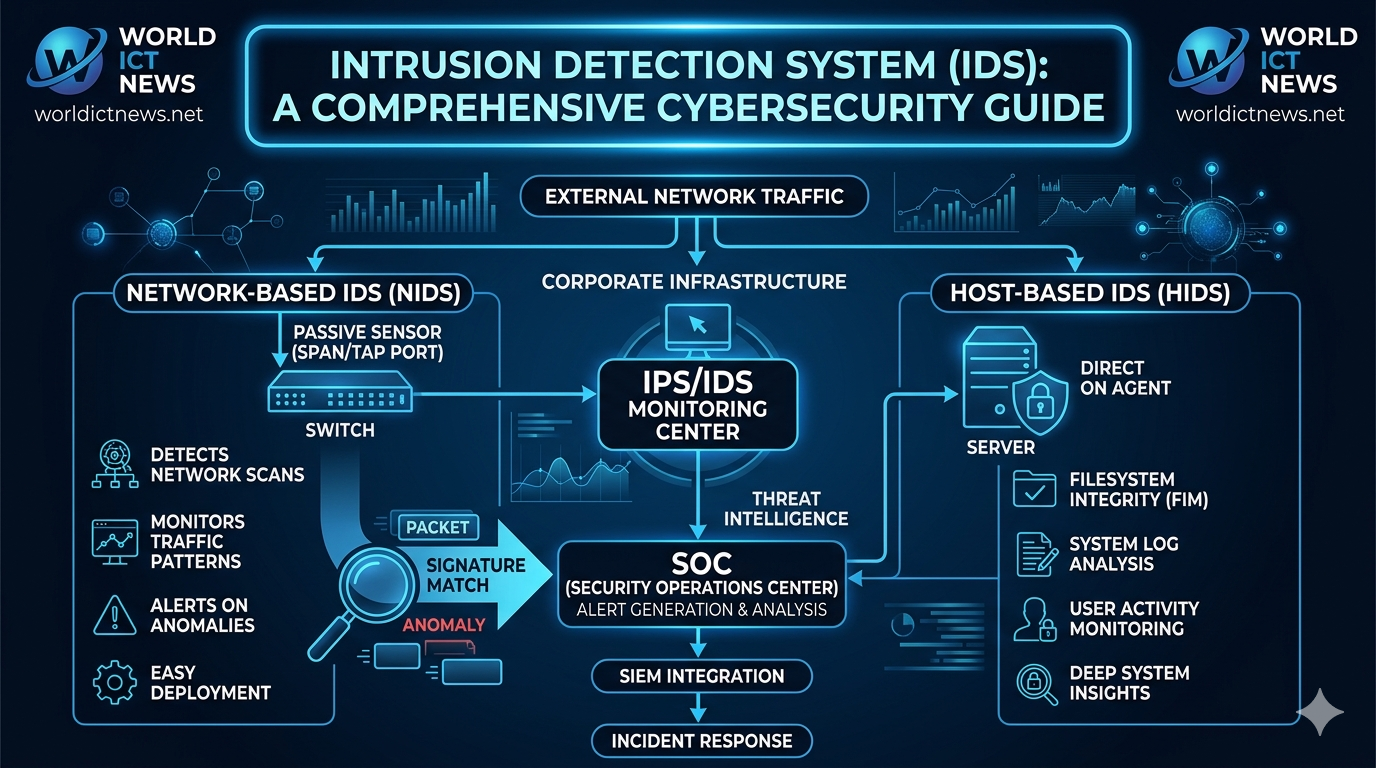
Intrusion Prevention System (IPS) in Cybersecurity: An Enterprise Deployment Guide. In the rapidly evolving landscape of network security, discovering a threat after it has already penetrated your infrastructure is no longer sufficient. While an Intrusion Detection System (IDS) is highly valuable for monitoring and providing deep analytical visibility, its passive nature means that malicious payloads, data exfiltration scripts, and ransomware strings can execute successfully before a Security Operations Center (SOC) analyst has the chance to respond to an alert.To bridge this operational delay and implement real-time defensive mitigation, modern enterprise security relies on an Intrusion Prevention System (IPS). An IPS is an active network security appliance or software service designed to inspect data flows, identify vulnerabilities, and automatically intercept malicious activity before it reaches its intended destination. This comprehensive guide details the foundational architecture of an IPS, explores its proactive defensive actions, evaluates its core variants, and provides a step-by-step roadmap for deployment.1. What is an Intrusion Prevention System?An Intrusion Prevention System is a inline network security technology that continuously scans network traffic to identify and block malicious activities. It represents a direct evolution of the traditional IDS, moving from a passive alert generation tool to an active, real-time security countermeasure.The fundamental structural difference lies in network placement. While an IDS sits out-of-band and receives a mirrored copy of network traffic via a SPAN port or network TAP, an IPS sits directly inline with network traffic. This means that all network data packets must physically pass through the IPS processing engine before they can continue to their destination.[ Internet Traffic ] │ ▼┌─────┐│ Firewall │└──┬──┘ │ ▼┌─────┐│ IPS Engine │ ◄─── (Inline: Automatically inspects and └──┬──┘ drops malicious packets in real time) │ ▼┌─────┐│ Core Servers │└─────┘Because it sits inline, the IPS has the unique capability to halt a packet in mid-transit, drop the connection, or reconfigure firewall rules instantly when an active exploit is recognized.2. Core Proactive Actions of an IPSWhen an IPS detects an anomaly, a signature match, or a policy violation, it does not merely log the event; it initiates automated, real-time countermeasures. Depending on configuration rules, an IPS executes four primary mitigation strategies:Dropping Malicious PacketsThe most direct action an IPS takes is dropping packets. If an incoming packet contains a known vulnerability exploit payload (e.g., a buffer overflow attack string aimed at an unpatched enterprise application), the IPS discards that specific packet while allowing standard, safe web packets from the same stream to continue moving forward.Resetting ConnectionsIf an attacker initiates a sustained exploit sequence or a brute-force credential attack, the IPS can send a TCP Reset (RST) packet to both the source and destination addresses. This instantly tears down the active socket connection, forcing the attacker's automation scripts to completely restart the handshake process.Dynamic Firewall ReconfigurationAdvanced IPS engines can interact directly with surrounding perimeter firewalls. If an automated script from a specific external IP address initiates an extensive port scan or a distributed denial-of-service (DDoS) spike, the IPS can update the corporate firewall's blocklist to drop all subsequent incoming traffic from that offending IP address at the perimeter.Traffic Sanitization (Normalization)Attackers sometimes attempt to evade security filters by slightly altering network transport layer formats—such as fragmenting packets into unusual sizes or rearranging packet sequences. An IPS can sanitize incoming traffic by reassembling fragmented packets, cleaning up packet headers, and normalizing data sequences before passing them down to internal hosts.3. Core Architectures: NIPS, HIPS, and WIPSIntrusion Prevention Systems are deployed at different layers of an enterprise infrastructure depending on the specific assets they are protecting.Network Intrusion Prevention Systems (NIPS)A Network Intrusion Prevention System (NIPS) analyzes data packets across entire subnets or network segments. It protects groups of servers, employee workstations, and cloud instances.Placement: Deployed inline immediately behind perimeter firewalls or at the boundaries between distinct internal corporate zones (such as separating the open corporate Wi-Fi network from the core financial database segment).Tools: Cisco Firepower, Palo Alto Networks Threat Prevention, and open-source Suricata configured in inline mode.Host Intrusion Prevention Systems (HIPS)A Host Intrusion Prevention System (HIPS) is a software agent installed directly on an individual machine, such as a critical server, application host, or executive endpoint.Operation: HIPS monitors activity inside the operating system, inspecting local system calls, memory allocations, and registry changes. If an application attempts to write code illegally to protected system kernel space, the HIPS agent actively kills the application process.Tools: OSSEC, Trend Micro Deep Security, and modern Endpoint Detection and Response (EDR) agents.Wireless Intrusion Prevention Systems (WIPS)A Wireless Intrusion Prevention System (WIPS) is a specialized variant that monitors the radio frequency spectrum of an organization's physical facility.Operation: WIPS analyzes wireless protocols to detect and neutralize threats unique to Wi-Fi infrastructure. If an attacker spins up a "Rogue Access Point" mimicking the corporate network name or launches a deauthentication attack to kick employees off the network, the WIPS emits counter-signals to disrupt the rogue wireless connection.4. Detection Methodologies and the Fail-Safe DilemmaTo safely prevent attacks without interrupting legitimate enterprise commerce, an IPS combines multiple detection methodologies.Detection MechanismsSignature-Based Detection: Matches packet byte sequences against known vulnerability fingerprints. Highly effective at blocking established exploits with minimal false-positives.Anomaly-Based Detection: Flags deviations from an established baseline of normal network behavior. Vital for catching novel Zero-Day exploits, but prone to false alarms if network patterns shift unexpectedly.Stateful Protocol Analysis: Understands the protocol rules established by governing bodies (like the IETF). If an application packet violates basic protocol standards (such as sending an HTTP request with invalid header fields), the IPS drops it as malformed traffic.The Fail-Open vs. Fail-Closed ConfigurationBecause an IPS sits directly inline, it introduces a significant architectural decision point: What happens if the IPS appliance loses power, experiences a software crash, or encounters a processing bottleneck?Security architects must configure the appliance to fail in one of two modes:Fail-Open (Priority on Availability): If the IPS crashes, network traffic bypasses the inspection engine completely and continues flowing to internal hosts unhindered. This ensures business operations stay online, but leaves the network temporarily exposed to threats until the IPS is restored.Fail-Closed (Priority on Security): If the IPS crashes, all inbound and outbound network traffic is completely blocked at the interface. This maintains absolute security by guaranteeing no uninspected packet enters the perimeter, but results in a total network outage for the enterprise.5. Implementation Roadmap for Enterprise DeploymentDeploying an active prevention system requires an iterative, careful approach. Dropping valid business traffic by accident can cause severe financial and operational disruptions. Follow this 5-step roadmap for a successful deployment:Phase 1: Passive Baseline (Detection Mode Only)Deploy the IPS hardware inline, but configure its initial rule policies to Audit/Detect Only rather than prevent. Let the system run for 2 to 4 weeks to observe real-world traffic flows, log baseline behaviors, and identify safe internal systems.Phase 2: False-Positive Tuning and Rule ReviewAnalyze the generated audit logs to find frequent alerts triggered by safe, internal utilities (such as scheduled vulnerability scanners or internal code deployment loops). Create explicit policy exceptions to safelist these safe business events.Phase 3: Gradual Prevention EnforcementBegin switching high-confidence signatures (such as critical Remote Code Execution exploits and verified malware command-and-control drops) from "Log" to "Drop/Block." Avoid turning on automated anomaly-based blocking globally during this stage.Phase 4: Establish High-Availability (HA) ClustersDeploy IPS units in active-passive or active-active failover pairs. If one hardware component fails, traffic is instantly rerouted to the secondary unit within milliseconds, ensuring zero uptime interruption.Phase 5: Continuous Threat Intelligence IntegrationConfigure automated, daily updates for signature databases and IP reputation tracking feeds. This ensures your active prevention metrics stay updated against emerging vulnerabilities and malicious domains.ConclusionAn Intrusion Prevention System is a vital pillar of a modern, proactive defense-in-depth security model. By moving beyond simple detection and into automated inline mitigation, an IPS intercepts threats at the perimeter before they can establish an internal foothold. When deployed methodically—using structured tuning windows to eliminate false positives and setting up highly available configurations—an IPS provides reliable, real-time protection that safeguards sensitive data assets, reduces pressure on SOC incident response teams, and maintains enterprise business continuity.Frequently Asked Questions (FAQ)1. What is the key difference between an IDS and an IPS?The primary difference is that an IDS is a passive monitoring system that sits out-of-band to analyze network copies and generate alerts, whereas an IPS sits inline with live network traffic to actively block, drop, or reset connections when an exploit is identified.2. Can an IPS replace a standard network firewall?No, an IPS does not replace a firewall. A firewall acts as a boundary barrier that screens large blocks of traffic based on ports, IP rules, and protocols. An IPS is deployed behind the firewall to perform deep, resource-intensive packet inspection to identify hidden exploits allowed through those open firewall ports.3. What does a "False Positive" mean in an IPS context?A false positive occurs when an IPS misidentifies safe, legitimate business traffic as a malicious cyberattack. Because an IPS operates inline, a false positive can cause operational harm by automatically dropping valid database transactions or blocking legitimate corporate users.4. How does an IPS handle fully encrypted network traffic?An IPS cannot look for signatures inside encrypted payloads (like HTTPS/TLS streams). To inspect this traffic, an enterprise must combine the IPS with a SSL/TLS decryption tool or Next-Generation Firewall (NGFW) that decrypts traffic at the boundary, passes cleartext to the IPS engine, and re-encrypts it before sending it forward.5. What is the benefit of a Wireless Intrusion Prevention System (WIPS)?A WIPS secures the physical airspace of an enterprise by continuously scanning for wireless protocol threats. It actively blocks unauthorized or malicious wireless activities, such as employee devices connecting to dangerous rogue access points or hackers attempting packet-sniffing attacks over Wi-Fi networks.
Intrusion Detection System (IDS) Deployment Guide
May 21, 2026
9 min read

Intrusion Detection System (IDS) Deployment Guide

Intrusion Detection System (IDS) in Cybersecurity: A Comprehensive Deployment Guide. In the modern digital landscape, corporate networks face an unceasing barrage of cyber threats. From automated vulnerability scanners to highly coordinated Advanced Persistent Threats (APTs), malicious actors are constantly looking for weaknesses in digital infrastructure. Traditional perimeter security tools—such as standard firewalls—operate by blocking unauthorized external access based on pre-defined ports and IP rules. However, once an attacker bypasses the perimeter or compromises an internal credential, standard firewalls offer little to no visibility into internal threat progression.To bridge this critical visibility gap, security architecture relies on an Intrusion Detection System (IDS). An IDS serves as an automated security sensor that continuously monitors network traffic and system activity for signs of unauthorized access, policy violations, or malicious payloads. This comprehensive guide details the foundational architecture of an IDS, explores its core operational variations, analyzes signature vs. anomaly detection, and provides an implementation checklist for enterprise deployment.1. What is an Intrusion Detection System?An Intrusion Detection System is a specialized software application or hardware appliance configured to monitor system logs or network packets. Its primary purpose is to identify suspicious activity and generate real-time alerts for Security Operations Center (SOC) analysts to investigate.Unlike an Intrusion Prevention System (IPS), which sits directly in line with network traffic and actively drops malicious packets to stop an attack, a standard IDS operates out-of-band as a passive monitoring tool. Think of an IPS as an active security guard physically blocking a door, while an IDS is a closed-circuit television (CCTV) security camera system that triggers an alarm when an unauthorized entry occurs.[ Incoming Network Traffic ] │ ┌───▼───┐ │ Firewall │ └───┬───┘ │ ├───────┐ ▼ ▼ [ Internal Network ] [ IDS Sensor (Passive Mirror) ] │ │ ▼ ▼ [ Core Servers ] [ SOC Alert Generated ]By functioning passively, an IDS provides deep visibility into traffic patterns without introducing processing latency or risking accidental downtime for critical applications due to false-positive blocks.2. Core Architectures: NIDS vs. HIDSIntrusion Detection Systems are classified into two main deployment models depending on where they collect data: Network-based and Host-based systems.Network Intrusion Detection Systems (NIDS)A Network Intrusion Detection System (NIDS) monitors traffic flowing across an entire subnet or network segment. It analyzes packets moving between internal systems, as well as traffic passing through the main gateway.Deployment: NIDS sensors are typically placed at strategic choke points, such as immediately behind a perimeter firewall, inside a Demilitarized Zone (DMZ), or adjacent to core internal switches. They rely on Network TAPs or Switch Port Analyzer (SPAN) ports to mirror network traffic into the sensor.Use Case: NIDS is used to spot network-wide anomalies, including distributed port scans, man-in-the-middle (MitM) attacks, and unauthorized lateral movement between subnets.Popular Tool: Snort, Suricata, and Zeek (formerly Bro).Host Intrusion Detection Systems (HIDS)A Host Intrusion Detection System (HIDS) is installed locally on a specific endpoint or server instance. It only monitors the inbound and outbound traffic, system logs, registry changes, and file integrity of that specific machine.Deployment: HIDS is deployed as a software agent directly on critical enterprise infrastructure, such as database servers, payment gateways, or domain controllers.Use Case: HIDS excels at detecting internal threats that network sensors cannot see. For example, if a user plugs a malicious USB drive into a server, modifies system files, or escalates local user privileges, HIDS will flag the unauthorized alteration.Popular Tool: OSSEC, Wazuh, and Tripwire.3. Detection Methodologies: Signature vs. AnomalyTo differentiate safe, regular system traffic from an active exploit, an IDS relies on two primary data analysis methodologies:Signature-Based DetectionSignature-based detection operates similarly to traditional antivirus software. It scans network packets and system logs for specific, pre-defined patterns—known as "signatures"—that match known malware samples or exploit behaviors.The Advantage: It is highly accurate and efficient at catching known threats. If a packet contains a specific code string associated with a known Ransomware strain, the IDS triggers an immediate, low-false-positive alert.The Limitation: It is blind to novel threats. If an attacker deploys a customized "Zero-Day" exploit or modifies a malware file's hash code, signature-based systems will fail to trigger an alert because a matching signature does not yet exist in their database.Anomaly-Based DetectionAnomaly-based detection relies on behavioral tracking rather than file fingerprints. During its initial configuration phase, the system goes through a learning window to map out a "baseline" of typical, everyday network behavior.The Baseline Profile: It records metrics such as typical bandwidth consumption, standard user login hours, common protocols used, and average system resource loads.The Trigger: If network behavior deviates significantly from this established baseline (e.g., a standard employee account suddenly downloads 50GB of encrypted data from a core database server at 3:00 AM), the system flags the anomaly as a potential breach.The Advantage: It can catch zero-day attacks and insider threats that leave no distinct signature footprint.The Limitation: It is notorious for generating high rates of false-positive alerts. If an IT team runs a legitimate, unscheduled system backup or utility update, the sudden spike in network traffic can easily trigger a false alarm.4. Setting Up an Open-Source NIDS: The Snort LogicTo illustrate how an intrusion detection system evaluates traffic, let us examine the logical syntax used by Snort, the industry standard for open-source signature-based NIDS.Snort relies on simple, human-readable rules to analyze network headers and payloads. A standard Snort rule is divided into a rule header and rule options.Example Rules Analysis:Rule 1: Detecting Cleartext FTP Root Loginsalert tcp any any -> 192.168.1.0/24 21 (msg:"FTP Root Login Attempt Detected"; content:"USER root"; sid:1000001;)Action (alert): Generate an alert log entry for the analyst.Protocol (tcp): Look exclusively at TCP network traffic.Source (any any): Look for traffic originating from any external IP and any source port.Direction (->): Moving toward the internal network destination.Destination (192.168.1.0/24 21): Targeted at your internal subnet on Port 21 (the standard port for FTP).Message (msg): The explicit text shown in the SOC dashboard.Content (content:"USER root"): The specific text pattern inside the packet payload that triggers the rule.Rule 2: Tracking Basic Network ICMP Ping Scansalert icmp any any -> $HOME_NET any (msg:"ICMP Ping Scan Detected"; itype:8; sid:1000002;)Protocol (icmp): Tracks ping requests.Option (itype:8): Specifically flags Echo Request packets, which are commonly used by attackers mapping out your internal network topology during a reconnaissance phase.5. Enterprise Deployment Challenges and TuningWhile an IDS is critical for network visibility, simply deploying a sensor and walking away will cause problems for a security team. Effective security architecture requires ongoing system maintenance and tuning.The Problem of Alert FatigueA standard out-of-the-box IDS deployment can generate thousands of alerts per day. If a SOC team is flooded with meaningless or low-priority notifications (such as false-positive anomaly logs or informational pings), they can develop alert fatigue. When alert fatigue sets in, analysts may ignore critical alerts, allowing actual compromises to pass through unnoticed.Overcoming Encryption BlindspotsModern web traffic is largely encrypted via HTTPS/TLS protocols. While encryption protects data privacy, it also blinds traditional network IDS sensors. If an attacker delivers a malicious payload inside a fully encrypted TLS stream, a standard NIDS cannot read the internal packet content to trigger a signature match.To mitigate this limitation, modern enterprise networks deploy TLS Decryption Proxies or Next-Generation Firewalls (NGFW) to decrypt inbound traffic, pass the cleartext stream through the NIDS sensor for deep inspection, and re-encrypt the data before forwarding it to its internal destination.6. Implementation Checklist for Enterprise DeploymentTo maximize the value of your Intrusion Detection System, ensure your engineering team executes these five deployment steps:Map Assets & Choke Points: Identify your highest-value data repositories (databases, web servers) and position NIDS sensors at the specific network boundaries protecting them.Deploy Layered HIDS: Install host-based logging agents (like Wazuh) on all public-facing production servers to track file adjustments and privilege changes locally.Implement TLS Decryption: Establish a decryption strategy at your network boundary so your NIDS sensors can analyze inbound application-layer payloads.Establish an Automated Rule Update Pipeline: Configure your signature database to automatically update its threat definitions every 24 hours to protect against emerging vulnerabilities.Integrate with a SIEM Platform: Stream your IDS alerts into a centralized Security Information and Event Management (SIEM) dashboard like Splunk or Elastic Security. This allows you to cross-reference network alerts with local system logs for complete situational awareness.ConclusionAn Intrusion Detection System is an essential foundation of a modern defense-in-depth cybersecurity strategy. By providing granular visibility into both network traffic and local host alterations, an IDS ensures that security teams can spot reconnaissance attempts, malicious files, and insider threats early in the attack lifecycle. When configured properly and tuned to prevent alert fatigue, an IDS gives organizations the real-time visibility needed to discover, investigate, and mitigate infrastructure compromises before they escalate into catastrophic data breaches.Frequently Asked Questions (FAQ)1. What is the difference between an IDS and a Firewall?A firewall acts as a digital barrier that allows or blocks network traffic based on rigid criteria like IP addresses, ports, or protocols. An Intrusion Detection System (IDS) sits behind that barrier to passively inspect the data inside those permitted packets, alerting security teams if the content contains malicious exploits or unauthorized behaviors.2. Can an IDS stop a cyberattack from happening?No, a standard IDS cannot stop an attack because it is a passive monitoring tool designed to generate alerts after an event is detected. To actively block or mitigate a live attack in real time, you must upgrade your architecture or transition the sensor into an Intrusion Prevention System (IPS).3. Why do anomaly-based intrusion detection systems have high false-positive rates?Anomaly-based systems flag any behavior that diverges from a previously recorded normal baseline. If a network administrator runs a valid but unscheduled high-bandwidth database migration or software update, the system treats this unexpected activity as an anomaly, triggering a false-positive alert.4. What does "File Integrity Monitoring" mean in a Host IDS?File Integrity Monitoring (FIM) is a HIDS function that tracks cryptographic hashes of core operating system files. If a hacker alters an official system file to hide malware or establish a back door, the file's hash value changes, prompting the HIDS to issue a critical warning to administrators.5. Where should a Network IDS sensor be placed?A Network IDS (NIDS) sensor should be placed at internal network choke points where critical data flows. Common deployment locations include inside the Demilitarized Zone (DMZ) behind the main firewall, directly in front of database clusters, or on internal switches routing core traffic.
Generative AI and Cloud Security Frameworks in 2026
May 16, 2026
5 min read

Generative AI and Cloud Security Frameworks in 2026

How Generative AI is Reshaping Cloud Security Frameworks in 2026. The rapid convergence of cloud computing and artificial intelligence has reached a critical tipping point. Modern enterprise infrastructures are no longer just cloud-hosted; they are AI-driven. While this technological evolution has unlocked unprecedented computational efficiency and automated scaling, it has simultaneously introduced an entirely new, highly sophisticated landscape of vulnerabilities.For information and communication technology (ICT) professionals, managing this shift requires a complete overhaul of traditional defense methodologies. Generative Artificial Intelligence (GenAI) is acting as both the ultimate weapon for malicious actors and the shield for modern security operations centers (SOCs). To safeguard enterprise digital assets, security architects must understand this paradigm shift, identify emerging AI-driven threat vectors, and implement zero-trust cloud architectures optimized for the modern era.1. The Threat Landscape: Weaponized AI in Cloud EnvironmentsThe democratization of advanced Large Language Models (LLMs) has inadvertently leveled the playing field for cybercriminals. Malicious entities no longer require advanced programming expertise to orchestrate complex attacks on cloud ecosystems. Instead, automated frameworks are being utilized to scan cloud infrastructures, find misconfigurations, and deploy adaptive exploits at machine speed.Automated Cloud Misconfiguration ScoutingHuman error remains the leading cause of cloud breaches, primarily through open storage buckets, exposed API keys, and overly permissive Identity and Access Management (IAM) policies. Rogue actors are leveraging specialized generative models to continually crawl public cloud footprints, automatically drafting custom exploits the moment a vulnerability is discovered.Hyper-Personalized AI Phishing and Social EngineeringAs documented by recent global cybersecurity intelligence, phishing remains the primary point of entry for over 90% of documented enterprise data breaches. Attackers use GenAI to analyze public records, social engineering profiles, and leaked corporate data to craft highly convincing, context-aware emails.Furthermore, voice and video deepfakes are increasingly being deployed to bypass traditional multi-factor authentication (MFA) checkpoints by impersonating senior C-suite executives.Polymorphic Malware InjectionTraditional endpoint detection and response (EDR) tools rely heavily on signature-based detection to stop malware. Today, AI engines are capable of rewriting malicious code on the fly. This results in polymorphic malware that changes its file signature every time it attempts to infiltrate a cloud workload, rendering legacy security tools obsolete.2. Defensive AI: Empowering the Modern SOCWhile the threats are formidable, generative AI provides defensive teams with tools that dramatically minimize the mean time to detect (MTTD) and mean time to respond (MTTR) to security incidents.[Cloud Traffic / Logs] ---> [AI Threat Synthesis Engine] ---> [Automated Remediation] | +---> [Natural Language Alerts for SOC]Contextual Log Analysis and Threat SynthesisCloud environments generate millions of log files daily across various services like AWS CloudTrail, Google Cloud Audit Logs, and Azure Monitor. Humans cannot manually correlate these disparate data points fast enough to stop a lateral movement attack.GenAI engines excel at ingesting terabytes of unstructured log data, instantly identifying behavioral anomalies, and synthesizing complex alerts into coherent, natural-language threat summaries for analysts.Automated Code Auditing in CI/CD PipelinesIn a modern DevOps pipeline, security must keep pace with rapid deployment cycles. Generative AI tools integrate directly into code repositories to scan Infrastructure-as-Code (IaC) templates (such as Terraform or Ansible scripts) prior to deployment. If a developer accidentally writes a script that exposes a private database to the public internet, the AI automatically flags the line of code and proposes a remediated alternative before the architecture is provisioned.3. Securing the AI Pipeline in the CloudAs organizations build and host their own proprietary AI models within public clouds, the underlying data pipelines themselves become premium targets for corporate espionage and data manipulation. Securing the AI infrastructure is now just as critical as securing standard network architectures.Organizations must implement safeguards against these critical vectors:Data Poisoning: Attackers injecting corrupted data into the training sets hosted in cloud data lakes, causing the AI model to output flawed or insecure results.Prompt Injection Attacks: Malicious users inputting carefully structured prompts designed to force an LLM to bypass its safety guardrails, potentially leaking backend database secrets or proprietary source code.Model Inversion: Reverse-engineering model outputs to reconstruct the sensitive training data, risking major compliance violations under modern data protection acts.4. Architectural Best Practices for 2026To neutralize AI-driven threats, enterprises must shift from reactive security measures to a proactive, resilient framework built around Zero Trust principles.Security DomainLegacy ApproachModern AI-Driven Zero Trust ApproachIdentity & AccessStatic passwords & periodic MFAContinuous adaptive authentication analyzing user behavior, location, and device health.Data ProtectionEncryption at rest and in transitContinuous automated scanning of data stores to detect and classify shadow data.Threat DetectionSignature-based rule matchesBehavioral analysis utilizing machine learning to detect zero-day exploits.Enforce Strict Micro-SegmentationDo not rely on a secure network perimeter. Cloud workloads must be tightly segmented so that if a single container or serverless function is compromised by an AI-driven attack, the threat is entirely contained, preventing lateral movement across the broader network virtual private cloud (VPC).Immutable Infrastructure and Automated Drift DetectionEnterprise production environments should be completely immutable. Developers should never log directly into production cloud servers to make changes. Instead, any infrastructure modification must go through the version-controlled CI/CD pipeline.Automated configuration management tools should constantly evaluate the live environment against the approved IaC blueprints, automatically destroying and rebuilding any server that exhibits unauthorized "drift."Conclusion: The Path Forward for ICT LeadersGenerative Artificial Intelligence has permanently altered the trajectory of cloud security. It is no longer an optional optimization tool; it is a foundational component of both offensive and defensive cybersecurity strategies. The organizations that succeed in this new era will be those that gracefully phase out reactive, legacy monitoring systems in favor of autonomous, self-healing cloud architectures.For ICT specialists, cloud engineers, and security analysts, the directive is clear: to defend against machine-speed threats, you must deploy machine-speed defenses. Embracing AI-driven security automation, maintaining a strict zero-trust posture, and continuously auditing the cloud-hosted AI data pipeline are the non-negotiable steps required to protect digital assets and drive secure innovation forward.
Snort: Modern IDS Tool
May 15, 2026
8 min read

Snort: Modern IDS Tool

Snort: Modern IDS Tool. Snort monitors and analyses your network traffic with its powerful Intrusion Detection System (IDS) and Intrusion Prevention System (IPS). With the help of IDS and IPS, it identifies if there are any malicious activities on your network. It is often referred to as a Network Intrusion Prevention and Detection System (NIPDS). From the term itself, it is evident that the primary role of Snort is to detect and prevent any suspicious intruders from corrupting your network.Being an open-source system, Snort is available for everyone to use and setup for their network. It is capable of detecting any kind of Denial-of-Service (DoS) attacks, distributed DoS (DDoS) attacks, port scans, buffer overflows and Common Gateway Interface (CGI) attacks.How Does Snort Work?Snort basically does real-time monitoring for your network and uses rule-based language to detect intruders or cyber attacks. The rule-based language is a collaboration of anomaly, protocol and signature inspections associated with suspicious attacks.It employs a network traffic capturing interface called Packet Library capture (Libpcap). With the help of this, Snort will capture the network traffic and compare them with its language to detect if there are any attacks or intruders. If there are any attacks, it will alert the network in real-time.Key Features of SnortThere are certain key features of Snort which will make it the best system for your network. Here is the list of its key features for you to choose it:1) Easy-to-apply RulesTo detect any suspicious activities, Snort should know what might come under those categories of suspicion. To differentiate these activities, Snort uses a language rule which allows it to read the regular network activity from suspicious one. The rule language setup is very flexible and easy, so that anyone can write their own regular network activity.2) OS FingerprintingIn general, all platforms will have their own Internet Protocol (IP) or Transmission Control Protocol (TCP) stack. With Snort, you’ll be able to identify the OS platform which tries to attack your network. This process is referred to as OS fingerprinting.3) Open-source and FreeSnort is an open-source and free software; accessible to all the people who wish to implement IDS and IPS to secure their network. The ultimate goal is to be available for everyone, and cost should not be a barrier from installing it for your network.4) Packet Capture and LoggingPacket capture and logging is also known as packet sniffing or network sniffing. Snort acts as a packet sniffer to collect, intercept and store the network traffic to the disk. It even logs the network’s IP addresses in a hierarchical manner.5) Protocol Analysis CapabilitiesSnort performs the role of a protocol analyser for a network. It means, it will inspect the packet captures of a network traffic for any suspicious activities. The data of several protocol layers of a network is captured for analysis.6) Cross-platform CompatibilityThe one thing that makes Snort fit in your choice is its compatible nature. This is because it could be installed on all networks and operating systems, including Linux and Windows. No matter in which network or system you installed initially, it is flexible if you’re changing from one system to another.7) Real-time Traffic MonitoringSnort is a real-time attack indicating system. It continuously supervises the traffic that goes in and out of a network. If it detects any suspicious attack, it will intimate you in real-time as well.Prevent the risks for your network by signing up for Security Management, Planning, and Asset Protection Training today!8) Content Inspection and MatchingWhen it comes to the language of Snort, it not only uses protocols or signatures, but it also includes contents. Content inspection involves multi-pattern matcher which will look out for the match in content. It takes the help of Hypertext Transfer Protocol (HTTP) to do this work.The above are the key features of Snort, aimed at providing a robust detecting support system and security protection.Snort Operating ModesThere are three different modes that a Snort can operate depending on the flag command it has. Let's have a short gist of those modes:1) Packet Sniffing ModeSnort’s packet sniffing mode monitors the TCP or IP packets that come in and out of a network and stores the collected details on a console. It has a (-v flag) coding.2) Packet Logging ModeThe packet logger mode of Snort will document the TCP or IP packets that visit your network. It helps you to understand who is visiting your network, including their protocols and OS. It works on (-l flag) coding.3) Network Intrusion Prevention and Detection System (NIPDS) ModeThe NIPDS mode detects network traffic for any malicious packets and logs them. The language that has been set earlier will assist them in determining what is malicious traffic. It has (-c flag) coding.Uses of Snort RulesThe Snort rules are set up to do certain actions. Depending on the rules, Snort knows exactly what needs to be done. Here are some of the actions carried out with Snort rules:1) Alert GenerationSnort is coded in a way to alert when there are suspicious attacks or intrusions. The criteria of suspicious attacks will be determined by coding what the actual or normal packets of a network are. If a packet doesn’t match the coding, then Snort will alert you in real-time about the suspicion.Become aware of network protocols with our Introduction to Networking Training - Join today!2) Custom Rule CreationWith Snort, you can create a new rule that suits your network. You can also change the rules by adding any new rules whenever you require. This makes the rule section customisable as per the nature of your network and preference.3) Packet Sniffing CapabilitiesWith packet sniffing, Snort will collect and store the network traffic details and also the data that travels in and out of a network. With those details, you can check how traffic is transmitted in your network.4) Network Traffic DebuggingThe next step after storing or logging the network traffic involves analysis of those data to check for any intrusion. If any suspicious activity is found, Snort works to eliminate those packets with debugging techniques.Benefits of Using Snort in Your NetworkApart from monitoring and detecting the network traffic for suspicious actions, Snort has other benefits too. Here are some other benefits of it:1) Flexible UsageBeing an open-source system, Snort is available to anyone. Even with its structure and functionality, it is simple and convenient to code it for your network. It is easy to access and modify, which makes it more flexible in its usage.2) High Detection AccuracySince Snort works on language based detection, it is high in accuracy about the suspicious activities with your network. It will show you all the activities which deviate from your language. Sometimes, a non-suspicious activity might also be found since it is deviated from the rule language.3) Fast and Efficient Threat ResponseSnort provides real-time data on suspicious attacks with the help of language detection. It is quick in finding varied traffic in your network, thereby immediately altering and blocking the attack. Due to this feature, it ensures robust screening and security.Snort Installation and Setup on LinuxInstalling and setting up Snort on Linux involves certain steps to follow. Let’s check what those steps are:1) Install Snort: The primary step is to install Snort on Linux. Sometimes, it might require its dependencies like its own libraries to be installed along with it.2) Decide the Network Interface: Once the installation is done, you will be asked to select a convenient type of interface for your Snort. Then you can configure the interface in the required area.3) Snort Configuration: In this section, you can code what action your Snort should perform, like which traffic it should alert.4) Understanding Language Rules: The language rules have certain specifications. The header of it contains its actions, protocol, IP address’ source and so on. With these details, the rules are designed.5) Testing: Once the rules are set, it is important to test and check if it is working as expected. For that you can run fake traffic to your network.6) Service Creation: After completing all the steps, your Snort is now ready to launch as software, and you will be provided with a service file for automatic and continuous running systems.By following the above steps, you can successfully install and run Snort on your Linux.ConclusionNetwork building requires a lot of effort and maintenance. In the same way, it could be easily lost if it is not built with a robust security system and detection software. Prevention is indeed better than rectification of an issue. Therefore, no matter how big or small your network is, running a system like Snort will always let you work in peace with a strong alliance!
The Ethics of Ransomware Payments
May 10, 2026
5 min read

The Ethics of Ransomware Payments

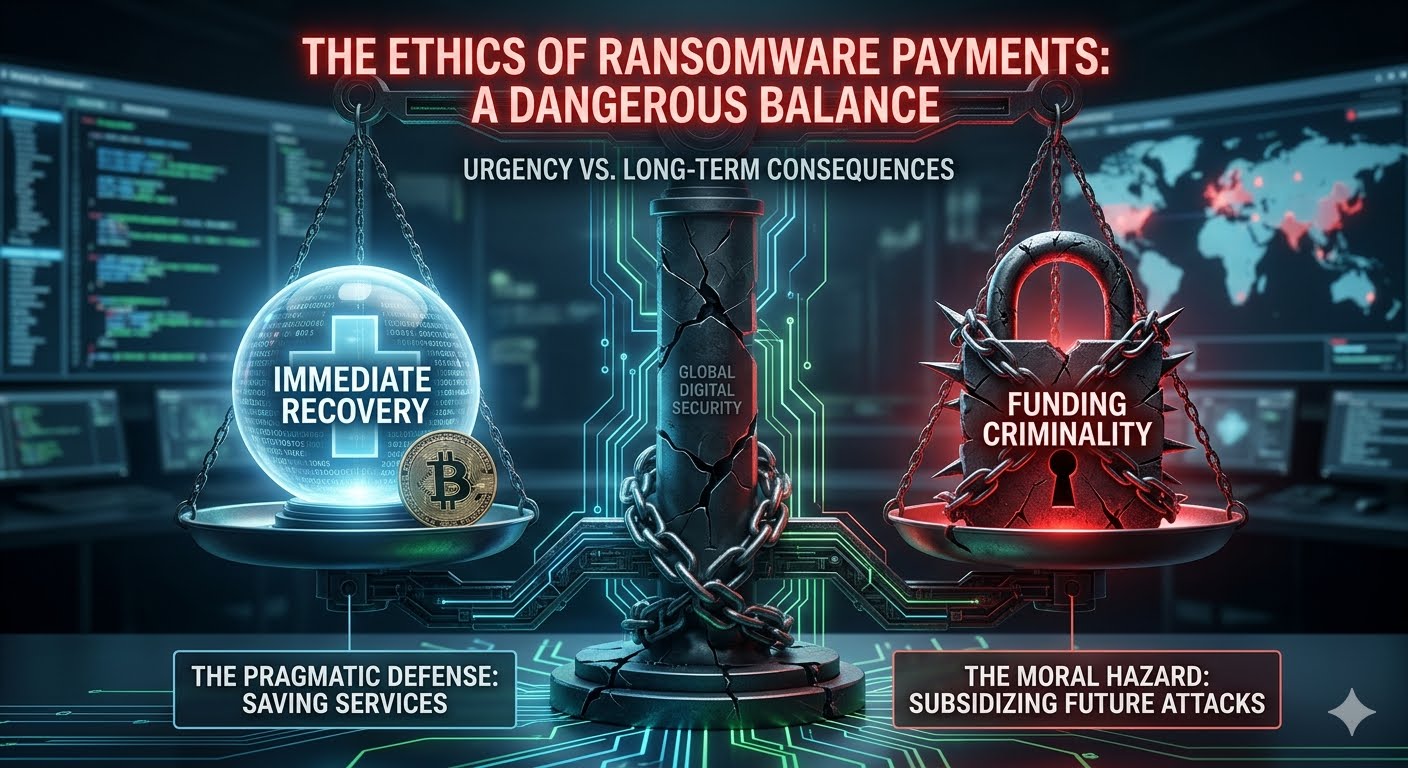
The Ethics of Ransomware Payments. The decision to pay a ransomware demand is one of the most agonizing dilemmas in modern cybersecurity. It is no longer a purely financial calculation; it is a profound ethical crisis that pits an organization’s immediate survival against the long-term safety of the global digital ecosystem. As ransomware attacks grow in scale and severity, the debate over the morality of "buying back" data has become a central pillar of cybersecurity strategy.The Pragmatic Defense: The Case for PayingFrom a strictly utilitarian perspective, many organizations argue that paying a ransom is the "lesser of two evils." When critical infrastructure—such as a hospital, a power grid, or a municipal water system—is held hostage, the cost of inaction is measured in human lives, not just dollars.Immediate Restoration of Services: For a hospital with encrypted patient records, every hour of downtime could mean a delayed surgery or a missed diagnosis. In such high-stakes environments, the ethical obligation to protect human life often overrides the abstract goal of de-funding cybercrime.Fiduciary Responsibility: Corporate leaders have a legal and ethical duty to their shareholders and employees to minimize loss. If the cost of rebuilding a network from scratch is $10 million, but the ransom is $500,000, many boards see payment as the only responsible way to preserve the company’s solvency and protect thousands of jobs.Data Sensitivity: In cases of "double extortion," where hackers threaten to leak sensitive private data (like mental health records or trade secrets), organizations may pay not just for a decryption key, but for a promise (however hollow) that the data will be deleted.The Moral Hazard: The Case Against PayingThe counter-argument is built on the principle that "negotiating with terrorists" only fuels the fire. Law enforcement agencies, including the FBI and Interpol, strongly discourage payments because they create a self-sustaining cycle of victimization.Funding Future Attacks: Ransomware is a business. Every dollar paid is reinvested by criminal syndicates into research and development. This allows them to buy more powerful "zero-day" exploits, recruit better talent, and target even more vulnerable sectors. By paying, a victim is essentially subsidizing the next victim’s downfall.The "Marked" Status: Paying a ransom does not guarantee safety; it often guarantees a follow-up attack. Statistics show that organizations that pay are frequently targeted again, either by the same group or by others who see them as a "soft target" willing to open their wallet.No Guarantee of Recovery: Attackers are under no obligation to provide a working decryption key. In many instances, the decryption tools provided are buggy and result in further data corruption, or the attackers simply vanish after receiving the cryptocurrency.The Geopolitical and Legal DimensionThe ethics of ransomware payment are increasingly complicated by international law and sanctions. Many ransomware groups operate out of jurisdictions that are hostile to the West, and some are suspected of having direct ties to state intelligence agencies.If an organization pays a ransom to a group that is on an official sanctions list (such as groups linked to the Russian or North Korean governments), they may be inadvertently funding state-sponsored espionage or warfare. In the United States, the Office of Foreign Assets Control (OFAC) has warned that companies facilitating such payments could face severe legal penalties, regardless of the "urgency" of their situation. This shifts the ethical burden from a private choice to a matter of national security.The Rise of Mandatory Reporting and BansAs the crisis deepens, some governments are moving toward a total ban on ransomware payments. The logic is that if the "revenue stream" is completely cut off, the business model of ransomware will collapse. However, critics argue that a ban would only lead to "under-the-table" payments and cause businesses to shut down permanently rather than report the crime.A more moderate approach being adopted is mandatory reporting. By requiring companies to disclose attacks and payments, governments can gather the intelligence needed to dismantle the infrastructure (servers and crypto-exchanges) that these groups rely on.A New Ethical Framework: "Defensive Resilience"To move beyond the binary "to pay or not to pay" debate, the cybersecurity community is advocating for a framework of Defensive Resilience. The most ethical action an organization can take is to invest so heavily in backups and "offline" data storage that a ransom demand becomes irrelevant.Ethical leadership in this space requires:Transparency: Being honest with customers and regulators about the breach.Collaboration: Sharing threat intelligence with competitors to prevent the spread of a specific strain of ransomware.Proactive Investment: Prioritizing security budgets over "reactive" insurance policies.ConclusionThe ethics of ransomware payments remain a "grey hat" area where there are rarely perfect answers. While the individual organization may save itself by paying, it does so at the expense of the collective security of the internet. The only true solution to this ethical impasse is to remove the leverage that attackers hold. Until organizations can recover from an attack without the need for a criminal's key, the dilemma will continue to haunt boardrooms across the globe.
AI Driven Phishing
May 10, 2026
5 min read

AI Driven Phishing

AI Driven Phishing in Cybersecurity. The era of "clunky" phishing—characterized by obvious spelling errors and generic greetings—is rapidly coming to an end. AI-Driven Phishing represents the weaponization of Large Language Models (LLMs) and Generative AI to create highly sophisticated, personalized, and scalable social engineering attacks that bypass traditional security filters and human intuition.The Evolution: From "Spray and Pray" to "Spear and Scale"Traditional phishing relied on a "spray and pray" methodology: sending millions of low-quality emails in the hope that a tiny percentage of recipients would be gullible enough to click. AI has flipped this script.With tools like ChatGPT (and its illicit counterparts like WormGPT or FraudGPT), attackers can now conduct "Spear Phishing" at the scale of a mass campaign. AI can analyze vast amounts of publicly available data from LinkedIn, social media, and corporate websites to craft messages that are contextually relevant to the victim. It can mimic the specific writing style of a CEO, use industry-specific jargon, and reference recent company events, making the deception nearly indistinguishable from a legitimate internal communication.The Mechanics of AI-Driven AttacksAI has enhanced every stage of the phishing lifecycle:1. Perfected Language and LocalizationOne of the easiest ways to spot a phish used to be poor grammar or awkward phrasing, often a result of non-native speakers using translation tools. AI removes this "red flag." It can generate perfect, professional prose in dozens of languages, allowing cybercriminals to expand their reach into foreign markets with the same level of persuasiveness as a native speaker.2. Deepfakes: Beyond the InboxAI-driven phishing is no longer limited to text. Business Email Compromise (BEC) has evolved into Business Communication Compromise.Voice Deepfakes (Vishing): Using just a few seconds of a person's voice recorded from a YouTube video or a podcast, AI can clone a voice to make a phone call to an employee, posing as a frantic executive requesting an urgent wire transfer.Video Deepfakes: During virtual meetings (like Zoom or Teams), attackers can now use real-time deepfake filters to impersonate high-level officials. In a notable 2024 case, a finance worker in Hong Kong was tricked into paying out $25 million after attending a video call with what he thought were his "colleagues," all of whom were AI-generated deepfakes.3. Dynamic Credential HarvestingAI can build adaptive phishing sites. Instead of a static fake login page, an AI-driven site can change its appearance in real-time based on the user's browser, location, or the specific email they clicked. This bypasses static "URL reputation" databases that security software uses to block known malicious sites.The Threat to Modern Defense SystemsAI phishing is specifically designed to defeat the two pillars of modern defense: Technical Filters and Employee Training.Bypassing SEGs: Secure Email Gateways (SEGs) look for "signatures" of known attacks. Because AI can generate a unique, one-of-a-kind message for every single recipient, there is no "signature" to detect. The message is technically "clean"—it contains no malware, just a persuasive call to action.Eroding Human Intuition: Most Security Awareness Training (SAT) teaches employees to look for urgency and errors. When an AI creates a calm, professional, and error-free request that perfectly matches a real business process, the "human firewall" often fails.Defending Against the AI WaveAs attackers use AI to sharpen their spears, defenders must use AI to thicken their shields.1. AI-Powered Email SecurityOrganizations are moving toward Integrated Cloud Email Security (ICES). These systems use machine learning to build a "baseline" of normal communication patterns. If an email arrives that is technically valid but uses a tone or request type that is statistically "unlikely" for that specific sender, the system flags it as an anomaly.2. Moving Toward Phishing-Resistant MFATraditional Multi-Factor Authentication (MFA) that uses SMS codes or push notifications is still vulnerable to "MFA Fatigue" or proxy-based phishing. The gold standard is now FIDO2/WebAuthn (Passkeys), which uses hardware-backed cryptography to ensure that a user can only log in to a legitimate site, making it physically impossible for a phishing site to "intercept" the credentials.3. Redefining "Trust" in CommunicationCompanies must implement strict out-of-band verification policies. If an "executive" makes an unusual request via voice or video call, employees must be trained to verify the request through a secondary, pre-approved channel (like a specific internal chat app) before taking action.Conclusion: The Arms RaceAI-driven phishing has turned cybersecurity into an AI vs. AI arms race. The advantage currently sits with the attackers, who can experiment with new models without the constraints of ethics or regulations. However, by adopting "Zero Trust" principles and shifting toward cryptographic authentication methods, organizations can mitigate the impact of even the most sophisticated AI deceptions.The goal is no longer to teach employees to "spot the phish"—it is to build systems where even if a human is tricked, the technology prevents the breach.
Post-Quantum Cryptography (PQC)
May 10, 2026
3 min read

Post-Quantum Cryptography (PQC)

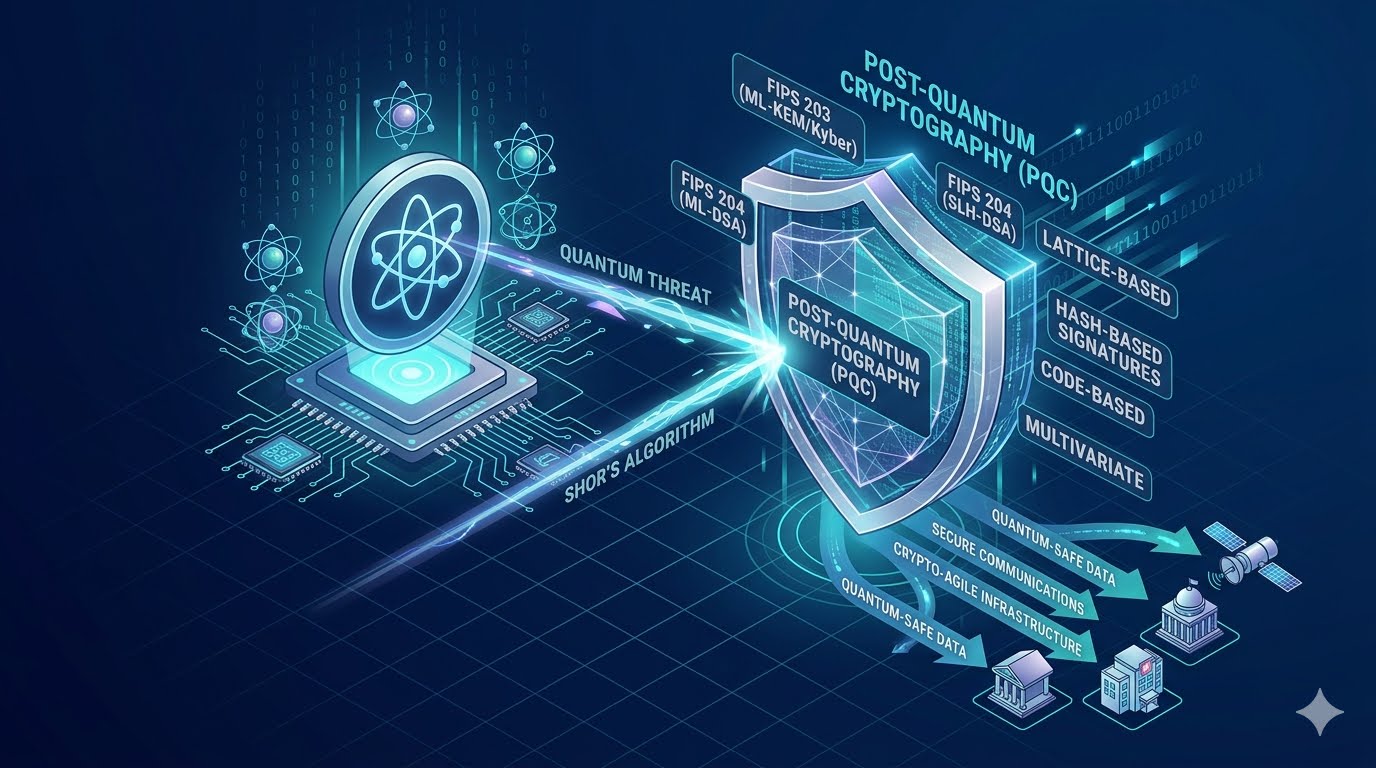
Post-Quantum Cryptography. Post-Quantum Cryptography (PQC) is the next critical frontier in cybersecurity, specifically designed to protect digital infrastructure from the theoretical but imminent threat of quantum computers. While traditional encryption relies on the difficulty of factoring large numbers—a task current computers find nearly impossible—quantum computers using Shor's algorithm could potentially solve these problems in minutes.The Quantum Threat: A Paradigm ShiftModern cybersecurity relies heavily on public-key infrastructure (PKI) like RSA and Elliptic Curve Cryptography (ECC) to secure everything from bank transfers to private messages. These methods are "pre-quantum" and vulnerable to a Cryptographically Relevant Quantum Computer (CRQC).A major concern for security experts is the "Harvest Now, Decrypt Later" strategy. Adversaries are currently intercepting and storing high-value encrypted data today, with the intent to decrypt it years from now when sufficiently powerful quantum computers become available. This makes transitioning to quantum-safe protocols an urgent priority, even before quantum computers are fully realized.Key Approaches to Post-Quantum CryptographyPQC does not require quantum hardware; it runs on classical computers but uses mathematical problems that are thought to be resistant to both classical and quantum attacks. Research is focused on several distinct mathematical foundations:Lattice-based Cryptography: These systems use high-dimensional geometric structures called lattices. Even for quantum computers, finding specific paths through these complex multidimensional grids is computationally exhausting. This approach, including algorithms like ML-KEM (formerly Kyber), is favored for its efficiency and scalability.Hash-based Signatures: These rely on cryptographic hash functions that are naturally resistant to quantum reversal. They offer high security but may have limitations in signature generation speed.Code-based Cryptography: Relying on error-correcting codes, these systems present quantum computers with difficult decoding problems. One of the oldest and most trusted is the Classic McEliece algorithm.Multivariate Cryptography: This approach uses systems of complex polynomial equations that are believed to be too difficult for any computer to solve efficiently.Standardization and ImplementationThe National Institute of Standards and Technology (NIST) has spearheaded a global effort to standardize these new algorithms. In August 2024, NIST released its first three official standards:FIPS 203 (ML-KEM): Based on the CRYSTALS-Kyber algorithm for general encryption.FIPS 204 (ML-DSA): Based on CRYSTALS-Dilithium for digital signatures.FIPS 205 (SLH-DSA): Based on SPHINCS+ as an alternative signature scheme.Organizations are encouraged to adopt "Crypto-Agility"—the ability to rapidly switch cryptographic algorithms without redesigning entire systems. Many are currently using hybrid schemes, which combine traditional classical encryption with post-quantum layers to ensure security remains intact even if one method is eventually compromised.Challenges and Future OutlookTransitioning to PQC is not without its hurdles. These new algorithms often require:Larger Key Sizes: Some PQC algorithms use much larger keys and certificates than RSA, requiring more storage and memory.Higher Latency: Encryption and decryption can be more computationally intensive, potentially slowing down real-time applications or high-frequency API requests.Infrastructure Updates: Legacy hardware, particularly in IoT or industrial environments, may lack the processing power needed for these advanced mathematical operations.Despite these challenges, tech giants like Google, Apple, and Microsoft have already begun integrating post-quantum protections into their platforms. As quantum computing continues to accelerate, the shift to PQC remains the only viable way to ensure long-term data resilience in a post-quantum world.

Stay Ahead in Tech

Get the latest ICT tutorials, DevOps guides, and AI news delivered directly to your inbox.