The Latest in

ICT Articles & Tutorials

World ICT News is a professional platform dedicated to Artificial Intelligence, Cloud Computing, DevOps, and Cybersecurity. Empowering the next generation of ICT specialists. Our exclusive tutorials and articles are designed to serve as a stepping stone for you into the world of ICT industry...

A Beginner’s Guide to Website Structure and Components
May 26, 2026
7 min read

A Beginner’s Guide to Website Structure and Components

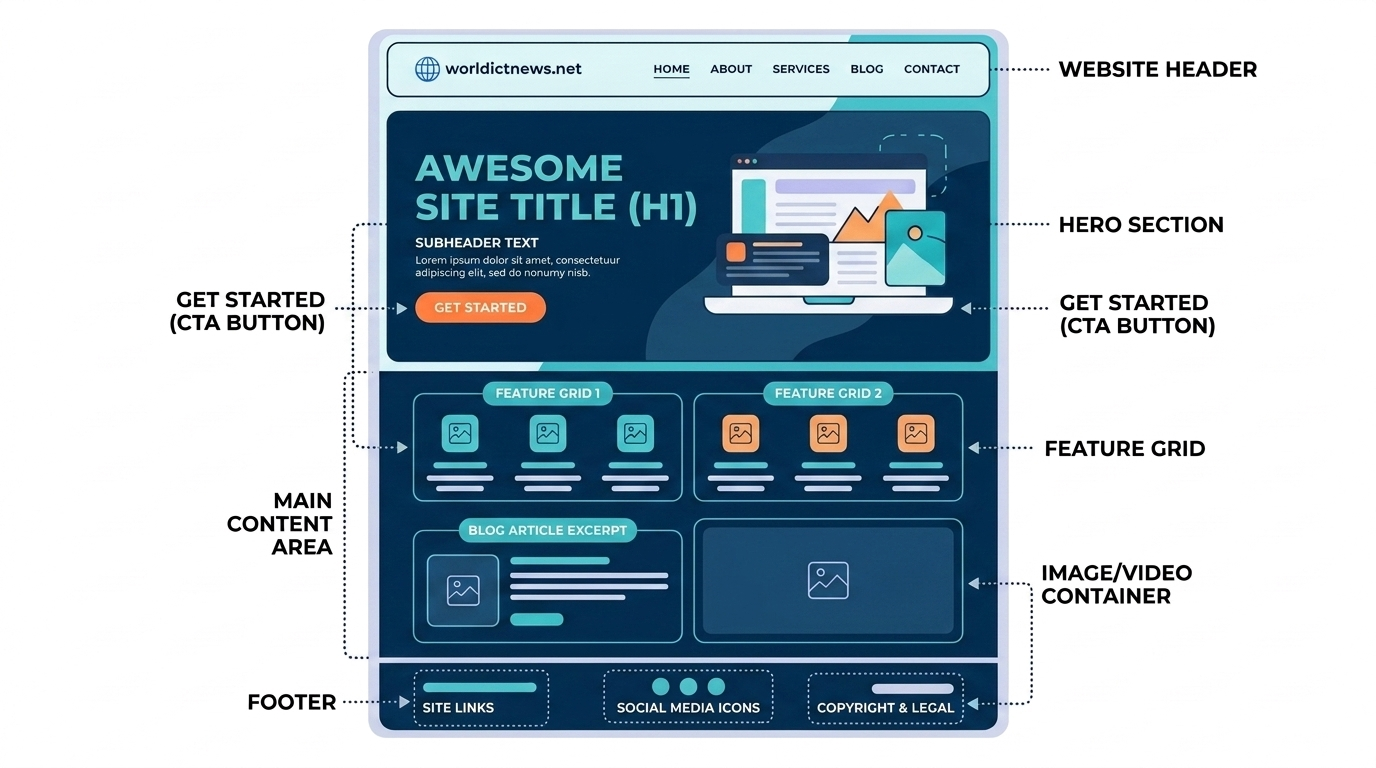
Blueprint of the Web: A Beginner’s Guide to Website Structure and Components. Every single day, billions of people click links, scroll through feeds, and complete checkouts on websites without ever thinking about how those digital spaces are built. To a beginner, a website can look like magic. However, beneath the beautiful designs, smooth animations, and product grids lies a highly logical structure built from standardized, reusable components.Building a website is very much like building a house. You cannot start by choosing the paint colors or picking out furniture; you must first lay a solid foundation, build the structural framework, map out the plumbing, and design the floor plan. In the digital world, this layout is known as website architecture.Whether you are looking to learn web development, starting an e-commerce side-hustle, or simply trying to understand how your business’s digital assets work, this guide breaks down website structures and essential components in plain language.🧭 The Core Mechanics: Frontend vs. BackendBefore diving into the visual building blocks of a webpage, it is critical to understand the two main layers that make a website function: the Frontend and the Backend.[ Frontend: The Visual Interface ] ── (Requests Data) ──► [ Backend: The Engine Room ] ◄── (Sends Data) ──The Frontend (The Client-Side)The frontend is everything a user sees, clicks, and interacts with directly inside their web browser. If you can view it, click it, or hover over it, it is part of the frontend. It is constructed using three primary languages:HTML (HyperText Markup Language): The raw bones and skeleton of the website. It defines where headings, paragraphs, images, and buttons go.CSS (Cascading Style Sheets): The clothing and makeup. It dictates the colors, fonts, spacing, alignment, and overall design style.JavaScript: The muscle and nervous system. It makes the site interactive, handling things like pop-up windows, drop-down menus, and data calculations.The Backend (The Server-Side)The backend is the invisible engine room behind the scenes. It consists of a web server, an application instance, and a database. When you log into an account, buy a product, or type a search query, the backend processes your request, searches the database, and sends the correct data back to your screen.🗺️ Website Architecture: Organizing the Whole SiteWebsite structure refers to how the different pages of your website are linked together and organized. A well-planned architecture helps human users find information in less than three clicks and enables search engine bots (like Google) to crawl and index your content efficiently.There are several ways to structure a site, but the most widely adopted framework is the Hierarchical Tree Structure. [ Home Page ] │ ┌───┴───┐ ▼ ▼ [ Services Page ] [ About Us Page ] │ ┌──┴──┐ ▼ ▼[Web Dev] [SEO Optimization]1. The Home Page (The Roots)The home page acts as your website's virtual front door and the main entry point for your traffic. It sets the tone, introduces the core value proposition, and points visitors toward the site's deeper sections.2. Category Pages (The Branches)These pages group related content together. For an online clothing store, categories would be "Men's Clothing," "Women's Clothing," and "Accessories." For a corporate business site, categories might include "Services," "Case Studies," and "Contact Us."3. Sub-Category/Individual Pages (The Leaves)These are the deepest pages on your website. They hold specific information, such as an individual blog article, a single product checkout page, or a breakdown of a specific service feature.🛠️ The Global Components: Anatomy of a WebpageEvery single page on a website contains standard structural regions. Regardless of whether you visit a news outlet, a personal blog, or a banking dashboard, you will almost always find these global components.┌─────┐│ [HEADER] Logo Home About Services Contact │├─────┤│ ││ [HERO SECTION] ││ Big Bold Heading (H1) ││ Subheading explanatory text ││ [Call-to-Action Button] ││ │├───┤│ [MAIN CONTENT AREA] ││ Articles, product grids, images, videos, testimonials ││ │├────┤│ [FOOTER] Privacy Policy | Terms of Service | © 2026 │└───┘1. The Header (Navigation Bar)Located at the absolute top of the page, the header is a permanent anchor across your entire website. Its main job is to help users find their way around.The Logo: Usually placed in the top-left corner. Clicking it will always return the user to the home page.Navigation Links: Buttons or text paths leading directly to primary category pages.Search Bar: A helpful field for larger websites, allowing users to bypass menus and search for specific content immediately.Shopping Cart / Profile Icon: Common on interactive e-commerce and member websites.2. The Hero SectionThe Hero Section is the first major visual area a visitor sees right below the header. It needs to capture attention instantly before the user scrolls down.The H1 Heading: The most important title on the page, summarizing exactly what the business or website does.Supporting Copy: A short 2–3 sentence paragraph expanding on the title.Call-to-Action (CTA) Button: A bright, highly visible button designed to drive user action (e.g., "Get Started," "Shop Now," "Book a Free Call").Background Visual: A high-resolution image, video loop, or clean abstract illustration matching the brand tone.3. The Main Content BodyThis is the heart of the page, holding the unique content that the user came to read. The body is typically broken down into distinct sections separated by vertical whitespace:Feature Grid blocks: Highlighting key benefits or capabilities.Media Containers: Embedded images, audio players, or video elements.Testimonials / Social Proof: Reviews, customer quotes, and case studies proving credibility.Contact Forms: Simple boxes allowing visitors to send messages directly without opening an email app.4. The FooterThe footer sits at the very bottom of the page. It serves as a safety net for lost users and holds important administrative, regulatory, and legal links.Legal Links: Copyright notices, Privacy Policies, and Terms of Service documents.Contact & Location Details: Physical addresses, customer service phone numbers, and support email channels.Social Media Icons: Direct hyperlinked connections to the company's profiles on external platforms like LinkedIn or Instagram.Sitemap Links: A comprehensive, text-based list of links to all major areas of the website.📈 Key Best Practices for Website DesignWhen assembling these pieces for the first time, keep these fundamental digital design principles in mind:Mobile-First Responsiveness: Over 55% of all web traffic comes from smartphones. Your website structure must adjust dynamically to look fantastic on desktop monitors, tablets, and small phone screens alike.Visual Hierarchy: Use size, weight, and color contrast to guide the user's eye. Your H1 heading should always be much larger than body paragraphs, and your primary CTA buttons should pop out noticeably against your background colors.Clear White Space: Avoid cluttering elements together. Generous spacing around text and sections gives your design room to breathe and makes it much easier to read.Fast Load Speed: Websites with heavy, unoptimized images load slowly, driving visitors away. Keep files compressed and use modern image formats like WebP.📊 Summary Structure Checklist for Absolute BeginnersComponent LayerCore ResponsibilityTypical Elements IncludedHeaderNavigation and OrientationCompany logo, menu navigation links, user search utilityHero SectionFirst Impression & Primary GoalH1 title statement, brief value copy, Call-to-Action buttonMain ContentDelivery of InformationParagraphs, informative images, videos, lists, contact formsFooterLegal and Secondary LinksCopyright info, privacy policy links, social media channels🏁 ConclusionBuilding a website becomes much less intimidating once you realize it is just a puzzle made of standardized components. By understanding how the header, hero section, content body, and footer work together across a clear page hierarchy, you can design user-friendly digital spaces from scratch. Master these baseline building blocks first, and you will have a solid foundation for your journey into web development, design, or digital marketing.
 Guides to JavaScript Objects with Real-World Applications
May 26, 2026
7 min read

Guides to JavaScript Objects with Real-World Applications

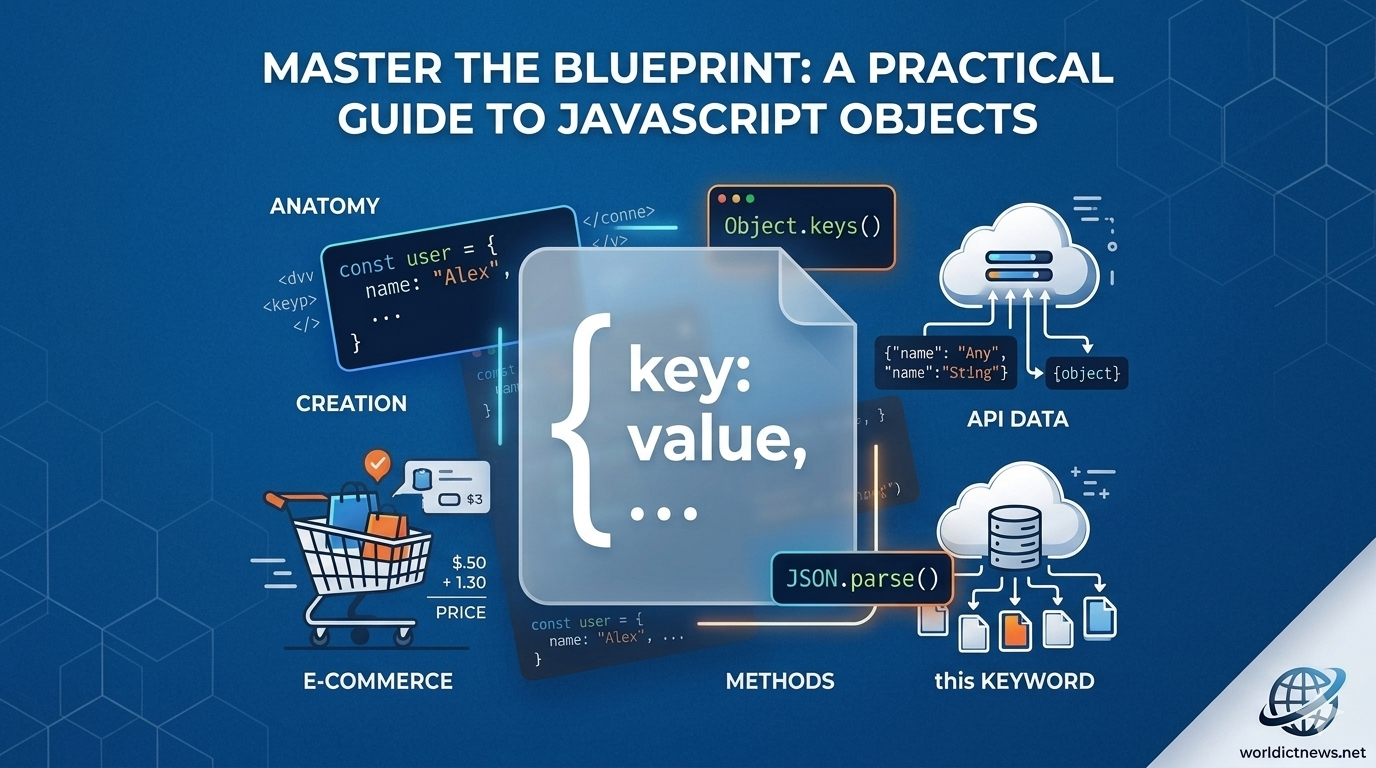
Master the Blueprint: A Practical Guide to JavaScript Objects with Real-World Applications. In JavaScript, almost everything revolves around a single fundamental concept: Objects. Whether you are extracting structured data from a remote REST API, managing the global application state in a frontend framework like React, or manipulating elements within the Document Object Model (DOM), you are constantly interacting with objects.Unlike primitive data types such as strings or numbers—which store single isolated values—objects act as structured collections. They allow developers to bundle related data variables (properties) and functional logic (methods) into a single, cohesive entity. Understanding objects is the definitive boundary line separating a casual scriptwriter from a proficient software engineer.This comprehensive technical guide breaks down the core structural mechanics of JavaScript objects, explains essential data manipulation patterns, and walks through production-ready code examples mapping directly to real-world applications.🧭 The Core Anatomy of a JavaScript ObjectAt its absolute simplest level, an object is an unordered collection of key-value pairs. The key (or property name) acts as a unique string identifier, pointing directly to a corresponding value, which can be any data type in the JavaScript ecosystem—including arrays, other objects, or executable functions.┌────────┐│ User Object │├───────┤│ • Key: username ──► Value: "dev_alex" │ ◄── Property (Data)│ • Key: isActive ──► Value: true │ ◄── Property (Data)│ ││ • Key: login() ──► Value: function() │ ◄── Method (Behavior)└───────┘When a variable is attached to an object, it is called a property. When an executable function is attached to an object, it is called a method.🛠️ Fundamental Mechanics: Creation and Data ManipulationBefore exploring complex enterprise applications, let’s look at how to declare objects and interact with their internal values.1. Object Declaration (The Literal Syntax)The most common and modern way to initialize an object is by using curly braces {}. This is known as the object literal syntax:javascript// Initializing a baseline user profile objectconst userProfile = { username: "cyber_sentinel", accountLevel: "Administrator", loginCount: 42, isTwoFactorEnabled: true};Use code with caution.2. Accessing Property ValuesJavaScript provides two intuitive ways to read properties stored inside an object: Dot Notation and Bracket Notation.javascript// 1. Dot Notation (Preferred for clean, standard property names)console.log(userProfile.username); // Output: cyber_sentinel// 2. Bracket Notation (Mandatory when property names use spaces, special characters, or variables)console.log (userProfile[ "accountLevel"]); // Output: Administrator// Dynamic access example using bracket notation:const queryKey = "loginCount";console.log (userProfile[queryKey]); // Output: 42Use code with caution.3. Modifying and Appending New DataObjects in JavaScript are dynamic and mutable by default. You can easily add completely new fields or alter existing values on the fly:javascript// Updating an existing property valueuserProfile.loginCount = 43;// Appending an entirely new property to the existing structureuserProfile.lastLoginIp = "192.168.1.105";// Deleting a property permanently from the objectdelete userProfile. isTwoFactorEnabled;console.log(userProfile);/*Output:{ username: "cyber_sentinel", accountLevel: "Administrator", loginCount: 43, lastLoginIp: "192.168.1.105"}*/Use code with caution.🏗️ Advanced Object Patterns: Methods and the this KeywordObjects become truly powerful when they hold functions. Methods allow objects to manage their own internal state and perform actions independently.javascriptconst e-commerceCart = { items: ["Laptop", "Wireless Mouse"], discountCode: "SUMMER20", totalAmount: 1250, // Method executing internal object data manipulation calculateFinalPrice: function() { // The 'this' keyword explicitly references the execution context of the parent object if (this.discountCode === "SUMMER20") { return this.totalAmount * 0.8; // Apply a 20% discount } return this.totalAmount; }};console.log (e-commerceCart. calculateFinalPrice() ); // Output: 1000Use code with caution.⚠️ Critical Architectural Warning: Avoid using arrow functions () => {} when writing methods inside objects. Arrow functions do not bind their own this context. Instead, they lexically inherit this from the surrounding global scope, which can cause unexpected undefined runtime errors.💼 Real-World Application 1: Managing an E-Commerce Shopping Cart SystemLet’s apply these fundamentals to a real-world scenario. Below is a production-style implementation of a shopping cart object capable of managing complex state calculations, adding new items safely, and generating checkout line receipts.javascriptconst shoppingCartManager = { customerName: "Elena Rostova", cartId: "CART_99821", itemsList: [], taxRate: 0.08, // 8% State Tax // Method to safely append a product line item to the internal array state addItem: function (productName, unitPrice, quantity = 1) { this.itemsList.push ({ name: productName, price: unitPrice, qty: quantity }); console.log (`Success: Added ${quantity} x ${productName} to the cart.`); }, // Method utilizing iteration loops to compute subtotal pricing metrics calculateSubtotal: function() { let subtotal = 0; for (let i = 0; i < this .itemsList. length; i++) { subtotal += this. itemsList[i].price * this.itemsList[i].qty; } return subtotal; }, // Method utilizing subtotal metrics to compute exact tax and final pricing generateInvoice: function() { const rawSubtotal = this .calculateSubtotal(); const computedTax = rawSubtotal * this.taxRate; const grandTotal = rawSubtotal + computedTax; return { client: this.customerName, subtotalPrice: rawSubtotal.toFixed(2), taxCharged: computedTax. toFixed(2), finalCheckoutPrice: grandTotal.toFixed(2) }; }};// --- Practical Execution Sequence ---shoppingCartManager. addItem ("Pro Mechanical Keyboard", 149.99, 1); shoppingCartManager. addItem ("4K UltraWide Monitor", 499.00, 2);// Generate final structured invoice payloadconst finalInvoice = shoppingCartManager. generateInvoice();console.table(finalInvoice);Use code with caution.Output Visualization Table:PropertyValueclientElena RostovasubtotalPrice1147.99taxCharged91.84finalCheckoutPrice1239.83💼 Real-World Application 2: Parsing Server API JSON PayloadsWhen working with modern web applications, you rarely create all your own data. Instead, your frontend apps fetch text-based JSON payloads from external server databases. JavaScript objects make it incredibly simple to parse and extract this information.Imagine your frontend application receives the following raw JSON data string from a backend user database:javascriptconst rawJsonPayloadFromServer = `{"id":1024, "meta": {"role":"editor", "department": "marketing"}, "profile" : {"fullName": "Marcus Vance", "emails": ["marcus@company.com", "marcus. personal@gmail.com"]}}`;// Step 1: Parse the string payload into a native JavaScript Object structureconst cleanUserData = JSON.parse(rawJsonPayloadFromServer);// Step 2: Extract nested items safely using Dot and Bracket Notation patternsconst userRole = cleanUserData. meta.role;const primaryEmailAddress = cleanUserData. profile. emails[0];console.log(`User: ${cleanUserData. profile.fullName} holds the role of: ${userRole}.`);// Output: User: Marcus Vance holds the role of: editor.Use code with caution.📈 Functional Utilities: Iterating and Cloning ObjectsAs software scales, you often need to loop through object keys or make safe copies of data packages. Here are the three most reliable ways to extract object metrics dynamically:javascriptconst serverStatus = { nodeId: "NODE_S1", cpuLoad: "42%", uptimeHours: 720};// 1. Object.keys() - Returns an array of all keysconsole.log (Object.keys (serverStatus)); // Output: ['nodeId', 'cpuLoad', 'uptimeHours']// 2. Object.values() - Returns an array of all valuesconsole.log (Object.values (serverStatus)); // Output: ['NODE_S1', '42%', 720]// 3. Object.entries() - Returns an array of nested key-value pairsconsole.log (Object.entries (serverStatus));// Output: [ ['nodeId', 'NODE_S1'], ['cpuLoad', '42%'], ['uptimeHours', 720] ]Use code with caution.Safe Data Cloning (Avoiding Reference Bugs)In JavaScript, copying an object with a simple equals sign (const copy = original) does not create a new object. Instead, it copies the reference pointer in memory. If you change a value in the copy, the original object changes too! To avoid this common bug, make a true copy using the Spread Operator (...):javascriptconst originalConfig = { theme: "dark", notifications: true };// Creating a safe clone copy that points to an entirely isolated memory spaceconst safeCloneConfig = { ...originalConfig };// Updating the clone does not damage the original setupsafeCloneConfig.theme = "light";console.log(originalConfig.theme); // Output: "dark" (Preserved!)console.log(safeCloneConfig.theme); // Output: "light" (Modified!)Use code with caution.📊 Quick Reference Checklist: Essential Object OperationsIntentCode ExampleOutput / ImpactInstantiationconst app = {};Creates an empty object literal container.Read Valueapp.theme;Accesses data using direct dot notation.Write/Updateapp.version = "2.1";Dynamically appends or overrides data.Check for Key"version" in app;Returns true or false based on field existence.Shallow Cloneconst copy = {...app};Copies all fields into a safe, independent object.🏁 ConclusionJavaScript objects are far more than just containers for plain text data. They are the scaffolding upon which complex modern web applications are built. By mastering how to structure properties, design self-contained methods, leverage context pointers via the this keyword, and parse external server JSON responses, you can write much cleaner, more modular code.Whether your next project involves building complex data structures, handling global state management, or developing server-side APIs, leveraging robust object-oriented patterns will ensure your applications remain maintainable and highly scalable.
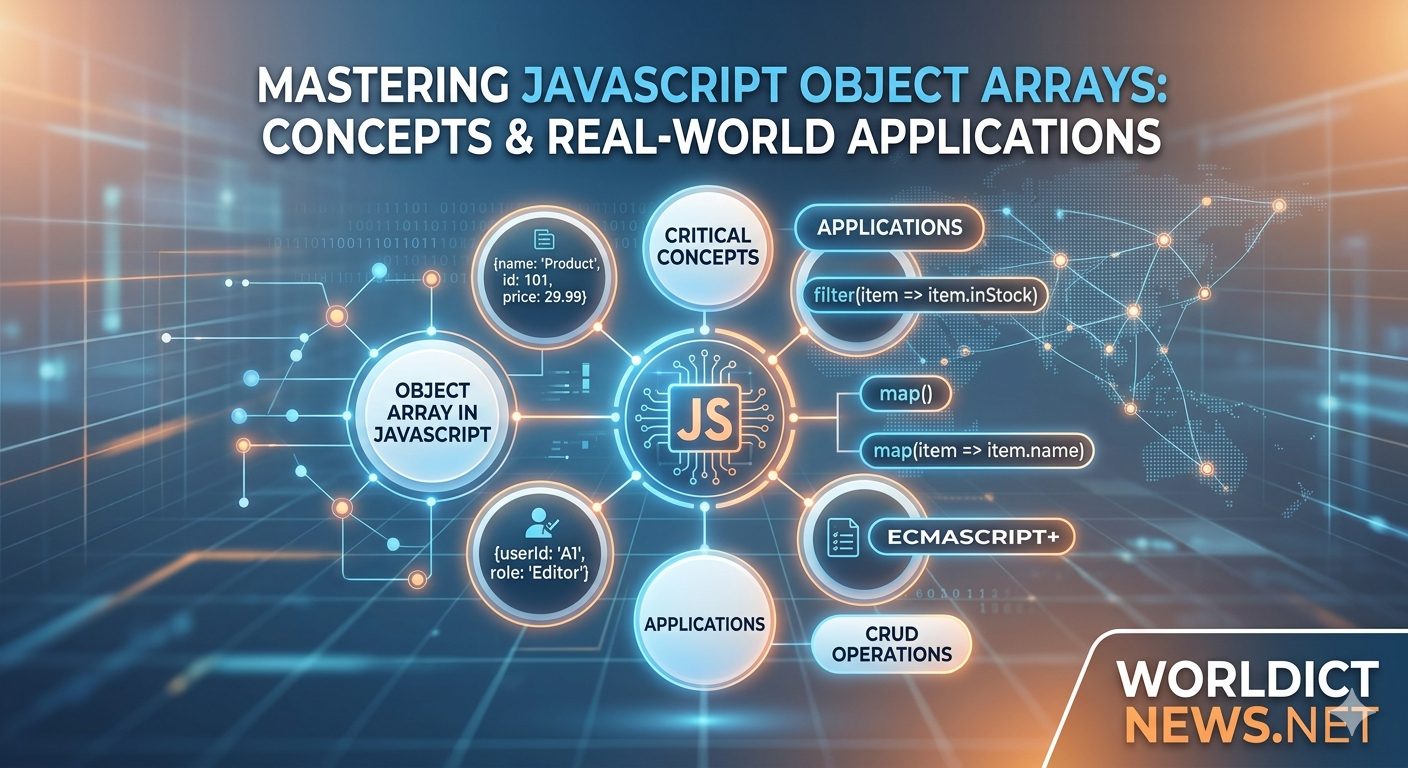
Mastering Complex Loops and Array in Javascript
May 22, 2026
7 min read

Mastering Complex Loops and Array in Javascript

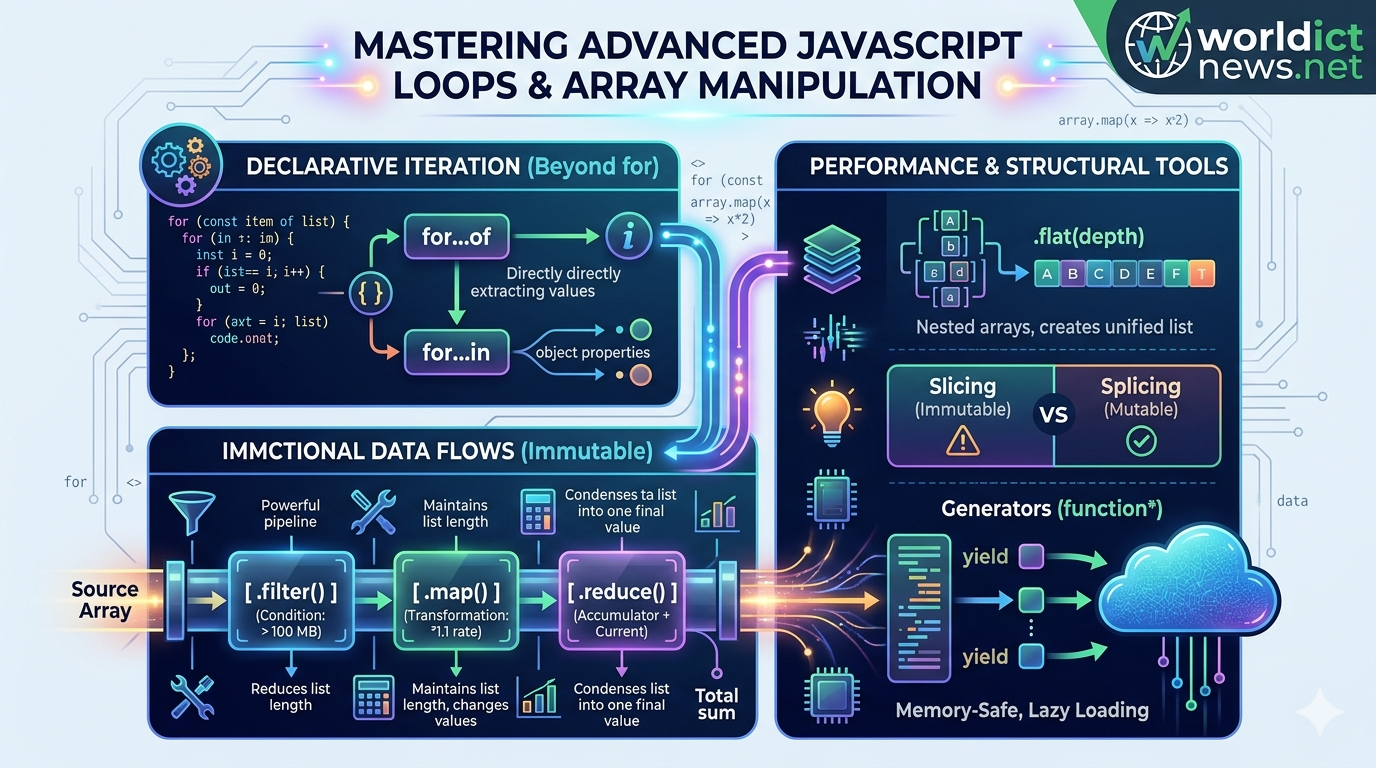
Advanced JavaScript: Mastering Complex Loops and Array Manipulation. In modern software engineering, data is rarely processed in simple, predictable formats. Enterprise applications routinely handle deeply nested JSON payloads, real-time API streams, and large arrays of complex data objects. To build high-performance, maintainable software architectures, developers must move beyond basic for loops and standard array operations.Modern ECMAScript (ES6+) provides a robust toolkit of advanced iteration protocols and functional array methods. Mastering these tools allows you to write declarative, highly optimized code that eliminates common logical bugs, minimizes computational overhead, and improves readability. This guide explores complex control flows, functional transformation matrices, memory-efficient generators, and optimal data mutation strategies with real-world examples.1. Declarative Iteration Protocols: Beyond the Standard LoopTraditional indexing loops (for (let i = 0; i < arr.length; i++)) introduce manual tracking states, making them prone to off-by-one errors and scope leaks. Modern JavaScript introduces declarative iteration protocols that abstract the underlying pointer mechanics away from the developer.The for...of StatementThe for...of loop executes a custom iteration loop over values produced by an iterable object—including arrays, strings, maps, sets, and function arguments.javascriptconst hardwareNodes = ['Server-A', 'Server-B', 'Gateway-01'];// Direct value extraction without manual index trackingfor (const node of hardwareNodes) { console.log(`Node Address: ${node}`);}Use code with caution.The for...in Statement (Object Reflection)Unlike for...of, the for...in loop iterates over the enumerable string properties of an object. It should never be used to traverse standard arrays because it inspects structural keys rather than array index values.javascriptconst systemConfig = { port: 443, ssl: true, environment: 'production' };for (const key in systemConfig) { if (Object.prototype.hasOwnProperty.call (systemConfig, key)) { console.log(`Setting: ${key} -> Value: ${systemConfig[key]}`); }}Use code with caution.2. Functional Functional Array Transformations: Immutable Data StreamsModern JavaScript embraces functional programming paradigms. The cornerstone of this approach is immutability: instead of modifying a raw source array directly, functional methods process data through an assembly pipeline, returning a brand-new array instance.Source Array ──► [ .filter() ] ──► [ .map() ] ──► [ .reduce() ] ──► Final Scalar/ArrayHigh-Order Methods Breakdown.map(): Transforms every individual element inside an array uniformly, producing a new array of identical length..filter(): Evaluates a boolean condition against each element, passing only items that return true into the new collection..reduce(): Executes a callback reducer function across all elements, condensing the entire array down into a single cumulative scalar output (like an integer, string, or object).Complex Pipeline Code ExampleConsider an array of telemetry logs collected from a cloud infrastructure environment. We need to filter out normal logs, extract the memory usage metrics from critical warnings, and calculate the total memory deficit.javascriptconst systemLogs = [ { id: 101, type: 'info', memoryUsage: 120 }, { id: 102, type: 'critical', memoryUsage: 512 }, { id: 103, type: 'warning', memoryUsage: 256 }, { id: 104, type: 'critical', memoryUsage: 1024 }];// Pipeline processing: Filter -> Map -> Reduceconst totalCriticalMemoryCost = systemLogs .filter(log => log.type === 'critical') .map(log => log.memoryUsage) .reduce((accumulator, currentMemory) => accumulator + currentMemory, 0);console.log(`Total Critical Memory Deficit: ${totalCriticalMemoryCost} MB`);// Output: Total Critical Memory Deficit: 1536 MBUse code with caution.3. High-Performance Searching and Matching OperationsWhen working with microservice arrays, locating specific objects quickly requires specialized evaluation tools that optimize computing resources.javascriptconst repositoryNodes = [ { tag: 'v1.0.0', compiled: true }, { tag: 'v1.1.0-beta', compiled: false }, { tag: 'v1.2.0', compiled: true }];// 1. .find() - Extracts the first exact matching object instanceconst activeNode = repositoryNodes.find(node => node.compiled === true);console.log('First Compiled Node:', activeNode.tag); // Output: v1.0.0// 2. .findIndex() - Locates the system index position of a matchconst uncompiledIndex = repositoryNodes.findIndex(node => !node.compiled);console.log('Uncompiled Pointer Index:', uncompiledIndex); // Output: 1// 3. .some() - Checks if at least ONE item meets the condition (Returns Boolean)const containsBeta = repositoryNodes.some(node => node.tag.includes('beta'));console.log('Contains Beta Software:', containsBeta); // Output: true// 4. .every() - Validates if 100% of items meet the conditionconst allCompiled = repositoryNodes.every(node => node.compiled);console.log('Deployment Validation Status:', allCompiled); // Output: falseUse code with caution.4. Advanced Array Mutation: Flattening and SlicingComplex data systems often produce multidimensional array models (arrays inside arrays). Modern JavaScript provides clean, built-in methods to structure these collections without resorting to recursive custom loop logic.Flattening Nested Collections with .flat() and .flatMap()The .flat(depth) method recursively flattens a nested array structure down to a specified depth metric. The .flatMap() method combines map-based transformations and flattening operations into a single performance loop.javascriptconst clusterMatrix = [ ['Node-01', 'Node-02'], ['Node-03', ['Node-04-Backup']]];// Flattening down 2 layers deepconst unifiedCluster = clusterMatrix.flat(2);console.log('Unified Node Matrix:', unifiedCluster);// Output: ['Node-01', 'Node-02', 'Node-03', 'Node-04-Backup']Use code with caution.Slicing vs. Splicing: Mutating vs. Non-MutatingUnderstanding the structural mechanics of .slice() and .splice() is essential for avoiding accidental data mutation bugs:.slice(start, end): Returns a shallow, isolated copy of a portion of an array. The source array remains completely unchanged..splice(start, deleteCount, items...): Destructively alters the source array by removing, replacing, or inserting items in place.javascriptconst inventory = ['Disk-A', 'Disk-B', 'Disk-C', 'Disk-D'];// Safe extraction using sliceconst subset = inventory.slice(1, 3);console.log('Extracted Subset:', subset); // Output: ['Disk-B', 'Disk-C']console.log('Source Inventory Integrity Check:', inventory); // Unchanged// Destructive replacement using spliceconst removedItems = inventory.splice(2, 1, 'SSD-Replacement');console.log('Altered Source Inventory:', inventory); // Output: ['Disk-A', 'Disk-B', 'SSD-Replacement', 'Disk-D']Use code with caution.5. Memory Optimization: Lazy Iteration with GeneratorsWhen processing exceptionally large data sets (e.g., streaming millions of string entries or database records), loading the entire collection into system memory all at once can easily cause browser tab crashes or severe out-of-memory errors on backend platforms.JavaScript resolves this constraint using Generator Functions. Denoted by an asterisk (function*), generators use the yield keyword to output values lazily, one at a time, pausing execution until the program explicitly requests the next element.javascript// Generator function creating an infinite, memory-safe data counterfunction* streamLogGenerator() { let internalCounter = 1; while (true) { yield `System-Log-Stream-ID: ${internalCounter++}`; }}const logStream = streamLogGenerator();// Requesting calculations on-demandconsole.log(logStream.next().value); // Output: System-Log-Stream-ID: 1console.log(logStream.next().value); // Output: System-Log-Stream-ID: 2console.log(logStream.next().value); // Output: System-Log-Stream-ID: 3Use code with caution.Because memory is only allocated for the active yielded item, generators allow your applications to navigate gargantuan data arrays or streams with near-zero initial memory overhead.ConclusionAdvanced loop control and structured array transformations represent a critical transition from basic scripting to scalable software development. By replacing manual loops with declarative functional workflows like .map(), .filter(), and .reduce(), you build predictable, immutable data systems. Combining these techniques with type safety, flattening architectures, and memory-safe generator streams enables you to build high-performance data operations optimized for complex enterprise applications.Frequently Asked Questions (FAQ)1. Why is mutability dangerous when manipulating JavaScript arrays?When you mutate an array directly (using methods like .push(), .reverse(), or .splice()), you change the data stored at that shared memory address. If other parts of your application rely on that original array state, it can lead to silent logical bugs, broken UI renders, and unpredictable component interactions.2. What is the execution performance difference between .map() and .forEach()?The .map() method transforms data functionally, creating and returning a new array instance based on your callback transformations. The .forEach() method is designed strictly to execute side-effects (e.g., updating external states or logging variables); it does not return a value and leaves your data collections unchanged.3. Can you terminate or break out of a .forEach() loop early?No. Unlike traditional for or modern for...of loops, a .forEach() iteration loop cannot be terminated using the standard break or continue statements. If your application logic requires an early exit based on a condition, you should use for...of, .some(), or .find() instead.4. How does the .reduce() initial value parameter impact code stability?If you omit the initial value parameter in a .reduce() loop, JavaScript automatically assigns the first element of your array as the initial accumulator state. If your array happens to be empty at runtime, omitting this initial value will cause the application to crash, throwing a severe TypeError. Always define an explicit initial accumulator parameter (e.g., 0, "", or {}).5. When should I choose a Generator function over a standard array return?Choose a Generator function whenever you are processing open-ended file streams, executing infinite mathematical cycles, or reading extremely large database sets. Generators produce values on-demand using minimal memory buffers, preventing your runtime environments from exhausting application memory capacities.
Modern JavaScript: Frameworks and Ecosystem
May 22, 2026
8 min read

Modern JavaScript: Frameworks and Ecosystem

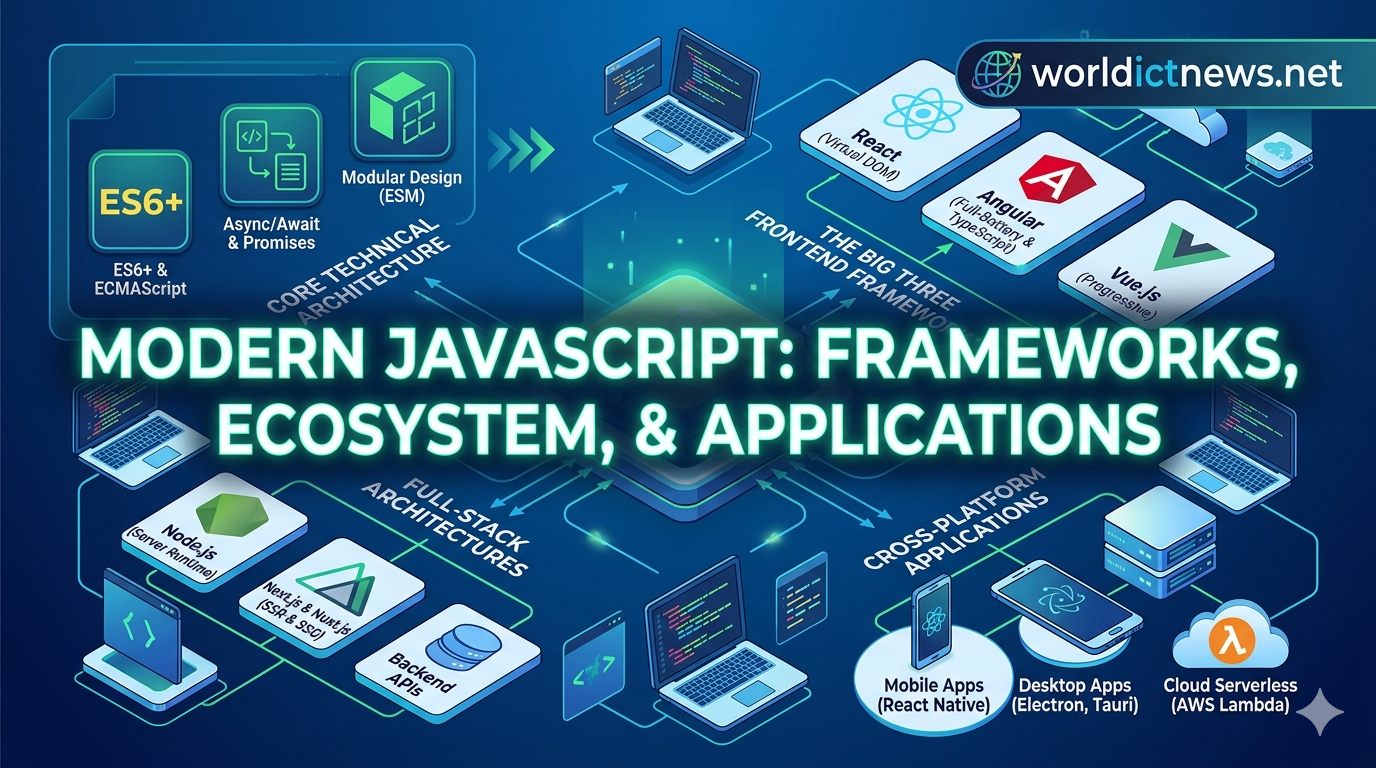
Modern JavaScript: Frameworks, Ecosystem, and Applications in Software Development. The evolution of JavaScript is one of the most remarkable stories in software engineering. What began in 1995 as a lightweight client-side scripting language designed to add basic animations to web browsers has transformed into an engineering powerhouse. Today, Modern JavaScript is an omnipresent runtime engine that powers complex enterprise web platforms, mobile applications, cloud services, and desktop software frameworks.This shift was accelerated by two major architectural milestones: the standardization of Modern ECMAScript (ES6+) specification rules and the creation of Node.js, which unlocked JavaScript execution outside the web browser environment. This comprehensive guide explores the core technical features of Modern JavaScript, analyzes the dominant development frameworks, and maps out its versatile applications across modern enterprise software development.1. Core Technical Architecture of Modern JavaScript (ES6+)Before diving into frontend libraries and server runtimes, it is essential to understand the modern language features that distinguish old JavaScript (ES5) from Modern JavaScript (ES6 and beyond). Modern development relies on clean, declarative syntax structures that improve code maintainability and minimize runtime logical bugs.Asynchronous Execution: Promises and Async/AwaitJavaScript is fundamentally a single-threaded language, meaning it executes one line of code at a time. However, web applications must handle slow operations—such as retrieving database records or querying third-party APIs—without freezing the user interface. Modern JavaScript handles this natively via asynchronous structures.javascript// Modern Asynchronous API Fetch Example using Async/Awaitasync function fetchSystemMetrics(endpoint) { try { const response = await fetch(endpoint); if (!response.ok) throw new Error("Network latency anomaly detected."); const data = await response.json(); return data; } catch (error) { console.error("System Log Error:", error.message); }}Use code with caution.Modules and Scoping ControlsModern frameworks use modular design principles, isolating software parts into separate script files. This prevents scope conflicts using built-in encapsulation keywords:javascript// Exporting a specialized utility class: mathUtils.jsexport const calculateDataDrift = (metricA, metricB) => Math.abs(metricA - metricB);// Importing the component into your application entrypoint: app.jsimport { calculateDataDrift } from './mathUtils.js';Use code with caution.2. The Big Three Frontend FrameworksBuilding large, scalable user interfaces using raw, native DOM manipulation code quickly leads to unmanageable code architectures. To solve this problem, software engineers rely on component-driven frontend frameworks. While many specialized libraries exist, three open-source ecosystems dominate enterprise software development. ┌── MODERN JS FRAMEWORKS ──┐ │ │ ▼ ▼ ▼┌──────┐ ┌──────┐ ┌──────┐│ REACT │ │ ANGULAR │ │ VUE.JS ││ Component │ │ Full-Battery │ │ Progressively││ Ecosystem │ │ Framework │ │ Adaptable │└──────┘ └──────┘ └──────┘React (Maintained by Meta)React is technically a UI library rather than a full-battery framework, but it commands the largest developer market share globally. React introduced the concept of the Virtual DOM, an in-memory representation of webpage elements that calculates minimal, optimized updates before rendering changes to the actual browser window.Core Architecture: Component-Based, using JSX syntax (a declarative blend of JavaScript logic and structural HTML markup).Best Use Case: Single-Page Applications (SPAs), complex dashboards, and rapidly scaling tech platforms.Angular (Maintained by Google)Angular is a robust, strictly structured, full-battery web application framework. Unlike React, Angular ships with built-in modules for routing, form validation, and server communication out of the box.Core Architecture: Model-View-Controller (MVC) built entirely on TypeScript (a statically typed superset of JavaScript that catches code errors during development rather than at runtime).Best Use Case: Enterprise banking software, corporate internal tooling, and large-scale applications managed by decentralized engineering teams.Vue.js (Community-Driven Project)Vue.js is a progressive frontend framework designed to combine the clean component architecture of React with the approachable, template-driven syntax of traditional HTML.Core Architecture: Single-File Components (SFCs), where HTML structure, CSS layout styling, and JavaScript programmatic logic exist inside a unified .vue file wrapper.Best Use Case: Rapid prototype creation, content-driven websites, and teams transitioning from traditional server-side rendering architectures.3. Full-Stack Architectures and Meta-FrameworksWhile frontend frameworks handle client-side rendering, modern enterprise development requires robust search engine optimization (SEO), fast initial load speeds, and secure backend routing. This need has catalyzed the rise of Meta-Frameworks that bridge client logic with server computing.Next.js (Built on React) and Nuxt.js (Built on Vue)These meta-frameworks abstract complex server pipelines away from developers, providing native access to advanced server architectures:Server-Side Rendering (SSR): The server pre-renders the full structural HTML page with complete data before transmitting it to the user's browser, providing optimized indexation for search engine crawlers.Static Site Generation (SSG): Pages are compiled into static files during the build pipeline, allowing them to be cached on global Content Delivery Networks (CDNs) for near-instantaneous load times.4. Cross-Platform Applications: Beyond the Web BrowserModern JavaScript is no longer limited to browser windows. A single engineering team can leverage JavaScript skills to deploy software applications across entirely distinct computing hardware targets. ┌─── MODERN JAVASCRIPT ───┐ │ │ ┌────┴───┐ ┌───┴──┐ ┌──┴──┐ ▼ ▼ ▼ ▼ ▼ ▼[ MOBILE APPS ] [ DESKTOP APPS ] [ CLOUD SERVERLESS ] [ BACKEND APIS ] React Native, NativeScript Electron, Tauri AWS Lambda, Cloudflare Node.js, Bun runtimesMobile Application Development: React NativeUsing React Native, developers can write application code in JavaScript and compile it directly into native iOS and Android user interface components. Unlike web-view wrapper apps, React Native applications communicate directly with the mobile operating system's native graphics engines, achieving high performance and fluid animations.Desktop App Deployments: Electron and TauriEnterprise desktop platforms like Slack, Visual Studio Code, and Discord are built using JavaScript ecosystems. Electron packs a Chromium browser window alongside a Node.js runtime process into a native app container. For more resource-constrained environments, modern alternatives like Tauri replace heavy internal browser dependencies with thin system web views to build highly optimized desktop apps.Cloud Serverless Computing: AWS Lambda and Cloudflare WorkersBecause modern JavaScript runtimes like V8 feature near-instant start times, the cloud computing architecture uses JavaScript heavily for Serverless Functions. When an event triggers an API endpoint, serverless nodes run short code loops instantly, enabling organizations to process backend events without paying for idle server space.5. Implementation Roadmap for Choosing Your Software StackWhen structuring a new enterprise digital platform, matching the correct JavaScript runtime environment and framework to your business goals is critical. Use this technical checklist to configure your project stack:Evaluate SEO Requirements: If your platform depends on organic web search discoverability, skip basic client-side React/Vue architectures. Choose a meta-framework like Next.js or Nuxt.js configured for Server-Side Rendering (SSR).Enforce Type Safety: For systems processing complex data contracts or financial records, require TypeScript over standard JavaScript to prevent object property runtime failures.Select Runtimes Judiciously: For standard corporate web APIs, utilize Node.js. For microservices prioritizing maximum request throughput and low cold-start latency, evaluate modern high-performance runtimes like Bun.Consolidate Codebases: If your roadmaps require both iOS and Android variants, utilize React Native to share business logic across both platforms, reducing total development resource overhead.ConclusionModern JavaScript has evolved into a highly versatile and robust software development ecosystem. Through structural language features like async/await, powerful frontend components from React, Angular, or Vue, and cross-platform runtimes like Node.js and React Native, JavaScript enables developers to build complex, full-stack applications with efficiency and scale. By understanding these modern paradigms and choosing the right framework combinations, engineering teams can build resilient digital architectures suited for the modern landscape.Frequently Asked Questions (FAQ)1. What is the fundamental difference between Node.js and browser-based JavaScript?Browser-based JavaScript executes inside a sandboxed environment controlled by the browser, giving it direct access to user interface elements (the DOM) while restricting direct file system operations. Node.js is a standalone runtime environment built on Chrome's V8 engine that runs directly on server hardware, giving it full access to filesystem operations, operating system networks, and databases.2. Why should a project switch from standard JavaScript to TypeScript?TypeScript adds static type definitions on top of standard JavaScript syntax. By declaring strict datatypes for variables and functions, errors are discovered during code compilation inside the development editor, rather than triggering unpredictable runtime crashes for active users.3. What is the primary benefit of utilizing a Virtual DOM over standard DOM manipulations?Directly updating webpage elements (the DOM) is computationally expensive and causes rendering lags when performed frequently. A Virtual DOM acts as a lightweight blueprint copy inside memory. When data changes, the framework calculates the most efficient structural changes first, batch-updating the visible webpage elements all at once to maintain performance.4. How does Server-Side Rendering (SSR) improve page performance over Client-Side Rendering (CSR)?In CSR, the server sends a blank HTML shell along with heavy JavaScript file streams; the user's browser must download and run those scripts before any text appears. In SSR, the server runs the initial scripts on the backend and transmits a complete, text-filled HTML page to the user, leading to faster initial load times and reliable indexing by search engine web crawlers.5. Can JavaScript be used for high-performance backend data processing?Yes, but with architectural constraints. Because JavaScript runs on a single event-driven loop, it handles high volumes of concurrent I/O connections (like receiving web traffic requests or fetching data) exceptionally well. However, for continuous CPU-heavy calculations (like advanced video processing or complex scientific model analysis), multi-threaded environments like Rust, C++, or Go are generally preferred.
A Complete Guide to Running Docker Containers on AWS EC2
May 16, 2026
6 min read

A Complete Guide to Running Docker Containers on AWS EC2

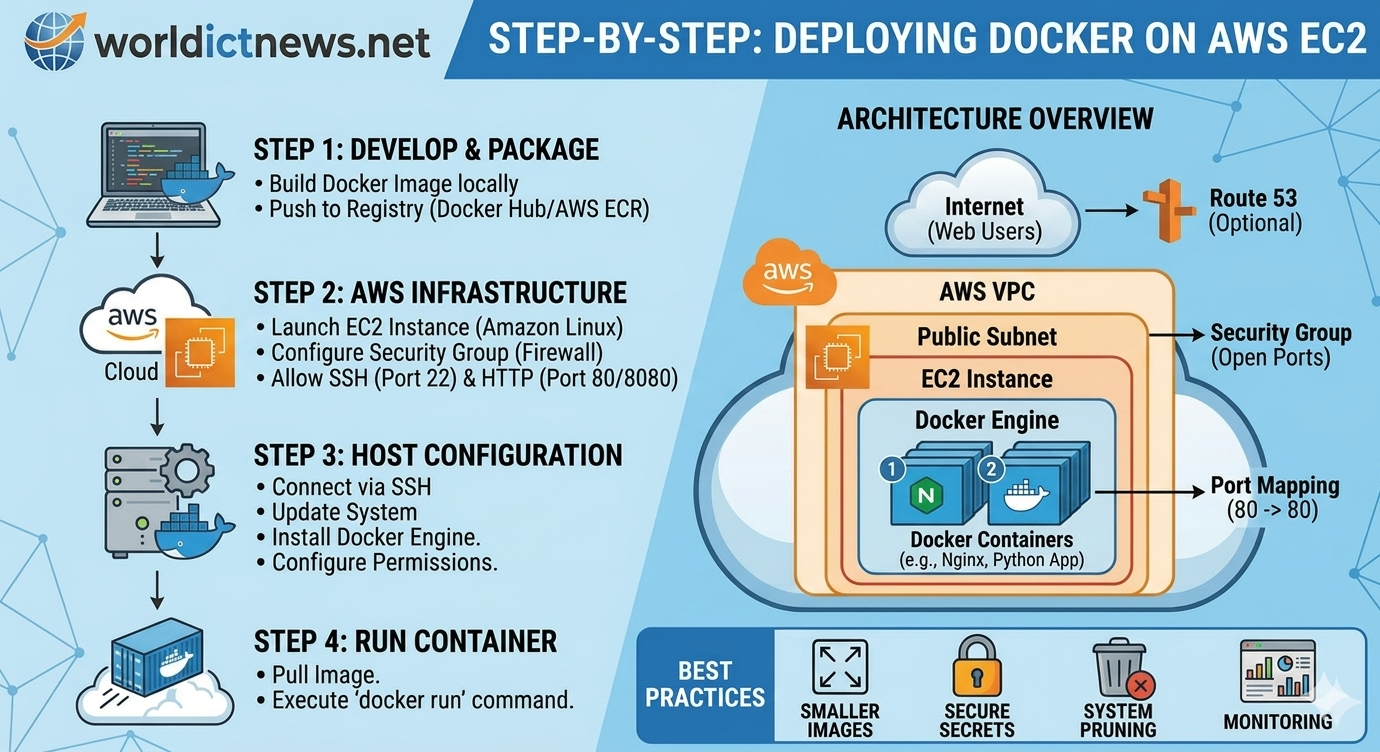
Streamlining Container Deployment: A Complete Guide to Running Docker Containers on AWS EC2. The containerization revolution has completely redefined how modern software is built, packaged, and shipped. By bundling an application alongside all its dependencies, system tools, and configurations, Docker ensures that software runs identically whether it is on a developer's local laptop or a massive corporate server. However, packaging your application into a Docker image is only half the battle; the real value comes from deploying that container to a reliable, scalable cloud infrastructure.For organizations running light-to-medium workloads, or those transitioning from legacy servers to a DevOps model, deploying Docker containers on an Amazon Web Services (AWS) Elastic Compute Cloud (EC2) instance is the perfect middle ground. While managed services like Amazon ECS (Elastic Container Service) or EKS (Elastic Kubernetes Service) handle complex orchestration, running Docker directly on EC2 offers granular control, unmatched transparency, and a cost-effective environment to master cloud deployments.1. Architectural Blueprint: Docker on EC2Deploying a containerized application onto a raw cloud server requires connecting several infrastructure components together securely. The workflow follows a clean, sequential pipeline:[ Developer PC ] ──(Push Image)──> [ Docker Hub / ECR ] │ (Pull Image) ▼[ AWS Cloud ] ──> [ VPC / Security Group ] ──> [ EC2 Instance (Docker Run) ]To achieve this setup successfully, developers must navigate three key deployment phases:Provisioning the Infrastructure: Setting up an AWS virtual server with correct security access.Configuring the Environment: Installing the Docker runtime engine directly onto the Linux host.Deploying the App: Pulling the pre-packaged container image from a registry and running it.2. Phase 1: Launching and Securing Your EC2 InstanceThe foundation of your deployment is the EC2 instance itself. Think of this as renting a blank virtual computer inside Amazon’s secure data centers.Selecting the Right AMILog into your AWS Management Console and navigate to the EC2 Dashboard. Click "Launch Instance". When choosing your Amazon Machine Image (AMI), select Amazon Linux 2023 (or Ubuntu 24.04 LTS). These operating systems are lightweight, highly secure, and optimized to run container workloads efficiently. For basic applications, choosing a t3.micro or t2.micro instance type falls within the AWS Free Tier, providing a risk-free testing ground.Configuring the Security Group (Firewall)A critical pitfall for beginners is misconfiguring network access. A Security Group acts as a virtual firewall controlling inbound and outbound traffic. To configure this properly, add two essential Inbound Rules:SSH (Port 22): Restrict the source to "My IP" so only your computer can log into the command line of the server.HTTP (Port 80 / Port 8080): Set the source to "Anywhere (0.0.0.0/0)" so public users can access your web application once it goes live.Download your private key pair file (.pem or .ppk) securely to your machine; you will need this file to authenticate your connection to the server.3. Phase 2: Preparing the Host System for DockerOnce your instance is up and running, you must connect to it via SSH and install the Docker engine. Open your local terminal (or Git Bash on Windows) and run the following command to log into your cloud server:bashssh -i "your-key-pair.pem" ec2-user@your-ec2-public-ipUse code with caution.Installing the Docker EngineOnce inside the Amazon Linux environment, update the system packages and install Docker using the native package manager:bash# Update the system repositorysudo dnf update -y# Install the latest Docker engine packagesudo dnf install docker -y# Start the background Docker servicesudo systemctl start docker# Enable Docker to automatically turn on whenever the server rebootssudo systemctl enable dockerUse code with caution.Optimizing User PermissionsBy default, the system requires administrative privileges (sudo) for every single Docker command. To prevent typos and enforce security best practices, add your default system user to the docker group:bashsudo usermod -aG docker ec2-userUse code with caution.Note: For these permission changes to take effect, close your terminal connection by typing exit, and then log back into the server using the SSH command provided above. Validate that the engine is running properly by typing docker info.4. Phase 3: Launching Your Containerized WorkloadWith Docker successfully running on your cloud server, you are fully prepared to launch your container. For this standard configuration guide, we will pull and run a production-ready Nginx web server container directly from Docker Hub.Execute the following command to deploy your containerized app:bashdocker run -d -p 80:80 --name my-web-app --restart always nginxUse code with caution.Dissecting the Deployment CommandUnderstanding exactly what happens behind the scenes of this command is vital for any cloud engineer:ParameterFunctionOperational Impact-dDetached ModeRuns the container quietly in the background, keeping your terminal open.-p 80:80Port MappingMaps traffic arriving at Port 80 of the EC2 instance directly into Port 80 inside the container.--nameCustom LabelingAssigns a readable name to the container for simple logging and management.--restartResiliency PolicyInstructs Docker to automatically restart the container if it crashes or if the server reboots.To verify that your deployment is completely healthy, run docker ps. Open any web browser, paste your EC2 instance's Public IPv4 Address into the address bar, and hit enter. You will instantly be greeted by the default Nginx welcome page, proving your container is live to the world.5. Enterprise Best Practices: Security and MaintenanceRunning Docker on raw EC2 instances demands a proactive approach to system security. To ensure your production environments remain resilient against malicious attacks, incorporate these DevOps protocols:Implement Multi-Stage BuildsKeep your production Docker images as small as possible. Use multi-stage builds in your Dockerfile to compile your code in a temporary container, transferring only the finished binary or compiled frontend files into the final production image. This radically slashes your attack surface by stripping away unnecessary compilers and system tools.Never Bake Secrets Into ImagesHardcoding API keys, database passwords, or AWS credentials directly into a Dockerfile or source code is an immense security vulnerability. Instead, leverage runtime environment variables or integrate your instances with AWS Systems Manager (SSM) Parameter Store. Pass these variables securely at runtime using the -e flag:bashdocker run -d -p 80:80 -e DB_PASSWORD=secure_token my-custom-appUse code with caution.Regular Pruning and Resource ManagementOver time, continuous deployment cycles leave behind unused container layers, stopped containers, and dangling images that silently eat up your instance’s limited storage disk space. Set up a cron job or regularly execute the clean-up command to reclaim valuable space:bashdocker system prune -af --volumesUse code with caution.Conclusion: The Stepping Stone to Cloud ArchitectureDeploying Docker containers directly on AWS EC2 is an essential foundational skill for any modern web developer or system administrator. It strips away the complex abstractions of advanced container orchestrators, giving you clear insight into how cloud networks, virtual firewalls, operating system daemons, and isolated application processes interact.Once you feel fully comfortable managing individual container deployments manually on EC2, you can easily automate this entire process using a CI/CD pipeline, or smoothly transition your workloads onto managed services like AWS ECS and Fargate for enterprise-grade scalability.
Introduction to CI/CD Pipelines for Absolute Beginners
May 16, 2026
7 min read

Introduction to CI/CD Pipelines for Absolute Beginners

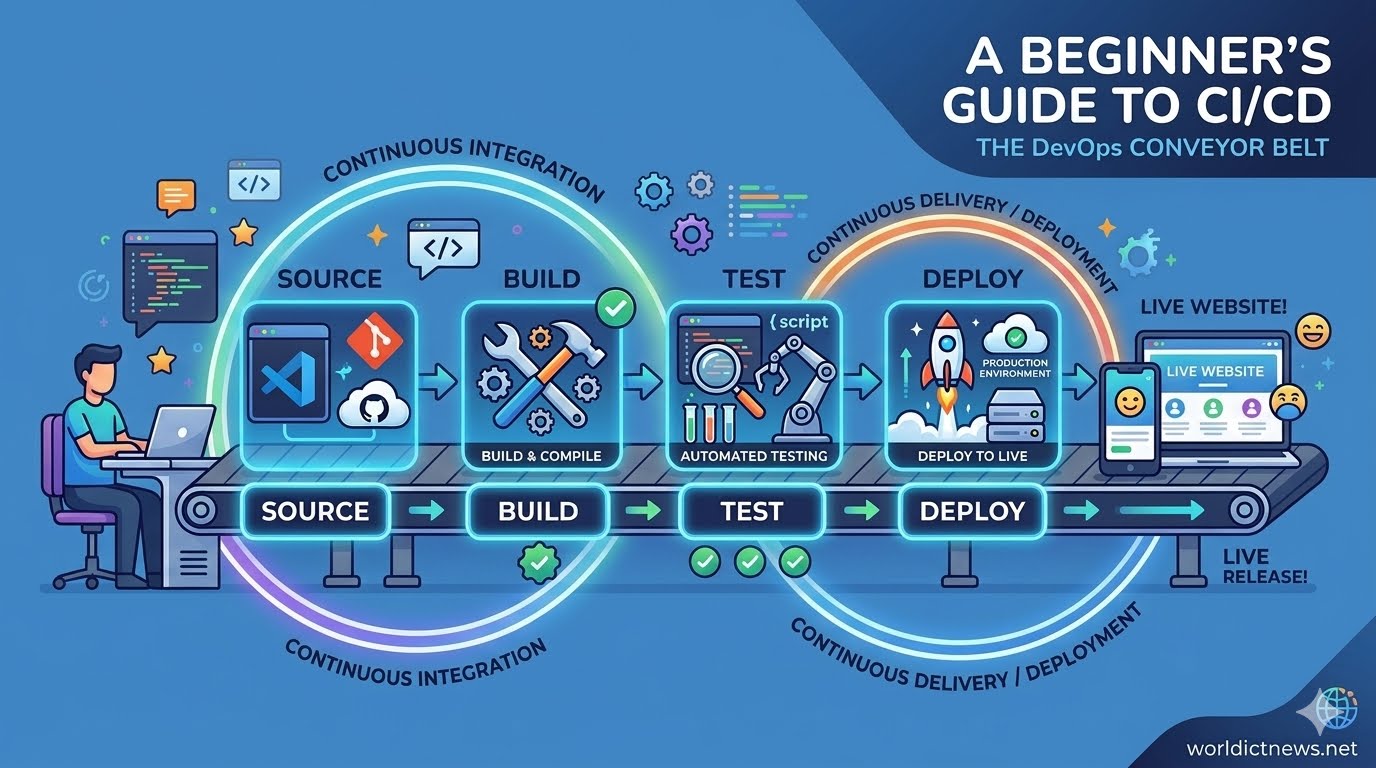
An Introduction to CI/CD Pipelines for Absolute Beginners. In the early days of software engineering, deploying new features to a live website was a stressful, high-stakes event. Developers would spend months writing code in isolation, bundle it all together into a massive update, and manually upload files to a server, often late at night. If a single typo or missing file slipped through, the entire website could crash, forcing teams to scramble for hours to find the error.Today, modern tech giants like Amazon, Netflix, and Google deploy new code thousands of times a day without their users ever noticing a disruption. How do they achieve this level of speed and stability? The secret lies in a core DevOps practice known as the CI/CD Pipeline.For absolute beginners, terms like "DevOps," "Automation," and "Pipelines" can sound incredibly intimidating. However, the core concept behind CI/CD is simple: it is a digital conveyor belt that takes software code from a developer’s computer, tests it to ensure it works perfectly, and safely delivers it to the live users—completely automatically.1. Deconstructing the Acronym: What is CI/CD?To understand how this conveyor belt works, we must break down the two main acronyms that define it: Continuous Integration and Continuous Delivery (or Continuous Deployment).[ Developer Writes Code ] │ ▼┌───────────┐│ CONTINUOUS INTEGRATION │ <-- Automates compiling & testing code└───────────┘ │ ▼┌─────────────┐│ CONTINUOUS DELIVERY │ <-- Automates preparing code for release└─────────────┘ │ ▼┌─────────────┐│ CONTINUOUS DEPLOYMENT │ <-- Automates pushing code to live users└─────────────┘Continuous Integration (CI)Continuous Integration focuses on the first stage of the development process. In an engineering team, multiple developers work on different features of the same application at the same time. If they all try to merge their individual changes back into the main codebase at the end of the month, it results in chaotic code conflicts—often called "merge hell."CI solves this by encouraging developers to merge their code changes back into a central repository frequently—often multiple times a day. Every single time a developer submits code, an automated system kicks into gear. This system automatically builds (compiles) the code and runs a battery of automated tests. If the tests pass, the code is safely integrated. If a bug is detected, the system alerts the developer immediately, allowing them to fix it while it is still fresh in their mind.Continuous Delivery vs. Continuous Deployment (CD)The "CD" half of the acronym can mean two slightly different things depending on how far an organization chooses to automate its process:Continuous Delivery: The automated system ensures that the code passes all tests and is fully prepared to go live. However, it stops just short of publishing it to the real world. A human manager must manually click a "Release" button to authorize the final push to production.Continuous Deployment: This is the ultimate level of automation. There is no human gatekeeper. If the code passes all automated tests in the CI stage, it is immediately and automatically deployed to live production servers.2. The Four Key Stages of a CI/CD PipelineTo visualize how code travels down this automated pipeline, let’s look at the four primary phases that every code update goes through:Pipeline StageWhat HappensWhy It Matters1. SourceDeveloper pushes code to a repository (e.g., GitHub).Triggers the pipeline to begin.2. BuildCode is compiled and packaged into a runnable app.Detects syntax errors and missing files.3. TestAutomated tools check for bugs and performance issues.Prevents broken code from reaching users.4. DeployThe application is pushed to a live server or cloud environment.Makes features visible to the real world.Stage 1: The Source (The Trigger)The pipeline begins the moment a developer finishes writing a feature and saves it to a version control system like GitHub, GitLab, or Bitbucket. This action acts as an electronic trigger, sending a signal to the CI/CD software that says: "New code has arrived. Start the inspection process."Stage 2: The BuildComputers cannot run raw code exactly how humans write it. In the build stage, the pipeline compiles the source code into a clean, executable package. If the application is built using a modern framework (like React, Docker, or Java), this stage gathers all the necessary dependencies, libraries, and files into a single, cohesive bundle. If a developer accidentally left a typo that prevents the app from starting, the build fails right here, halting the conveyor belt before any damage is done.Stage 3: The TestThis is the heart of the pipeline. Instead of relying on a human quality assurance (QA) analyst to manually click every button on a website to check for errors, the pipeline runs automated scripts. These include Unit Tests (checking if individual functions calculate data correctly) and Integration Tests (ensuring different parts of the application talk to each other flawlessly). If even a single test fails, the pipeline sounds an alarm, rejects the update, and notifies the team.Stage 4: The DeployIf the code passes all tests with flying colors, it reaches the final stage. The pipeline automatically moves the completed application bundle onto cloud servers (like AWS, Microsoft Azure, or Google Cloud). Within seconds, users around the world have access to the brand-new feature, entirely without downtime.3. Why is CI/CD Vital for Modern Software?For a beginner, setting up a pipeline might seem like an extra, unnecessary chore. Why not just write code and upload it directly? The benefits of CI/CD completely transform how software businesses operate:Lightning-Fast Releases: Instead of waiting months to bundle hundreds of features together, companies can release value to their customers incrementally, day by day or hour by hour.Trivial Risk: Because code changes are shipped in tiny, bite-sized updates, tracking down bugs is incredibly simple. If something breaks, engineers know exactly which 10 lines of code caused the issue, rather than searching through 10,000 lines.Happier Engineering Teams: Automation removes the boring, repetitive tasks of manual testing and deployment. Developers get to spend their energy doing what they love most: solving problems and writing creative code.4. Popular Tools to Start Your JourneyIf you want to start practicing CI/CD, you don't need to build these automation systems from scratch. There are pre-built tools designed to manage the conveyor belt for you:GitHub Actions: The absolute best starting point for beginners. It is built directly into GitHub, meaning you can set up automation right alongside where you store your code using simple configurations.Jenkins: A powerful, open-source, industry-standard tool. It is highly customizable but has a steeper learning curve because you have to host and manage it yourself.GitLab CI/CD: A robust, all-in-one platform seamlessly woven into GitLab's ecosystem, heavily favored by enterprise enterprise DevOps teams.Conclusion: Take the First StepEmbracing the world of CI/CD requires a mental shift from thinking about software as a static product to seeing it as a living, continuously evolving service. For absolute beginners, mastering the core principles of automation is the single most valuable step you can take toward a professional career in modern web development or DevOps engineering.Start small: write a simple HTML page, host it on GitHub, and use a tool like GitHub Actions to automatically deploy it to a free hosting provider whenever you make a change. Once you watch your first automated pipeline turn code into a live website, you will never want to deploy software manually ever again.
Container Security in DevOps
May 10, 2026
6 min read

Container Security in DevOps

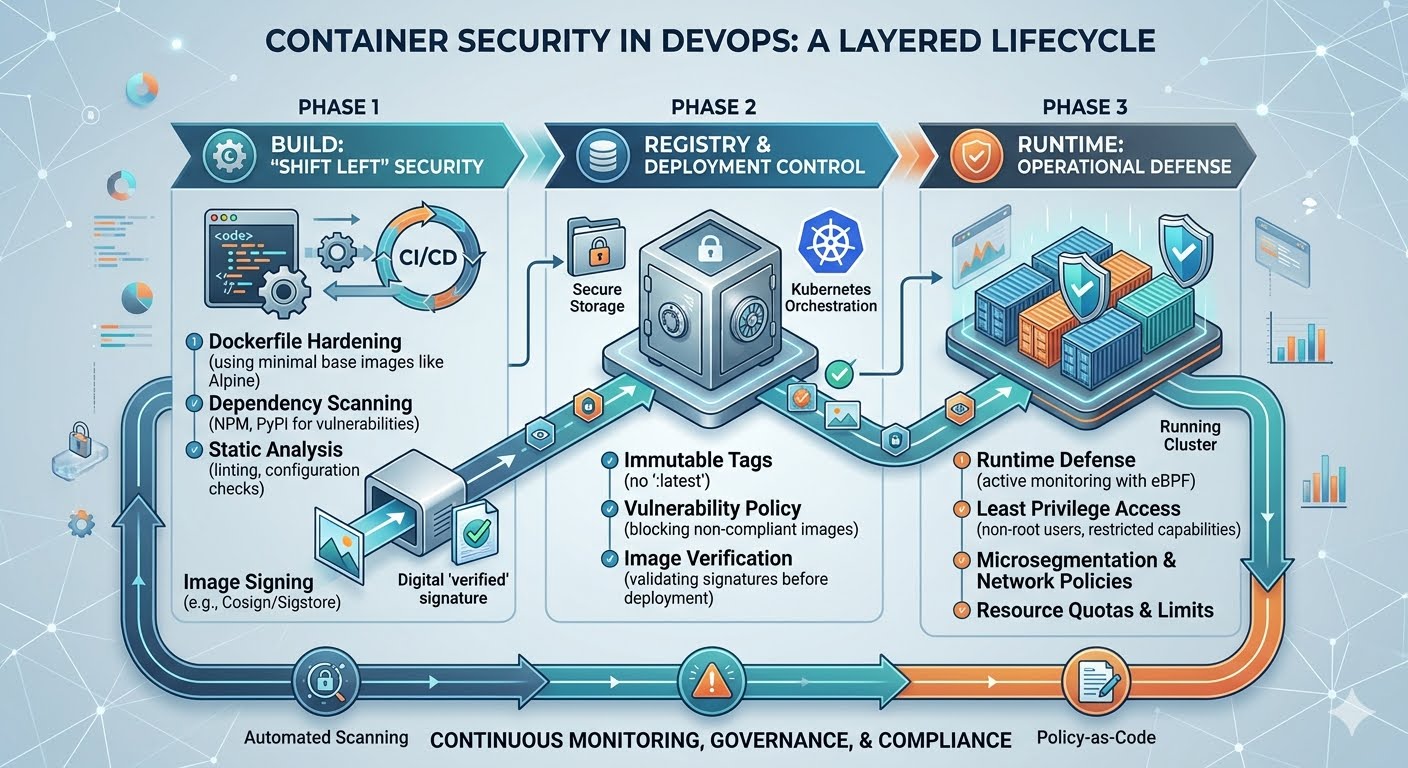
Container Security in DevOps. The shift toward cloud-native applications has made Container Security the cornerstone of modern DevOps. In a world where software is packaged into portable units like Docker or Podman, the traditional security model—protecting the physical or virtual server—is no longer sufficient. If a container is compromised, it can serve as a beachhead for an attacker to move laterally across an entire Kubernetes cluster or cloud environment.In 2026, container security is no longer a "check-the-box" activity at the end of the development cycle. It is an integrated, continuous process known as DevSecOps, where security is baked into every layer of the container lifecycle: from the moment the first line of a Dockerfile is written to the real-time monitoring of a production workload.1. The Anatomy of Container VulnerabilitiesTo secure a container, one must first understand its attack surface. A container is not a "black box"; it is a stack of dependencies, and each layer introduces potential risk.The Base Image: Many developers pull images from public repositories like Docker Hub. If that image contains an outdated OS (like an old version of Debian) or pre-installed malicious libraries, the security of the application is compromised before a single line of custom code is even written.Application Dependencies: Modern apps rely on hundreds of open-source packages (NPM, PyPI, Composer). These are the most common entry points for supply-chain attacks.The Container Engine & Host: Vulnerabilities in the container runtime (like Docker or containerd) or the underlying Linux kernel can allow a "container escape," where an attacker breaks out of the container to gain control of the host machine.Misconfigurations: Running a container as the "root" user or mounting sensitive host directories are common mistakes that turn a minor breach into a total system takeover.2. Securing the Build Phase: "Shift Left"The most cost-effective way to secure containers is to catch vulnerabilities during the build phase. This is the "Shift Left" philosophy in action.Image ScanningEvery container image must be scanned for Common Vulnerabilities and Exposures (CVEs) during the CI/CD process. Tools like Trivy, Clair, or Snyk automatically analyze the layers of an image. In a mature 2026 DevOps pipeline, a "High" or "Critical" vulnerability will automatically trigger a build failure, preventing the insecure image from ever reaching a registry.Minimalist Base ImagesThe "less is more" rule applies perfectly to container security. Instead of using a full-blown Ubuntu image, security-conscious teams use Distroless or Alpine Linux images. These images contain only the bare minimum files needed to run the application (no shell, no package manager, no editors), leaving an attacker with almost no tools to work with even if they manage to get inside.3. Securing the RegistryThe container registry (like Amazon ECR, GitHub Packages, or Harbor) is the "source of truth" for your infrastructure. If an attacker gains access to your registry, they can swap your legitimate images with malicious ones.Immutable Tags: Never use the :latest tag in production. It is ambiguous and can be overwritten. Use specific version tags or, better yet, the unique SHA-256 digest of the image.Image Signing: Using tools like Cosign (from the Sigstore project), organizations can "sign" their images. The deployment platform can then be configured to only run images that carry a valid signature from the build server, ensuring the integrity of the software.4. Hardening the Runtime EnvironmentOnce a container is running, the focus shifts to Runtime Defense. This is where you protect against "Zero Day" exploits that haven't been patched yet.The Principle of Least PrivilegeBy default, containers should be restricted using:Non-Root Users: Never run your application as root. If a hacker breaches a non-root container, their ability to damage the system is severely limited.Read-Only File Systems: Configure containers so they cannot write to their own file system. This prevents attackers from downloading and executing malware within the container.Resource Quotas: Set limits on CPU and RAM. This prevents a compromised container from being used for resource-intensive tasks like crypto-mining or launching a Denial-of-Service (DoS) attack.Network SegmentationIn a microservices environment, containers should only be able to talk to the specific services they need. Using a Service Mesh (like Istio or Linkerd) or Kubernetes Network Policies, DevOps teams can create a "Zero Trust" network where all internal traffic is encrypted and strictly controlled.5. Continuous Monitoring and Incident ResponseContainer security is not a "set it and forget it" task. Because containers are ephemeral (they might only live for minutes), traditional monitoring tools often miss them.Modern Cloud-Native Detection and Response (CNDR) tools use eBPF (extended Berkeley Packet Filter) technology to watch what's happening inside the kernel in real-time. If a container suddenly starts making unusual network connections or attempts to modify a sensitive system file, these tools can automatically "kill" the container and alert the security team.6. The Role of Governance and ComplianceIn 2026, many industries are subject to strict regulations (like SOC2, HIPAA, or the EU's Cyber Resilience Act). Container security is no longer just a technical preference; it's a legal requirement. Policy-as-Code tools like Kyverno or Open Policy Agent (OPA) allow teams to write their security rules in code. For example: "No container may run in the 'Production' namespace unless it has been scanned in the last 24 hours." This ensures that compliance is automated and continuous, rather than a once-a-year headache.7. Conclusion: A Layered DefenseContainer security in DevOps is about Defense in Depth. No single tool or practice is a silver bullet. Instead, security is achieved through the cumulative effect of:Scanning and signing images in the Build phase.Securing the Registry as a trusted vault.Applying strict Runtime policies to limit the blast radius of a breach.As containerized environments become the standard for all enterprise software, the organizations that thrive will be those that view security not as a hurdle, but as a core feature of their delivery pipeline.
Low Code and No Code Platforms
May 10, 2026
5 min read

Low Code and No Code Platforms

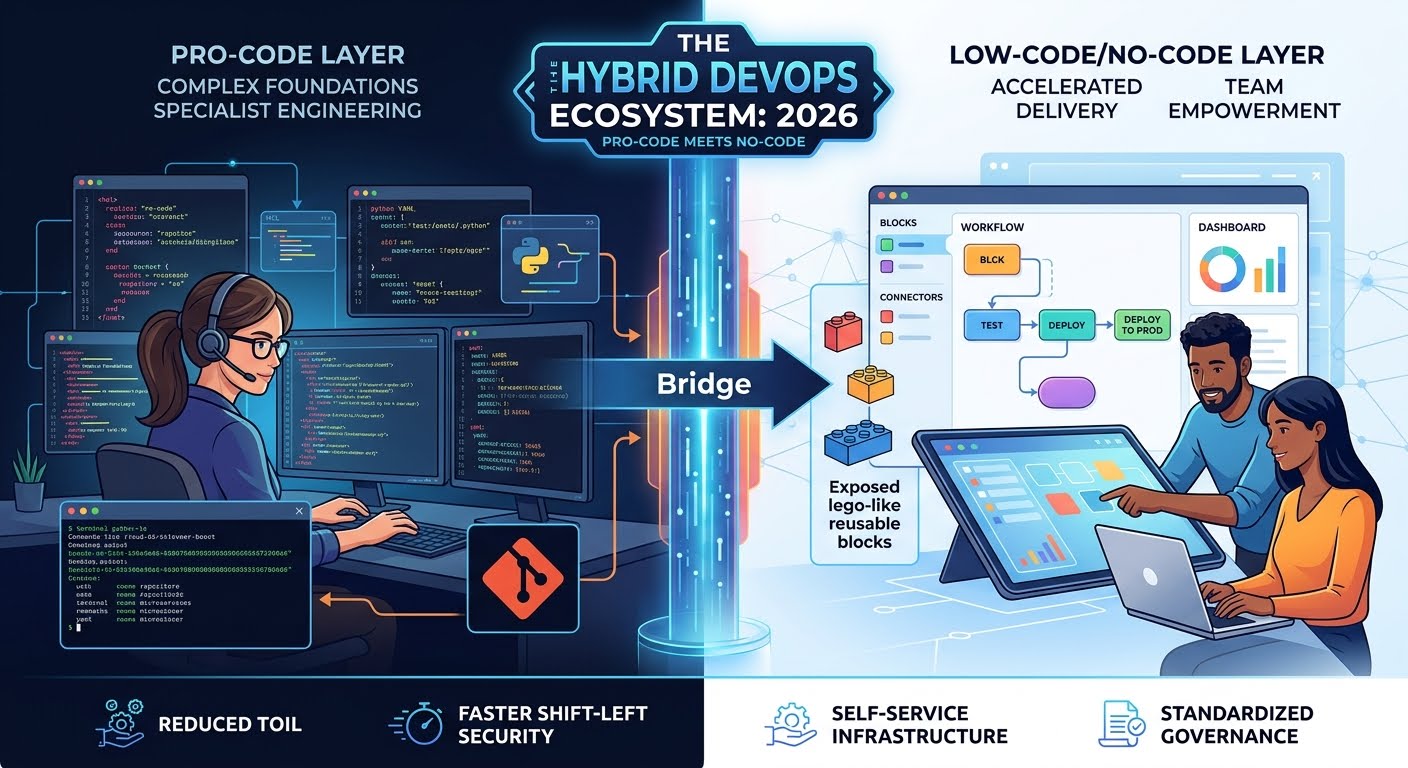
Low Code/No code Platforms in 2026. The "democratization of software" has reached a tipping point. For years, Low-Code/No-Code (LCNC) platforms were viewed as toys—tools for "citizen developers" to build simple internal forms or basic websites. However, in 2026, LCNC has moved into the heart of the DevOps lifecycle. It is no longer just about building apps; it is about automating the very machinery of software delivery.In a world where the demand for software far outstrips the supply of senior developers, LCNC in DevOps offers a way to bridge the "delivery gap" without compromising on security or scale.1. Defining Low-Code/No-Code in a DevOps ContextIn traditional development, every automation—from a CI/CD pipeline to a cloud infrastructure template—requires writing code (YAML, HCL, Python, or Go). Low-Code/No-Code DevOps abstracts these technical layers into visual interfaces.No-Code: Drag-and-drop interfaces that allow non-technical stakeholders (Product Managers, QA testers) to trigger deployments or configure environment variables without seeing a single line of code.Low-Code: "Pro-code" foundations with visual layers. A DevOps engineer might write a complex custom script once and then expose it as a "visual block" for the rest of the team to use and reuse.2. The Rise of "Citizen DevOps"One of the biggest bottlenecks in modern tech is the "Ops Gatekeeper." Developers wait for Ops to provision a database; QA waits for Ops to set up a testing environment.LCNC platforms empower Citizen DevOps. By using an Internal Developer Platform (IDP) with a low-code interface, a developer can self-service their infrastructure needs. Instead of writing a Jira ticket and waiting three days, they use a visual "Service Catalog" to deploy a pre-configured, company-compliant AWS environment in three minutes.3. Visual CI/CD: The New Pipeline RealityThe "YAML-hell" of 2020—where engineers spent hours debugging indentation in a Jenkins or GitHub Actions file—is being replaced by visual pipeline builders.In 2026, leading DevOps platforms allow teams to map out their delivery flow as a flowchart. You can visually see the "gates": If test passes → Deploy to Staging → Notify Slack → Await Manager Approval → Deploy to Production.This visual clarity doesn't just make it easier to build; it makes it easier to debug. When a deployment fails, the visual interface highlights exactly which "node" in the flow turned red, allowing for much faster incident response.4. The Benefits of the LCNC ShiftA. Drastic Reduction in "Toil"DevOps is often plagued by "toil"—repetitive, manual tasks that provide no long-term value. LCNC allows teams to automate these tasks (like user onboarding, secret rotation, or log cleanup) using simple logic-based triggers (e.g., Zapier or Microsoft Power Automate for Infrastructure).B. Accelerated "Shift Left"When security and testing tools have low-code interfaces, it is easier to "Shift Left." A security analyst doesn't need to be a Python expert to add a new vulnerability scan into the pipeline; they can simply "plug in" the security module via the visual interface.C. Standardized GovernanceLCNC platforms allow the "Platform Team" to set the rules. They create the "Lego bricks," and the rest of the company builds with them. Because the "bricks" are pre-vetted for security and compliance, the chance of a developer accidentally leaving an S3 bucket open to the public is drastically reduced.5. The Risks: Shadow IT and Vendor Lock-inWhile the benefits are massive, LCNC in DevOps introduces new challenges:The "Black Box" Problem: If a visual automation fails, and there is no underlying code to inspect, senior engineers can find themselves "locked out" of their own logic.Vendor Lock-in: Unlike an open-source script that can run anywhere, a low-code workflow is often tied to a specific vendor’s proprietary engine. Moving from one LCNC tool to another can be a nightmare of manual rebuilding.Version Control Gap: Traditional code is tracked in Git. Many early LCNC tools struggled with "versioning." If a "Citizen DevOps" user changes a visual workflow and breaks it, can you "git revert" to yesterday? In 2026, the best LCNC tools solve this by automatically generating a "Code View" (like YAML) in the background that syncs with Git.6. The Hybrid Future: "Pro-Code" meets "No-Code"The most successful organizations in 2026 don't choose one over the other; they embrace a Hybrid Model.Complexity is Pro-Code: The core, high-performance engines and complex integrations are written by senior engineers using Go, Rust, or Python.Consumption is Low-Code: The "last mile" of the workflow—how that engine is triggered, how the data is displayed, and how it connects to other apps—is handled via a low-code layer.This creates a "tiered" ecosystem where experts focus on deep engineering, while the broader team focuses on orchestrating those efforts to deliver value to customers.7. ConclusionLow-Code/No-Code is no longer an "alternative" to DevOps; it is a force multiplier. By abstracting away the "grunt work" of infrastructure management and pipeline configuration, LCNC allows DevOps to finally live up to its original promise: Speed without Chaos.In the coming years, we will see the role of the DevOps Engineer shift from "The person who writes the scripts" to "The person who builds the platform that allows everyone else to ship safely."
The Rise of Platform Engineering
May 10, 2026
5 min read

The Rise of Platform Engineering

The Rise of Platform Engineering in 2026. The era of "you build it, you run it" is undergoing a major recalibration. While the DevOps movement successfully broke down the silos between development and operations, it inadvertently created a new problem: cognitive overload. By 2026, the industry has realized that asking every developer to be an expert in Kubernetes, Terraform, IAM roles, and CI/CD pipelines is a recipe for burnout and inefficiency. This realization has fueled the meteoric Rise of Platform Engineering.Platform Engineering is not a replacement for DevOps; rather, it is the industrialization of DevOps. It is the discipline of designing and building Internal Developer Platforms (IDPs) that provide self-service capabilities, allowing developers to manage their own infrastructure needs within "golden paths" set by the platform team.The Problem: The "DevOps Tax"In the early days of DevOps, the mantra was simple: empower developers. However, as the cloud-native ecosystem exploded, the sheer number of tools became overwhelming. A typical developer in 2025 might need to touch 15 different tools just to get a single microservice into production.This "DevOps Tax" meant that highly paid software engineers were spending 30% to 40% of their time wrestling with YAML files, networking configurations, and security patches instead of writing the business logic that actually generates revenue. Platform Engineering emerged to reclaim this lost time.What is Platform Engineering?At its core, Platform Engineering is about treating Infrastructure as a Product. The "customers" of a Platform Engineer are the internal software developers.The Internal Developer Platform (IDP)The primary output of a platform team is the IDP. Think of it as a private, company-specific version of AWS or Heroku. An IDP typically includes:Self-Service Portals: A UI or CLI (like Backstage.io) where a dev can click a button to "Create New Service."Infrastructure Provisioning: Automated creation of databases, clusters, and storage.Governance and Compliance: Security policies are baked into the platform, so "default" setups are automatically secure.Observability: Built-in logging and monitoring that works the moment a service is deployed.The Core Philosophy: "Golden Paths, Not Cages"A common fear is that Platform Engineering will restrict developer freedom. The industry has solved this with the concept of Golden Paths.A Golden Path is a pre-approved, automated way to accomplish a task. If a developer uses the Golden Path to deploy a Laravel app, the platform handles the SSL certificates, the load balancer, and the database backups automatically.However, if a developer has a unique use case that isn't covered by the Golden Path, they are still free to "go off-road"—but they must then take on the operational burden themselves. This balances standardization with flexibility.Why It’s Scaling in 2026The shift toward Platform Engineering is driven by three main factors:1. Reducing Cognitive LoadBy abstracting away the complexity of the underlying infrastructure, Platform Engineering reduces the mental energy required to ship code. This leads to higher Developer Experience (DevEx) scores and better retention of talent.2. Security and Compliance by DefaultIn an era of rising cyber threats, "Shift Left" security often failed because developers aren't security experts. Platform Engineering "shifts security into the platform." When the platform manages secrets and network policies, human error—the leading cause of breaches—is significantly reduced.3. Cost Management (FinOps)With autonomous teams spinning up cloud resources, costs can spiral. A centralized platform team can implement automated "shutdown" rules for dev environments or enforce the use of cheaper spot instances, saving organizations millions in "cloud waste."The Difference Between DevOps and Platform EngineeringWhile they share the same goal (faster, safer delivery), their focus differs:DevOps is a culture and a set of practices centered on collaboration.Platform Engineering is the discipline that builds the tools to make those practices scalable.In 2026, we see "DevOps Engineers" evolving into two roles: Platform Engineers (who build the platform) and Site Reliability Engineers (SREs) (who ensure the platform and services stay up).The Role of AI in Platform EngineeringBy 2026, AI has become the "intelligent glue" of the IDP. Modern platforms now include AIOps features that can:Predict Failures: Analyze deployment patterns to warn a developer if a change is likely to cause a memory leak.Natural Language Provisioning: Allow a developer to type "I need a staging environment for the video-upload service" and have the platform generate the necessary resources.Auto-Remediation: Automatically scale or restart services based on real-time traffic patterns without manual intervention.Conclusion: The New StandardThe rise of Platform Engineering marks the maturity of the cloud-native era. Organizations have moved past the "Wild West" phase of DevOps and into a structured, product-centric approach to infrastructure.For the developer, this means a return to the joy of coding. For the organization, it means a more predictable, secure, and cost-effective way to innovate. In 2026, the question is no longer "Do you do DevOps?" but "How good is your platform?"

Stay Ahead in Tech

Get the latest ICT tutorials, DevOps guides, and AI news delivered directly to your inbox.